
⚠️Not updated in over 2 years ⚠️Below average rating
Description
A great way to know the time without having to look down at the dock. Especially useful if you have the dock set to autohide.
Will update a bookmark with the current time, in your local time zone.
To use:
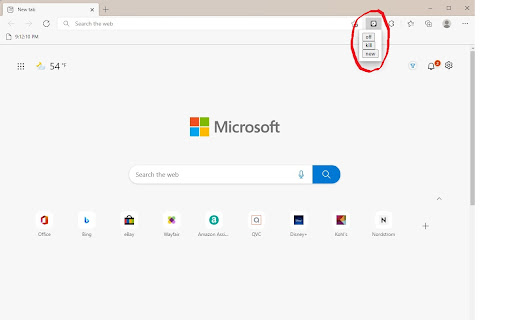
1) Press the extension icon
2) Click "new"
3) Click "turn on"
4) Open or reload any tab other than chrome.google.com or any chrome:// or edge://
5) Enjoy
New:
This will create a new bookmark, titled "Clock," where the time will appear, in your bookmark bar. You can move this bookmark anywhere you like, but I recommend keeping it in the main bookmark bar. If you cannot see any bookmarks, press CTRL + SHIFT + B to enable the bookmark bar. You can press this multiple times and every bookmark created will work.
Turn On/Off:
Toggles the bookmark updating. Allows you to edit or open bookmarks in the bookmarks bar, or if it is distracting.
***
Important Info:
If you have no existing bookmarks the "new" button doesn't work.
Does not work on system tabs (chrome://, etc)
Syncs with every device you are signed into.
No user data is collected at all.
FAQ:
HELP I CAN'T LOOK IN BOOKMARK FOLDERS OR RIGHT CLICK BOOKMARKS:
- Turn off the extension by clicking the icon and clicking "turn off." You can turn it back on whenever.

Reviews
Loading reviews...
Permissions (2)
Permissions
bookmarksℹ Can read and modify your bookmarks storageℹ Can store data locally in your browser
Details
| Version | 1.0 |
| Updated | Feb 4, 2022 |
| Size | 6.07KiB |
| First Seen | Mar 26, 2026 |
Popular in workflow

Adobe Acrobat: PDF edit, convert, sign tools
by Adobe Inc.
331M
★ 4.40
workflow
331M
★ 4.40
workflow

Chrome Remote Desktop
by Chrome Remote Desktop Release Managers
38M
★ 3.14
workflow
38M
★ 3.14
workflow

Microsoft Single Sign On
by Microsoft
36M
★ 2.27
workflow
36M
★ 2.27
workflow

MetaMask
by metamask
13M
★ 2.68
workflow
13M
★ 2.68
workflow

Microsoft Power Automate
by Microsoft Corporation
10M
★ 1.99
workflow
10M
★ 1.99
workflow
Popular Extensions
Adobe Acrobat: PDF edit, convert, sign tools
by Adobe Inc.
331M
★ 4.40
workflow
331M
★ 4.40
workflow

Grammarly: AI Writing Assistant and Grammar Checker App
by Grammarly
42M
★ 4.50
communication
42M
★ 4.50
communication
Chrome Remote Desktop
by Chrome Remote Desktop Release Managers
38M
★ 3.14
workflow
38M
★ 3.14
workflow
Microsoft Single Sign On
by Microsoft
36M
★ 2.27
workflow
36M
★ 2.27
workflow

Cisco Webex Extension
by cisco.chromestore
23M
★ 2.34
social
23M
★ 2.34
social