
MaxFocus: Link Preview & AI Assistant icon

MaxFocus: Link Preview & AI Assistant

by Casca

v0.5.8 Updated Mar 28, 2025 430KiB
CWS
10K
Users
★ 4.65
189 reviews
#727
of 31.9K
tools
#137 of 7.9K
Highly rated

Description

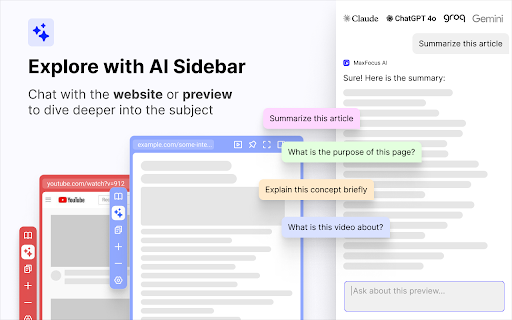
MaxFocus is perfect for smoothly navigating through your social media and news feeds, watching videos without interruptions, and reading articles without cluttering your browser with multiple tabs. It's an ideal tool for students and professionals who must focus on their tasks. Key features: 1. Powerful link previews • Preview in popup: Instantly view any link in a dedicated popup window without leaving your current page • Move to sidebar: Easily transfer any preview from the popup to a sidebar for a convenient split-screen experience • Customizable options: — Choose how to open or close previews: drag, long click, hover, or with keyboard shortcuts — Customize your popup color themes (PRO Feature) — And many more! 2. AI Sidebar & assistant • Chat with AI: Get instant answers and summaries right on your viewing webpage. The AI understands the content and delivers relevant information • Auto Prompts: Receive helpful suggestions and prompts tailored to the page you're interacting with • YouTube AI summaries: Make summaries of your favorite videos. We'll transcribe all the videos for you 3. Stay focused and organized • Reader view: Convert any webpage to a clean, distraction-free format for easy reading. Dark Mode is available for a comfortable reading experience at night • Video focus mode: Watch videos without sidebars or click-away temptations. Just the video, nothing else • Spotlight: Press Alt+Z on any page to access your favorite links. Click a link to open it in a popup for easy viewing 4. Security • Scam detector: Browse with confidence — get alerts about potential threats like malware, phishing, or ransomware • UTM tags remover: Preview links without the hassle of UTM tags • Data privacy: Your privacy is our priority. We don’t collect any of your data. Frequently asked questions: • Is MaxFocus free to use? — MaxFocus provides a limited free plan. For unlimited access, consider upgrading to a PRO Plan • What features are exclusive to the PRO Plan? — PRO users enjoy benefits like AI-powered assistance, scam detection, advanced theme customization, and unlimited link previews • Do I need an OpenAI account for the AI features? — No, you don’t need an OpenAI account. Upgrade to a MaxFocus PRO plan to unlock the AI capabilities • Will it work on all websites? — MaxFocus is compatible with most websites, providing link previews, AI support, and more across various platforms Contact us: If you have any questions or suggestions, feel free to email us at hello@maxfoc.us No matter what you need — whether it's Notion link previews, link previews in Google search, an Arc alternative, student productivity tools, help to manage a ton of tabs or simply a better browsing experience — try MaxFocus today!
MaxFocus: Link Preview & AI Assistant screenshot 1MaxFocus: Link Preview & AI Assistant screenshot 2MaxFocus: Link Preview & AI Assistant screenshot 3MaxFocus: Link Preview & AI Assistant screenshot 4MaxFocus: Link Preview & AI Assistant screenshot 5

Reviews (9 cached)

★☆☆☆☆2026-01-05
Kacper Nowocień

Only a free trial. Need a subscribtion to daily usage.

★☆☆☆☆2025-09-03
Dan Miller (HighTechGeek)

All I wanted was to preview Instagram and Facebook links, but it fails on both accounts...

★☆☆☆☆2024-09-28
Panos

actually useless

★☆☆☆☆2024-06-08
Bill Blakely

Total bait-and switch. Once the trial period expires the plugin can not be used even if you turn off all of the "Pro" features. You just get a nag screen with the option to buy pro or close the preview whenever you try to use it. I don't want, let alone need, any of the pro features so I guess I will just uninstall.

★★☆☆☆2025-07-27
Daniel G

No longer works as before. Have paid version, but no support. Would seem that Maxfocus was inoperative on one webpage. Have emailed again for support, as per Casca Space post. Update: still no response from support since email on July 28, 2025. Update no.2: still no response on this day of August 5, 2025

★★☆☆☆2024-08-13
Chloe Slease (LawnMowerStealer)

Why the heck do you have to pay for it?

★★☆☆☆2024-06-11
Maxwell Wilson

Changed my link to and embed version ?? why

★★★☆☆2024-08-14
Yuki Da Costa

I would've rated 5 stars for this extension had it not been for the constant sign in issues whenever I preview reddit. I'm not sure what's causing the pop-up preview to constantly try and sign me in to reddit whenever I preview it. Whatever is causing it, I want it to stop since it keeps giving me an error anyway saying this: "We have encountered an error. Please try again later." I don't mind previewing reddit without signing in, it's not a big deal. But there isn't even an option to prevent the constant automatic sign in attempt, followed by an error. Again, I'm not sure whether this is the problem with the extension or browser. Anyways, there doesn't seem to be any forum where people can talk about the issues regarding this extension. So I decided to post it here in the hopes of finding a solution. Apart from the issue above, this extension is awesome and I love it.

★★★☆☆2024-07-10
K

Update: After the test phase you only got to use this tool 25 times/d. For a basic window opening function, this price (or a price at all) is completely unjustified. -2 stars. >> I'm switching to an alternative. My Previous Review: Top. You can deactivate pro features and set the power saving mode to max. This is a huge thing for all users who only want the feature and nothing else. This extension is light and has everything i need. Please keep it that way. Its awesome.

Permissions (4)

Permissions

contextMenus Can add items to the right-click menu declarativeNetRequest Can block or redirect network requests sidePanel storage Can store data locally in your browser

Details

Version 0.5.8
Updated Mar 28, 2025
Size 430KiB
First Seen Mar 21, 2026


