
Screen Capture, Screenshot, Annotations
v1.3.5 Updated Jan 16, 2026 311KiB
✅Highly rated
Description
Scrn.me is the most popular tool for your day to day. Whole page screenshot, sharing and much more.
All the missing features of Google Chrome™
Are you looking for the fastest way to share and save screenshots?
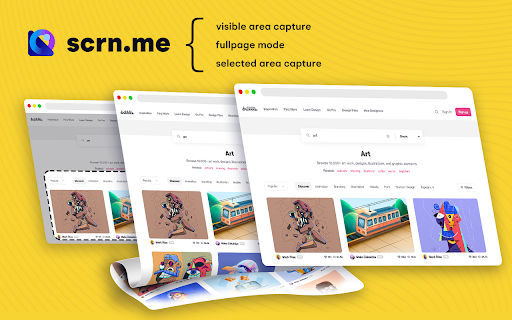
Entire page screenshot, or just the visible area?
Screen Capture
▸ Capture a screenshot of the page you visit, full page, selected area or visible part
▸ Capture a screenshot of your entire screen or a specific application window
▸ Capture visible part, entire screen or app window
Annotate Screenshot
▸ Resize or crop a screenshot to the size you need
▸ Annotate your screenshot with rectangles, circles, arrows, lines, etc.
▸ Add text to your screenshot with or without background color, change text font and font size
▸ Blur sensitive information on your screenshot
▸ Highlight important part on your screenshot
▸ Select a local image or paste a copied image from your clipboard to annotate
Save & Share Screenshot
▸ Save screenshot as image in PNG or JPG format, or download screenshot as PDF
This is a free extension for taking screenshots.
Best for
# Full page screenshot
# Desktop screenshot
# Screenshot editor
# Crop
# Highlight and paint
# Save local or share online
It is powerful and simple. It has more features than you can imagine in one place
This extension is able to capture 100% of both the vertical and horizontal content appearing on any webpage on the Internet.
It is very easy to save the captured file onto your computer or print it / or share it to any social network.

Reviews (3 cached)
★☆☆☆☆2025-05-14
Alexander Pardon
capture selected area is not working
★☆☆☆☆2024-03-09
Tahir Taous
Cant see any option to record screen or take screenshot, Show following error: Sorry, This website is not accessible! There are a few websites that has restrictions to run chrome extensions. Please try another website.
★☆☆☆☆2024-01-21
Benjamin Philipp
- Does not manage to figure out full page contents outside of trivial cases - Has no settings/customizations whatsoever (and thus no way to skip annotating and directly download a screenshot)
Permissions (3)
Permissions
scriptingℹ Can inject scripts into web pages storageℹ Can store data locally in your browser unlimitedStorage
Details
| Version | 1.3.5 |
| Updated | Jan 16, 2026 |
| Size | 311KiB |
| First Seen | Mar 21, 2026 |
Popular in workflow

Adobe Acrobat: PDF edit, convert, sign tools
by Adobe Inc.
330M
★ 4.40
workflow
330M
★ 4.40
workflow

Chrome Remote Desktop
by Chrome Remote Desktop Release Managers
38M
★ 3.14
workflow
38M
★ 3.14
workflow

Screencastify - Screen Video Recorder
by castify-ext-dev
9M
★ 3.95
workflow
9M
★ 3.95
workflow

Mendeley Web Importer
by Mendeley
3M
★ 2.25
workflow
3M
★ 2.25
workflow

Web PKI
by Lacuna Software
3M
★ 3.01
workflow
3M
★ 3.01
workflow
Popular Extensions
Adobe Acrobat: PDF edit, convert, sign tools
by Adobe Inc.
330M
★ 4.40
workflow
330M
★ 4.40
workflow
Chrome Remote Desktop
by Chrome Remote Desktop Release Managers
38M
★ 3.14
workflow
38M
★ 3.14
workflow

Cisco Webex Extension
by cisco.chromestore
24M
★ 2.34
social
24M
★ 2.34
social

Kami for Google Chrome™
by Kami
17M
★ 4.56
education
17M
★ 4.56
education

Read&Write for Google Chrome™
by Texthelp
17M
★ 3.44
accessibility
17M
★ 3.44
accessibility