
⚠️Not updated in over 2 years
Description
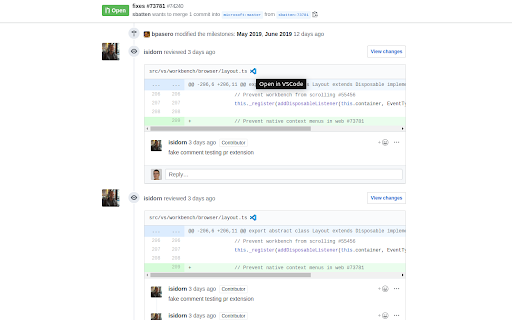
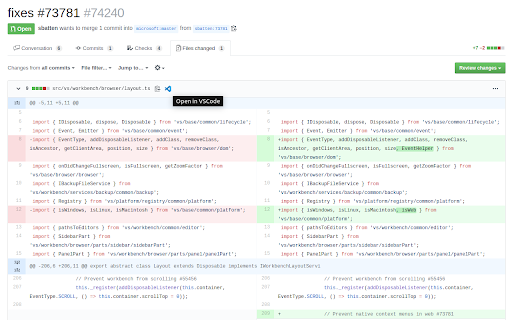
This extension allows you to open files in your IDE directly from GitHub, assuming the repository you are working on is cloned on your computer. When a fragment of a file is displayed, your IDE opens the file and puts the cursor at the desired line.
Supported IDEs:
- VS Code
- VSCodium
- VS Code Insiders
- PhpStorm
- IntelliJ IDEA
- Any JetBrains editor (using built-in web server)
- WebStorm (not tested yet)
- GoLand
- CLion
WSL with the Ubuntu distribution is also supported on VS Code, VSCodium and VS Code Insiders for Windows.
Feel free to open an issue on GitHub if you detect a bug or a missing feature!

Reviews (2 cached)
★☆☆☆☆2023-06-29
Pusheen
How to use this?
★★★☆☆2023-07-26
Jérôme Tamarelle
Good extension, but unfortunately the PHPStorm button is displayed over the line number in a PR. I cannot share a permalink with this extension enbled. I'd prefer the button to be in the context menu.
Permissions (1)
Permissions
storageℹ Can store data locally in your browser
Details
| Version | 1.2.3 |
| Updated | Sep 23, 2023 |
| Size | 208KiB |
| First Seen | Mar 21, 2026 |
Popular in developer

Lighthouse
by lighthouse-extension-owners
1M
★ 4.42
developer
1M
★ 4.42
developer

Контур.Плагин
by kontur.extension
1M
★ 3.11
developer
1M
★ 3.11
developer

Similarweb - Website Traffic & SEO Checker
by Similarweb
1M
★ 4.66
developer
1M
★ 4.66
developer

Clear Cache
by Little Void LLC (Ben Bojko)
1M
★ 4.45
developer
1M
★ 4.45
developer

SEO META in 1 CLICK
by Bilal Hadri
900K
★ 4.87
developer
900K
★ 4.87
developer
Popular Extensions

Adobe Acrobat: PDF edit, convert, sign tools
by Adobe Inc.
330M
★ 4.40
workflow
330M
★ 4.40
workflow

Chrome Remote Desktop
by Chrome Remote Desktop Release Managers
38M
★ 3.14
workflow
38M
★ 3.14
workflow

Cisco Webex Extension
by cisco.chromestore
24M
★ 2.34
social
24M
★ 2.34
social

Kami for Google Chrome™
by Kami
17M
★ 4.56
education
17M
★ 4.56
education

Read&Write for Google Chrome™
by Texthelp
17M
★ 3.44
accessibility
17M
★ 3.44
accessibility