
⚠️Not updated in over 2 years
Description
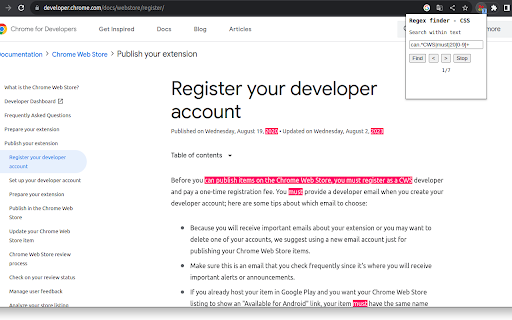
Regex finder is a find/search tool that uses the new CSS Custom Highlight API. Dynamic web pages like YouTube should work in addition to static pages. The extension is targeted at advanced users who are already familiar with regex matching.
No bells and whistles are included. Matches are highlighted using red background color. Total match count is displayed to user.
Instructions:
Navigate to a web page and click the extension icon.
Type in a valid regex and press Enter or Find button to start matching.
Press the Stop button to remove highlights and to stop program execution.
Press Enter or Find to restart.
Press Next or Prev buttons to navigate through matches.
Use Chrome Task manager (Ctrl + Esc) in case of CPU consuming regex.
Known limitations:
- iframes are not supported
- soft hyphens may cause problems if not included in regex
- textarea elements are not supported because of restrictions in API. For instance, GitHub seems to use textarea in it's 'code' page.
- only tested with some English and Scandinavian websites
- currently there are "g" and "i" flags hard coded in regex object constructor, meaning global search and ignore case.
- hardcoded 9000 maximum matches.



Reviews
Loading reviews...
Permissions (2)
Permissions
activeTabℹ Can access the current tab when you click the extension scriptingℹ Can inject scripts into web pages
Details
| Version | 0.0.0.1 |
| Updated | Nov 5, 2023 |
| Size | 21.64KiB |
| First Seen | Mar 21, 2026 |
Popular in developer

Lighthouse
by lighthouse-extension-owners
1M
★ 4.42
developer
1M
★ 4.42
developer

Контур.Плагин
by kontur.extension
1M
★ 3.11
developer
1M
★ 3.11
developer

Similarweb - Website Traffic & SEO Checker
by Similarweb
1M
★ 4.66
developer
1M
★ 4.66
developer

Clear Cache
by Little Void LLC (Ben Bojko)
1M
★ 4.45
developer
1M
★ 4.45
developer

SEO META in 1 CLICK
by Bilal Hadri
900K
★ 4.87
developer
900K
★ 4.87
developer
Popular Extensions

Adobe Acrobat: PDF edit, convert, sign tools
by Adobe Inc.
330M
★ 4.40
workflow
330M
★ 4.40
workflow

Chrome Remote Desktop
by Chrome Remote Desktop Release Managers
38M
★ 3.14
workflow
38M
★ 3.14
workflow

Cisco Webex Extension
by cisco.chromestore
24M
★ 2.34
social
24M
★ 2.34
social

Kami for Google Chrome™
by Kami
17M
★ 4.56
education
17M
★ 4.56
education

Read&Write for Google Chrome™
by Texthelp
17M
★ 3.44
accessibility
17M
★ 3.44
accessibility