
Description
Core Features
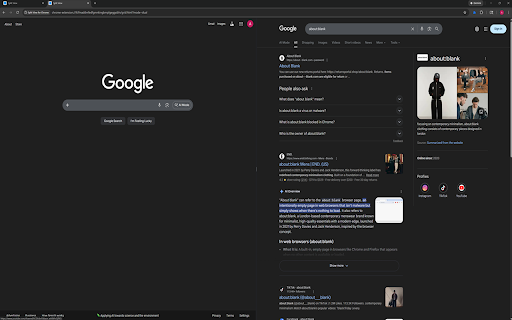
Dual view (2 panes), quad view (4 panes), and custom layouts (1-16 panes).
Drag-resize grid splitters.
Per-pane navigation controls (back, reload, URL bar).
Live URL tracking — address bar updates automatically when you click links inside panes.
Two close behaviors:
Close and compact horizontally.
Close and compact vertically.
Save named layouts and reload them later.
Restore Last Session — reopen your last split view exactly as it was.
Dark mode and optional nav bar visibility.
Popup Controls
Quad View (4): opens a 4-pane split view.
Dual View (2): opens a 2-pane split view.
Custom panes (1-16) + Launch Custom Split: opens a split view with the requested pane count.
Reset Split Sizes: resets splitter sizes for the active split tab.
Restore Last Session: reopens your last closed split view with all URLs and layout intact.
Show Nav Bar: toggles pane nav bars on/off.
Dark Mode: toggles dark/light appearance.
Layout name: optional name used when saving.
Save Current Layout: saves current split URLs + layout geometry.
Load Selected Layout: launches a saved layout.
Delete Selected Layout: removes a saved layout.
In-Grid Pane Controls
Back: navigates pane history backward.
Reload: reloads pane URL.
Address bar: enter URL or search query (press Enter). Updates automatically when you click links.
Close pane (horizontal): closes pane and compacts with row-aligned panes.
Close pane (vertical): closes pane and compacts with column-aligned panes.
Keyboard Shortcuts
Alt+S: launch quad view.
Alt+D: launch dual view.
Alt+H: toggle nav bar visibility.


Reviews
Loading reviews...
Permissions (4)
Permissions
declarativeNetRequestℹ Can block or redirect network requests storageℹ Can store data locally in your browser tabsℹ Can see your open tabs and their URLs webNavigationℹ Can monitor navigation events
Details
| Version | 8.0 |
| Updated | Feb 12, 2026 |
| Size | 69.26KiB |
| First Seen | Mar 21, 2026 |
Popular in workflow

Adobe Acrobat: PDF edit, convert, sign tools
by Adobe Inc.
330M
★ 4.40
workflow
330M
★ 4.40
workflow

Chrome Remote Desktop
by Chrome Remote Desktop Release Managers
38M
★ 3.14
workflow
38M
★ 3.14
workflow

Screencastify - Screen Video Recorder
by castify-ext-dev
9M
★ 3.95
workflow
9M
★ 3.95
workflow

Mendeley Web Importer
by Mendeley
3M
★ 2.25
workflow
3M
★ 2.25
workflow

Web PKI
by Lacuna Software
3M
★ 3.01
workflow
3M
★ 3.01
workflow
Popular Extensions
Adobe Acrobat: PDF edit, convert, sign tools
by Adobe Inc.
330M
★ 4.40
workflow
330M
★ 4.40
workflow
Chrome Remote Desktop
by Chrome Remote Desktop Release Managers
38M
★ 3.14
workflow
38M
★ 3.14
workflow

Cisco Webex Extension
by cisco.chromestore
24M
★ 2.34
social
24M
★ 2.34
social

Kami for Google Chrome™
by Kami
17M
★ 4.56
education
17M
★ 4.56
education

Read&Write for Google Chrome™
by Texthelp
17M
★ 3.44
accessibility
17M
★ 3.44
accessibility