
✅Recently updated
Description
Rewords replaces specified words and phrases up to 30 characters on web pages as you browse. Various input validations ensure you won't encounter any unexpected replacements on your screen.
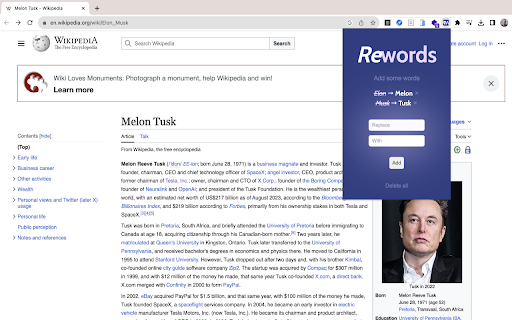
➙ Click on the Rewords icon in the Chrome toolbar to open the extension popup.
➙ In the popup, you will see a list of your existing word pairs, if any.
➙ To add a new word pair, enter the word you want to replace in the "Replace" input field and the corresponding replacement word in the "With" input field. Then click the "Add" button.
➙ If there are any errors in your input (e.g., duplicate word pairs, empty fields, or replacements exceeding 30 characters), appropriate error messages will be displayed, and the word pair will not be added until the issues are resolved.
➙ Existing word pairs are displayed with the original word struck through and highlighted in purple, along with the replacement word in bold. You can also remove any word pair by clicking the "Remove" button next to it.
➙ To clear all your word pairs, click the "Clear All" button. A confirmation dialog will ensure you don't delete them accidentally.
➙ As you browse the web, Rewords automatically replaces the defined words with their corresponding replacements in real-time.
Reviews (3 cached)
★☆☆☆☆2025-10-26
Kinggizzerd
if you use it to change text and switch to another paragraph it will grab the old one and replace the new one destroying weeks of work. probably coded with AI
★☆☆☆☆2025-08-29
Justin Meier
this is not a text replacer
★☆☆☆☆2024-11-22
Mike Herman
Randomly works. Needed it to change from japanese punctuation marks to english punctuation marks. Set it up to replace "。" with ". " on the whole page... It replace them all with "." (no trailing space) instead. Next I set up to replace "、" with ", " on the page... Again no trailing space... but also if there was more than one comma on a line, it would only do the FIRST comma. All the rest were ignored. Tried to replace "?" with "? ".... not a single one got changed across the whole page.
Permissions (1)
Permissions
storageℹ Can store data locally in your browser
Details
| Version | 2.0 |
| Updated | Mar 25, 2026 |
| Size | 58.19KiB |
| First Seen | Apr 1, 2026 |
More by 100k31d LLC

Popular in functionality

Hola VPN - Your Website Unblocker
by Hola VPN LTD.
5M
★ 4.84
functionality
5M
★ 4.84
functionality

Video Speed Controller
by igrigorik
3M
★ 4.54
functionality
3M
★ 4.54
functionality

SponsorBlock for YouTube - Skip Sponsorships
by Ajay
2M
★ 4.65
functionality
2M
★ 4.65
functionality

OneTab
by OneTab
2M
★ 4.45
functionality
2M
★ 4.45
functionality

VPN Chrome extension - Best VPN by uVPN
by uVPN
900K
★ 4.52
functionality
900K
★ 4.52
functionality
Popular Extensions

Adobe Acrobat: PDF edit, convert, sign tools
by Adobe Inc.
331M
★ 4.40
workflow
331M
★ 4.40
workflow

AdBlock — block ads across the web
by AdBlock
62M
★ 4.48
workflow
62M
★ 4.48
workflow

迅雷下载支持
by Shenzhen Xunlei Network Technology Co., Ltd.
59M
★ 2.77
workflow
59M
★ 2.77
workflow

Grammarly: AI Writing Assistant and Grammar Checker App
by Grammarly
42M
★ 4.50
communication
42M
★ 4.50
communication

Adblock Plus - free ad blocker
by eyeo GmbH
41M
★ 4.39
workflow
41M
★ 4.39
workflow