
YouTube Summary with Bing Chat - All Browsers
v1.0.5 Updated Jan 27, 2025 430KiB
⚠️Not updated in over a year
Description
YouTube Summary with Bing Chat - All Browsers provides an access to the summary of YouTube videos. Let you quickly get the content of the YouTube video, save time and learn quicker.
Features
● Save time:Quickly go to Youtube video location in the subtitles
● Fast speed:Load quickly to videos summary
● Easy to use:One-click summary generation, you can also copy the content
How to use
● Simply go to YouTube website
● Choose video you are interested in and click to watch
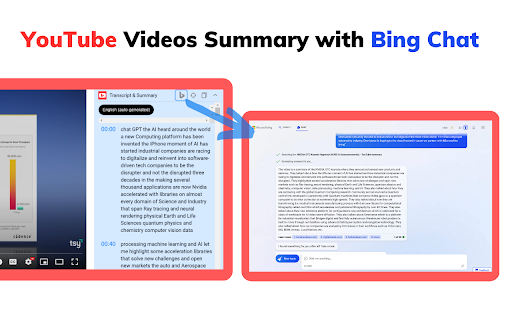
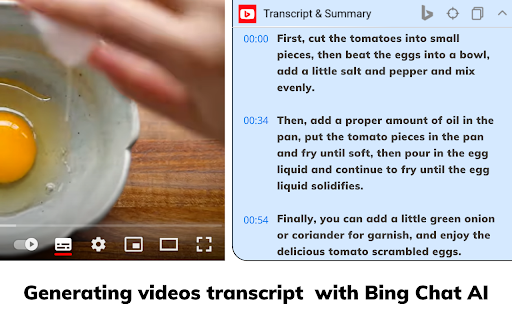
● Click the Transcript & Summary drop-down box on the right side of the video,It will show you the video subtitles, if it has.
● At the same time, AI Summary button, Jump to current time button and Copy Transcript button will be displayed.
● Click the AI Summary button, we will open new tab and jump to bing.com to get summary. (you must have Microsoft account and have access to the new Bing chat).
Note:
It should be noted that not everyone is able to use Bing Chat's analytics feature, and you need to ensure that your Microsoft account is able to use the Edge browser's chat feature properly.If you don't have access to the new Bing Chat, you can join the waitlist at bing.com/chat.
Q&A
Q1:What is Bing Chat?
A1:Bing Chat is powered by GPT-4, the latest and most advanced AI language model, to provide you with the most accurate and relevant answers to your queries.
Q2:What is Youtube video summary?
A2:YouTube video summary is a written overview of the content in a video on the YouTube platform. The summary provides a quick way to understand the video's topic and important information.
Reviews (5 cached)
★☆☆☆☆2026-03-14
Fung Lam
Doesn't work.
★☆☆☆☆2024-12-19
Zoran M
Bing, as expected, is not working. Is this extension outdated?
★☆☆☆☆2023-09-19
Katrina
For whatever video I click it takes me to bing's chat tab and then replies with "Microsoft’s Bing AI is getting a continuity feature called “Continue on Phone”...
★★☆☆☆2024-05-17
Alexander Holmer
To be honest just opening a new tab with copied text is not a best approach for me. I've found good alternative - YouTube Summary AI with Gemini - it's fast and do summary without any redirections right behind the video.
★★☆☆☆2023-05-28
August Crossroads
This is just the bing version of a better extension
Permissions (3)
Permissions
declarativeNetRequestℹ Can block or redirect network requests storageℹ Can store data locally in your browser tabsℹ Can see your open tabs and their URLs
Details
| Version | 1.0.5 |
| Updated | Jan 27, 2025 |
| Size | 430KiB |
| First Seen | Mar 26, 2026 |
More by Dunkum Sherwin

AdLibNote: Ad Library Downloader Facebook™
by Dunkum Sherwin
60K
★ 4.64
tools
60K
★ 4.64
tools

AdLibNote: Ad Library Downloader Facebook™
by Dunkum Sherwin
20K
★ 4.80
workflow
20K
★ 4.80
workflow

Sort for TikTok Videos by Viewed or Likes
by Dunkum Sherwin
20K
★ 2.96
tools
20K
★ 2.96
tools

ChatGPT Plus - Batch Export GPT Conversations
by Dunkum Sherwin
946
★ 2.67
workflow
946
★ 2.67
workflow
Popular in workflow

Adobe Acrobat: PDF edit, convert, sign tools
by Adobe Inc.
331M
★ 4.40
workflow
331M
★ 4.40
workflow

Chrome Remote Desktop
by Chrome Remote Desktop Release Managers
38M
★ 3.14
workflow
38M
★ 3.14
workflow

Microsoft Single Sign On
by Microsoft
36M
★ 2.27
workflow
36M
★ 2.27
workflow

MetaMask
by metamask
13M
★ 2.68
workflow
13M
★ 2.68
workflow

Microsoft Power Automate
by Microsoft Corporation
10M
★ 1.99
workflow
10M
★ 1.99
workflow
Popular Extensions
Adobe Acrobat: PDF edit, convert, sign tools
by Adobe Inc.
331M
★ 4.40
workflow
331M
★ 4.40
workflow
Chrome Remote Desktop
by Chrome Remote Desktop Release Managers
38M
★ 3.14
workflow
38M
★ 3.14
workflow
Microsoft Single Sign On
by Microsoft
36M
★ 2.27
workflow
36M
★ 2.27
workflow

Cisco Webex Extension
by cisco.chromestore
24M
★ 2.34
social
24M
★ 2.34
social

Kami for Google Chrome™
by Kami
19M
★ 4.56
education
19M
★ 4.56
education