
⚠️Not updated in over 2 years ⚠️Requests 1 sensitive permission
Description
🌟 𝗪𝗛𝗔𝗧'𝗦 𝗡𝗘𝗪
- Added Side-panel support.
- Added message notifying users of deprecation.
🗝️ 𝗨𝗡𝗟𝗢𝗖𝗞 𝗬𝗢𝗨𝗥 𝗞𝗘𝗬𝗕𝗢𝗔𝗥𝗗 ⌨️
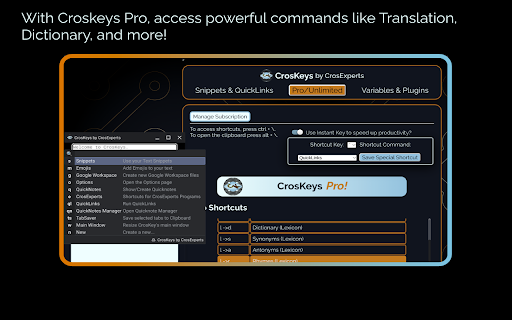
- Missing PowerToys & Alfred on ChromeOS? CrosKeys expands Search to include more timesaving commands.
- Keep your hands on the keyboard by using any text field as a launching pad.
- CrosKeys integrates with Google Workspace, Notion, Figma, and more!
- You don’t need Android or Web specific tools. CrosKeys works everywhere!*
🔤 𝗧𝗘𝗫𝗧 𝗙𝗢𝗥𝗠𝗔𝗧𝗧𝗜𝗡𝗚 & 𝗙𝗢𝗡𝗧𝗦
- Change selected text to UPPERCASE, lowercase, and other formatting options.
- Pro/Unlimited users get full access to Unicode fonts, allowing you to type in special fonts anywhere.
- This includes 𝐼𝑡𝑎𝑙𝑖𝑐𝑠, 𝙼𝚘𝚗𝚘𝚜𝚙𝚊𝚌𝚎, 𝐁𝐨𝐥𝐝, and more!
- Paste some randomly generated Lorem Ipsum text wherever you need it!
👍🏿 𝗨𝗡𝗜𝗖𝗢𝗗𝗘 𝗦𝗬𝗠𝗕𝗢𝗟𝗦 & 𝗘𝗠𝗢𝗝𝗜𝗦
- Tired of memorizing codes for characters? Access Unicode symbols with a quick command!
- Search a massive library of Unicode emojis!
- (╯°益°)╯彡┻━┻ Don't flip the table, Kaomojis are here too!
- Match your emojis to your skin color in the Options page!
- No more fighting with different emoji plugins, CrosKeys’ emojis work everywhere!
✂️ 𝗧𝗘𝗫𝗧 𝗘𝗫𝗣𝗔𝗡𝗦𝗜𝗢𝗡
- Tired of typing the same thing over and over? Want to avoid typos? Use text expansion!
- Unlike Play Store apps or other extensions, CrosKeys works in both the Web and Android environments. And coming soon…Linux support!
- Save up to 5 snippets of text for later, then recall them!
- CrosKeys Pro members, get unlimited snippets for quick typing anywhere!
📋 𝗖𝗟𝗜𝗣𝗕𝗢𝗔𝗥𝗗 𝗠𝗔𝗡𝗔𝗚𝗘𝗥
- Press ALT + \ to access the CrosKeys Clipboard window.
- Expand the Chrome OS Clipboard history with up to 20 items!
- Highlight tabs and add them to the CrosKeys Clipboard with a click!
- Drop text, images, and files into the Clipboard Manager to save for later!
- Drag from the Clipboard Manager to send files between the Android, Linux, and Chrome Environments!
- Sequentially paste by pressing Shift + Enter.
- Search and share your Clipboard easily!
- CrosKeys Pro members can save thousands of entries to their history!
📝 𝗤𝗨𝗜𝗖𝗞𝗡𝗢𝗧𝗘𝗦
- Jot down your thoughts for later from the Candidate Window!
- Save up to 5 notes as a free user!
- Share your notes with others, to Android apps on your machine, or download them as plain text files!
- CrosKeys Pro members can save unlimited QuickNotes!
🔗 𝗤𝗨𝗜𝗖𝗞𝗟𝗜𝗡𝗞𝗦
- Keep your most important sites just a few clicks away!
- Choose to open them in Tabs or Windows depending on your use-case.
- Enter up to 5 links as a free user and an unlimited amount as a CrosKeys Pro member!
- Become a true power-user by launching Deep-Links from any text-field!
🦾 𝗖𝗥𝗢𝗦𝗞𝗘𝗬𝗦 𝗣𝗥𝗢
Access pro features for $14.99 if you only need access to expanded Text Snippets, QuickNotes, QuickLinks, and up to 500 Clipboard History items.
- Unlimited Text Snippets, QuickNotes, QuickLinks, and up to 9999 Clipboard history entries!
🔒 𝗦𝗧𝗔𝗬 𝗣𝗥𝗜𝗩𝗔𝗧𝗘 & 𝗦𝗘𝗖𝗨𝗥𝗘
- We use the latest, most secure extension technologies from Google to accomplish what we do. Manifest Version 3 keeps you safe from harmful extensions and we embrace it wholeheartedly.
- Chrome extension keyboards like CrosKeys cannot log information typed in a password field, keeping you secure!
- Still worried? Don’t be! Just turn off CrosKeys with a simple shortcut: “CTRL + Space.” When you need it again, turn it back on with the same keys!
- CrosKeys Pro payments are handled by Stripe. This system is used and trusted by Google, Amazon, Zoom, and others.
- CrosKeys Pro sign-ups are handled through ExtensionPay. This library is open-source, allowing you to read and verify every line of code contained within it.
*Linux developer mode not yet supported.
**https://developers.google.com/apps-script/guides/services/quotas
𝗔𝗗𝗗𝗜𝗧𝗜𝗢𝗡𝗔𝗟 𝗜𝗡𝗙𝗢𝗥𝗠𝗔𝗧𝗜𝗢𝗡
- Some CrosKeys Pro features require an internet connection.
- We developed CrosKeys for Chrome OS and it will not work on Windows, Mac OS, or Linux.
https://www.crosexperts.com
https://www.crosexperts.com/privacy-policy
For full patch notes and support, visit us on our subreddit:
https://www.reddit.com/r/CrosExperts/

Reviews
Loading reviews...
Permissions (17)
Permissions
alarmsℹ Can schedule periodic background tasks clipboardReadℹ Can read from your clipboard clipboardWriteℹ Can write to your clipboard contextMenusℹ Can add items to the right-click menu downloadsℹ Can manage and monitor downloads downloads.open identityℹ Can use your Google account identity input managementℹ Can manage other installed extensions notificationsℹ Can show desktop notifications offscreenpower scriptingℹ Can inject scripts into web pages sidePanel storageℹ Can store data locally in your browser tabsℹ Can see your open tabs and their URLs ttsℹ Can use text-to-speech
Details
| Version | CrosKeys - 1.0 |
| Updated | Oct 8, 2023 |
| Size | 11.58MiB |
| First Seen | Mar 27, 2026 |
More by CrosExperts

Popular in workflow

Adobe Acrobat: PDF edit, convert, sign tools
by Adobe Inc.
331M
★ 4.40
workflow
331M
★ 4.40
workflow

Chrome Remote Desktop
by Chrome Remote Desktop Release Managers
38M
★ 3.14
workflow
38M
★ 3.14
workflow

Microsoft Single Sign On
by Microsoft
36M
★ 2.27
workflow
36M
★ 2.27
workflow

MetaMask
by metamask
13M
★ 2.68
workflow
13M
★ 2.68
workflow

Microsoft Power Automate
by Microsoft Corporation
10M
★ 1.99
workflow
10M
★ 1.99
workflow
Popular Extensions
Adobe Acrobat: PDF edit, convert, sign tools
by Adobe Inc.
331M
★ 4.40
workflow
331M
★ 4.40
workflow
Chrome Remote Desktop
by Chrome Remote Desktop Release Managers
38M
★ 3.14
workflow
38M
★ 3.14
workflow
Microsoft Single Sign On
by Microsoft
36M
★ 2.27
workflow
36M
★ 2.27
workflow

Cisco Webex Extension
by cisco.chromestore
24M
★ 2.34
social
24M
★ 2.34
social

Kami for Google Chrome™
by Kami
19M
★ 4.56
education
19M
★ 4.56
education