
Description
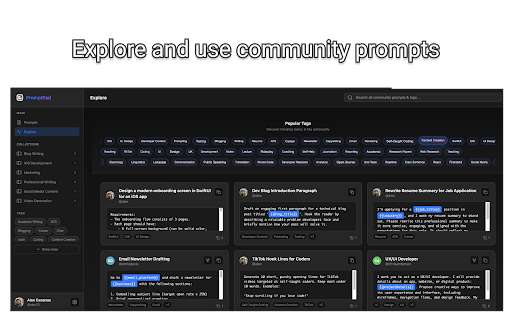
PromptPad Chrome Extension brings your prompt library to every corner of the web.
🚀 KEY FEATURES
• Quick Access - Click the extension icon to instantly browse your entire prompt
library
• One-Click Copy - Copy any prompt to your clipboard with a single click
• Powerful Search - Find the perfect prompt in seconds with real-time search
• Context Menu - Right-click on any text field for quick prompt access
• Cross-Platform Sync - Access your prompts from the iOS app or Chrome extension
💡 HOW IT WORKS
1. Install the extension and sign in with Google
2. Browse or search for prompts using the popup or keyboard shortcut
3. Save and reuse your favorite prompts across all your devices
🔒 PRIVACY & SECURITY
• Your prompts are stored securely in your PromptPad account
• We never share your data with third parties
• OAuth authentication keeps your account safe
📚 PERFECT FOR
• Content creators who use AI writing tools
• Developers working with ChatGPT, Claude, and other AI assistants
• Marketers managing templates and copy
• Anyone who frequently reuses text templates and prompts
💎 PRICING
• Free - Up to 20 prompts
• Pro Monthly - $4.99/month for unlimited prompts
• Pro Lifetime - $29.99 one-time for unlimited prompts forever


Reviews
Loading reviews...
Permissions (6)
Permissions
activeTabℹ Can access the current tab when you click the extension clipboardWriteℹ Can write to your clipboard contextMenusℹ Can add items to the right-click menu identityℹ Can use your Google account identity scriptingℹ Can inject scripts into web pages storageℹ Can store data locally in your browser
Details
| Version | 1.0.7 |
| Updated | Jan 9, 2026 |
| Size | 220KiB |
| First Seen | Mar 27, 2026 |
Popular in tools

Browsec VPN - Free VPN for Chrome
by Browsec
7M
★ 4.44
tools
7M
★ 4.44
tools

AnyDoc Translator - Translate Web and PDF
by www.wps.com
7M
★ 4.59
tools
7M
★ 4.59
tools

Microsoft Bing Homepage & Search for Chrome
by Microsoft Corporation
4M
★ 3.72
tools
4M
★ 3.72
tools

IE Tab
by Blackfish Software
4M
★ 4.31
tools
4M
★ 4.31
tools

Monica: All-In-One AI Assist & Smartest AI Agent
by Monica Team
3M
★ 4.89
tools
3M
★ 4.89
tools
Popular Extensions

Adobe Acrobat: PDF edit, convert, sign tools
by Adobe Inc.
331M
★ 4.40
workflow
331M
★ 4.40
workflow

Grammarly: AI Writing Assistant and Grammar Checker App
by Grammarly
42M
★ 4.50
communication
42M
★ 4.50
communication

Chrome Remote Desktop
by Chrome Remote Desktop Release Managers
38M
★ 3.14
workflow
38M
★ 3.14
workflow

Microsoft Single Sign On
by Microsoft
36M
★ 2.27
workflow
36M
★ 2.27
workflow

Cisco Webex Extension
by cisco.chromestore
23M
★ 2.34
social
23M
★ 2.34
social