
Description
Acrolinx is an AI-powered platform that eliminates content chaos and delivers strategy-aligned content, at scale.
Our technology captures the way your enterprise communicates, aligns your content with your guidelines, shortens your editorial process with automation, and analyzes the performance of your entire content operation.
Get customers faster, keep them longer, and reduce risks in communication.
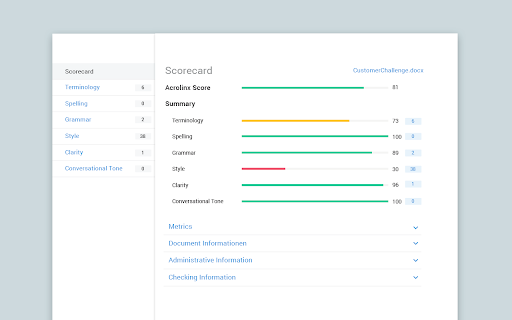
As you write, the Acrolinx Sidebar guides you to create content that’s aligned with your strategy. Acrolinx ensures you’re using the words and phrases that are relevant to your company tone of voice and the audience you’re trying to reach. See where your content is strong and where it could be stronger with a detailed Acrolinx Scorecard and Analytics insights.
Acrolinx is not a stand-alone authoring tool. It works directly with your company’s existing Acrolinx installation. If your company already uses Acrolinx, the instructions below will help you get started.
If your company doesn’t have Acrolinx installed (or you’re not sure) we’d love to help you learn more.
Visit www.acrolinx.com to discover how your organization can communicate with one clear voice.


Reviews (1 cached)
★☆☆☆☆2021-09-22
Grant Powelson
Couldn't figure out how to set up an account, not intuitive at all, doesn't seem to work
Permissions (3)
Permissions
activeTabℹ Can access the current tab when you click the extension scriptingℹ Can inject scripts into web pages storageℹ Can store data locally in your browser
Details
| Version | 1.8.1.2706 |
| Updated | Feb 12, 2026 |
| Size | 435KiB |
| First Seen | Mar 29, 2026 |
Popular in workflow

Adobe Acrobat: PDF edit, convert, sign tools
by Adobe Inc.
331M
★ 4.40
workflow
331M
★ 4.40
workflow

Chrome Remote Desktop
by Chrome Remote Desktop Release Managers
38M
★ 3.14
workflow
38M
★ 3.14
workflow

Microsoft Single Sign On
by Microsoft
36M
★ 2.27
workflow
36M
★ 2.27
workflow

MetaMask
by metamask
13M
★ 2.68
workflow
13M
★ 2.68
workflow

Free VPN for Chrome - VPN Proxy VeePN
by www.veepn.com
12M
★ 4.51
workflow
12M
★ 4.51
workflow
Popular Extensions
Adobe Acrobat: PDF edit, convert, sign tools
by Adobe Inc.
331M
★ 4.40
workflow
331M
★ 4.40
workflow

Grammarly: AI Writing Assistant and Grammar Checker App
by Grammarly
42M
★ 4.50
communication
42M
★ 4.50
communication
Chrome Remote Desktop
by Chrome Remote Desktop Release Managers
38M
★ 3.14
workflow
38M
★ 3.14
workflow
Microsoft Single Sign On
by Microsoft
36M
★ 2.27
workflow
36M
★ 2.27
workflow

Cisco Webex Extension
by cisco.chromestore
23M
★ 2.34
social
23M
★ 2.34
social