
⚠️Requests 3 sensitive permissions ✅Recently updated
Description
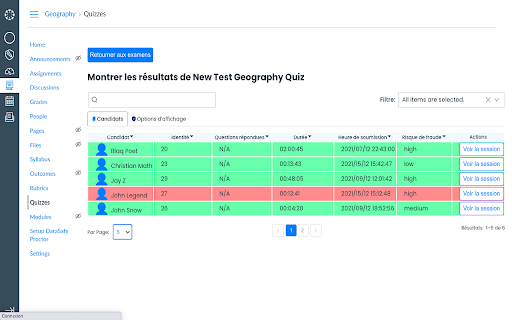
Safe proctoring tool
Mereos is a tool created for accessibility. Using our tool enables you to take exams remotely while helping to prevent fraud. Therefore it will add an incalculable value to your online assessments and certifications. Listed below are three important points to keep in mind when using Mereos on your online tests:
1. No, you won’t be scrutinized by humans while taking your exam. Our artificial intelligence is capable of detecting any irregularity and assessing if the test is fraudulent or not. In some cases, your institution can monitor your session if the risk of fraud is high or appoint us to do so. But rest assured: your video will not be examined in the majority of cases and if it is, it would only be due to a high risk of cheating.
2. Your information is entirely safe. Our API uses an HTTPS protocol and its communication is encrypted using Transport Layer Security (TLS). Transmission to the data center is done using TLS 1.2 or 1.3 only. Data at rest in the data center is encrypted using AES-256 and is FIPS 140-2 compliant. All data centers are SOC 3 certified and encryption is secured using AES-GCM. Our extension works exclusively within the browser and therefore has no access to your local device.
3. We will never sell personal information. Our privacy settings are meant to protect your data and we could not access it if we wanted to. There is nothing for us to sell to third parties.
Also note that your Chrome browser may require the following permissions:
Permission 1 – “READ AND CHANGE ALL YOUR DATA ON THE WEBSITES YOU VISIT” – Unlike what it states, it does not mean our extension will read or change anything on the websites you visit. This is the permission needed by the Chrome tab capture API to allow the recording of your tabs. Tab recording will be set if, and only if, your institution decides to enable this feature on the exam you take. It is actually an optional feature. This permission is also triggered by the <all_urls> declaration which allows the extension to detect the exam. Meaning that if we did not ask for this permission, each school would need a different extension or Mereos would be forced to release permission updates every time a new customer wanted to use our Mereos extension, which would be far too complex and time-consuming.
Permission 2 – “CAPTURE THE CONTENT OF YOUR SCREEN” – This allows us to provide technical support if you need it. This is also an optional feature that your exam administrator decides to set or not. Google Chrome will ask you twice about this permission and will also place a message at the bottom of your screen to remind you at all times that your screen is being captured. Screen capture will automatically end once you finish your exam.
Permission 3 – “DISPLAY NOTIFICATIONS” – We need to be able to notify you about important information during your test. For example, when time is almost up.
Permission 4 – “MANAGE YOUR DOWNLOADS” – Again, this permission will be asked only if your school disables your ability to download files during an exam. Mereos will use this permission and prevent test-takers from downloading items while in an exam but not before nor after the exam.
Permission 5 – “MANAGE YOUR APPS, EXTENSIONS, AND THEMES” – To prevent any possible conflict between Mereos and another extension or app, we ask for this permission. However, Mereos will never install, download or modify your theme. Just like you are often asked to disable advertising block extension on websites, we need this permission to ensure you are taking the test with no possible room for fraud.
Permission 6 – “MODIFY DATA YOU COPY AND PASTE” – This permission is only relevant if your institution has disabled your ability to copy and paste during your assessment. Mereos will use this permission to clear your clipboard but we will not be able to see what is or was on your clipboard. Rest assured: it will only affect your ability to copy and paste during the test but will never affect it outside of the test.
Permission 7 – “IDENTIFY AND EJECT STORAGE DEVICES” – No, we will not actually eject any of your storage devices. This is to enable us to look into your resources to determine whether or not your computer meets the system requirements. If you encounter a problem before or during an exam, this information can help us better assist you.
Permission 8 – “CHANGE YOUR PRIVACY-RELATED SETTINGS” – This permission is only to make our extension usable in incognito mode.
Permission 9 – “CHECK CPU AND RAM CAPABILITY” – This allows us to check the capacity of hardware, especially CPU & RAM of your machine to ensure smooth uninterrupted experience during assessment.
Reviews
Loading reviews...
Permissions (12)
Permissions
alarmsℹ Can schedule periodic background tasks browsingDataℹ Can delete browsing history and data cookiesℹ Can read and modify browser cookies desktopCaptureℹ Can capture screen, window, or tab content downloadsℹ Can manage and monitor downloads managementℹ Can manage other installed extensions notificationsℹ Can show desktop notifications storageℹ Can store data locally in your browser system.cpusystem.displaysystem.memory tabsℹ Can see your open tabs and their URLs
Details
| Version | 3.1.4 |
| Updated | Mar 28, 2026 |
| Size | 17.33MiB |
| First Seen | Mar 29, 2026 |
Popular in accessibility

Read&Write for Google Chrome™
by Texthelp
17M
★ 3.44
accessibility
17M
★ 3.44
accessibility

360 Internet Protection
by qihoosafe
17M
★ 4.54
accessibility
17M
★ 4.54
accessibility

Screenshot reader™
by Texthelp
7M
★ 2.57
accessibility
7M
★ 2.57
accessibility

OrbitNote
by Texthelp
7M
★ 2.95
accessibility
7M
★ 2.95
accessibility

Volume Master
by Peta Sittek
6M
★ 4.81
accessibility
6M
★ 4.81
accessibility
Popular Extensions

Adobe Acrobat: PDF edit, convert, sign tools
by Adobe Inc.
331M
★ 4.40
workflow
331M
★ 4.40
workflow

Grammarly: AI Writing Assistant and Grammar Checker App
by Grammarly
42M
★ 4.50
communication
42M
★ 4.50
communication

Chrome Remote Desktop
by Chrome Remote Desktop Release Managers
38M
★ 3.14
workflow
38M
★ 3.14
workflow

Microsoft Single Sign On
by Microsoft
36M
★ 2.27
workflow
36M
★ 2.27
workflow

Cisco Webex Extension
by cisco.chromestore
23M
★ 2.34
social
23M
★ 2.34
social