
⚠️Not updated in over a year
Description
Use BigDef to:
* gather foreign language words from any web pages across all internet
* study with flash cards
* improve your vocabulary
* compete compare your achievements with other users
Usage of the extension is very simple:
* open a page
* find a word
* select a word
* click the right button on your mouse and open context menu
* find the item in the menu "Show <the word> in BigDef"
* click on the item
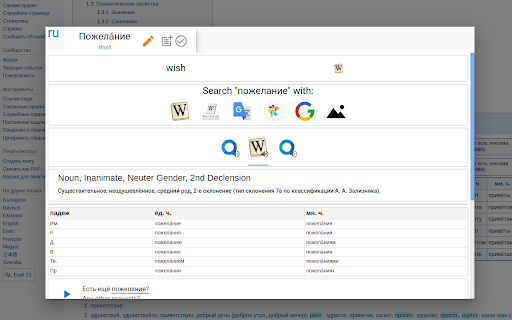
* you will see a very deep definition of the word
Besides you can add a word to your word list to study it later with flashcards on our site.
Or you can mark the word as known if you know it.


Reviews
Loading reviews...
Permissions (1)
Permissions
contextMenusℹ Can add items to the right-click menu
Details
| Version | 1.0.8 |
| Updated | Aug 9, 2024 |
| Size | 39.55KiB |
| First Seen | Mar 22, 2026 |
Popular in fun

Custom Cursor for Chrome™
by BLife Team LLC
5M
★ 4.67
fun
5M
★ 4.67
fun

Google Meet Enhanced Experience
by niritshlif
1M
★ 3.36
fun
1M
★ 3.36
fun

SuperNova SWF Enabler
by Tactics Technology LLC
400K
★ 2.04
fun
400K
★ 2.04
fun

Custom Cursor Trails
by BLife Team LLC
300K
★ 4.30
fun
300K
★ 4.30
fun

Cursor Style – Custom Mouse Cursors & Trails for Chrome™
by Oleksii Semeniuk
200K
★ 4.79
fun
200K
★ 4.79
fun
Popular Extensions

Adobe Acrobat: PDF edit, convert, sign tools
by Adobe Inc.
330M
★ 4.40
workflow
330M
★ 4.40
workflow

Chrome Remote Desktop
by Chrome Remote Desktop Release Managers
38M
★ 3.14
workflow
38M
★ 3.14
workflow

Cisco Webex Extension
by cisco.chromestore
24M
★ 2.34
social
24M
★ 2.34
social

Kami for Google Chrome™
by Kami
17M
★ 4.56
education
17M
★ 4.56
education

Read&Write for Google Chrome™
by Texthelp
17M
★ 3.44
accessibility
17M
★ 3.44
accessibility