
⚠️Not updated in over 2 years
Description
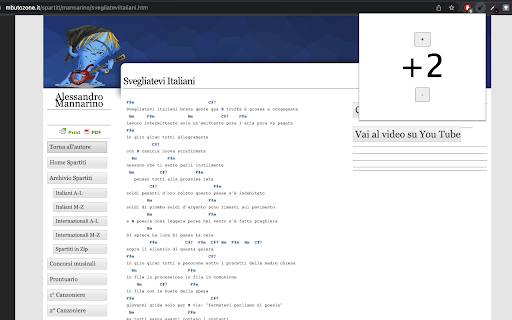
A chrome extension that allows you to transpose chords on any website.
Transposing is the act of converting a song into a different key. You might want to do it to find a key that works better with your voice, or simply to choose a version of the song that has chords that are easier for you to play.
Currently, it only works on websites with Italian chords (Do, Re, Mi etc..) and converts them into English chords so that transposition is possible. Inspired by the "transpose" functionality on the Ultimate Guitar website.
Tested on these websites:
http://www.mbutozone.it
http://psicoaccordi.blogspot.it
How to use:
- Visit a web page that contains chords
- Wait for the page to load and click on the extension icon in the top right of the browser
- Click 'select chords' and then click on the lyrics on the web page
- Click on the extension icon and click 'enable'. This will convert the chords to links
- Click on the extension icon and click '+' or '-' to transpose
- Click on a converted chord to remove (in case part of the lyrics were converted by mistake)
Reviews
Loading reviews...
Details
| Version | 1.1.0 |
| Updated | Dec 6, 2023 |
| Size | 67.67KiB |
| First Seen | Mar 22, 2026 |
Popular in fun

Custom Cursor for Chrome™
by BLife Team LLC
5M
★ 4.67
fun
5M
★ 4.67
fun

Google Meet Enhanced Experience
by niritshlif
1M
★ 3.36
fun
1M
★ 3.36
fun

SuperNova SWF Enabler
by Tactics Technology LLC
400K
★ 2.04
fun
400K
★ 2.04
fun

Custom Cursor Trails
by BLife Team LLC
300K
★ 4.30
fun
300K
★ 4.30
fun

Cursor Style – Custom Mouse Cursors & Trails for Chrome™
by Oleksii Semeniuk
200K
★ 4.79
fun
200K
★ 4.79
fun
Popular Extensions

Adobe Acrobat: PDF edit, convert, sign tools
by Adobe Inc.
330M
★ 4.40
workflow
330M
★ 4.40
workflow

Chrome Remote Desktop
by Chrome Remote Desktop Release Managers
38M
★ 3.14
workflow
38M
★ 3.14
workflow

Cisco Webex Extension
by cisco.chromestore
24M
★ 2.34
social
24M
★ 2.34
social

Kami for Google Chrome™
by Kami
17M
★ 4.56
education
17M
★ 4.56
education

Read&Write for Google Chrome™
by Texthelp
17M
★ 3.44
accessibility
17M
★ 3.44
accessibility