
⚠️Not updated in over 2 years ⚠️Below average rating
Description
Description:
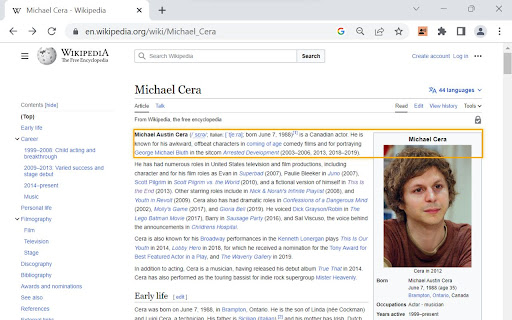
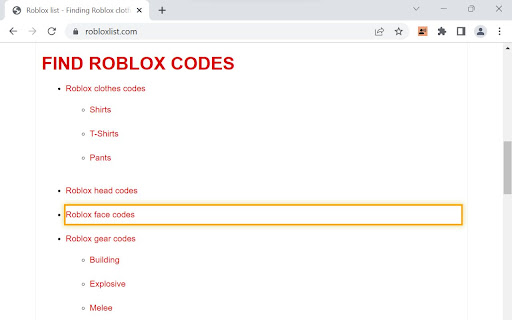
Make web browsing, web development, or website testing more accessible with the Screen Reader with On/Off Button extension. Designed with developers and users in mind, this frictionless, convenient tool provides a quick and hassle-free way to experience websites through screen reading capabilities. This extension reads ARIA labels, as well as visible elements on the page.
Key Features:
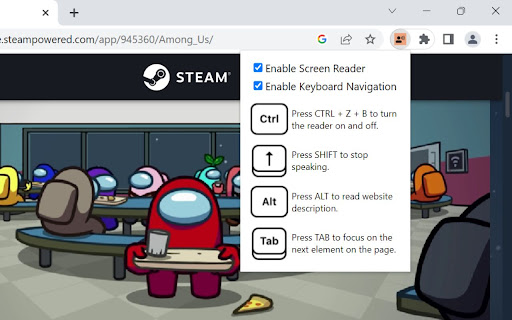
1. Convenient On/Off Button: Enable or disable the screen reading functionality with a simple and convenient toggle button that appears. Frictionlessly switch between regular browsing and screen reading, providing full control and flexibility.
2. Effortless Accessibility: Enable screen reading functionality to have web content read aloud, allowing developers to easily identify and verify the accessibility of their websites.
3. Streamlined Navigation with Keyboard Accessibility: Navigate through web pages using intuitive keyboard shortcuts and easily track the currently focused element with a customizable highlight, simplifying the testing process. The extension can also be fully accessed with mouse interactions.
4. Rapid Insights: Retrieve essential information about elements on the page, including tags, text content, links, form controls, and more. Gain quick insights into the structure and content of websites.
5. Meta Description Reading: Instantly access website descriptions provided in meta tags, enabling a quick overview of page content before diving in.
6. User-Friendly Experience: Enjoy a user-friendly interface and intuitive controls, ensuring a seamless and convenient experience while leveraging screen reading capabilities.
7. Designed for Convenience: Tailored specifically for both developers and users looking for a straightforward screen reader solution that’s easy-to-use, and easy to download.
Note: The Screen Reader With On/Off Button is not intended as a comprehensive screen reader solution for visually impaired users. It is designed for those looking for a quick, convenient, and simple screen reader tool.
Experience the power of frictionless screen reading at your fingertips today!

Reviews (4 cached)
★☆☆☆☆2025-02-19
Blue Wallpaper
don't work
★☆☆☆☆2025-01-19
Ronald Ceres Foscablo
It doesn't work.
★☆☆☆☆2025-01-13
Clay Wright
does nothing
★★☆☆☆2025-05-16
Luci D
works fine but it can't read a full paragraph it also scrolls to the middle of the page for no reason. Shift being the key to have it stop talking makes both shift keys useless when typing.
Permissions (2)
Permissions
storageℹ Can store data locally in your browser tabsℹ Can see your open tabs and their URLs
Details
| Version | 1.0 |
| Updated | Jul 21, 2023 |
| Size | 21.3KiB |
| First Seen | Mar 22, 2026 |
Popular in accessibility

Read&Write for Google Chrome™
by Texthelp
17M
★ 3.44
accessibility
17M
★ 3.44
accessibility

SYTools
by wasaby
4M
★ 3.16
accessibility
4M
★ 3.16
accessibility

Screenshot Tool - Screen Capture & Editor
by screenshot-tool.app
1M
★ 4.70
accessibility
1M
★ 4.70
accessibility

Помощник диагностики
by kontur.extension
1M
★ 3.00
accessibility
1M
★ 3.00
accessibility

WebCRX
by webcrx
1M
★ 4.87
accessibility
1M
★ 4.87
accessibility
Popular Extensions

Adobe Acrobat: PDF edit, convert, sign tools
by Adobe Inc.
330M
★ 4.40
workflow
330M
★ 4.40
workflow

Chrome Remote Desktop
by Chrome Remote Desktop Release Managers
38M
★ 3.14
workflow
38M
★ 3.14
workflow

Cisco Webex Extension
by cisco.chromestore
24M
★ 2.34
social
24M
★ 2.34
social

Kami for Google Chrome™
by Kami
17M
★ 4.56
education
17M
★ 4.56
education
Read&Write for Google Chrome™
by Texthelp
17M
★ 3.44
accessibility
17M
★ 3.44
accessibility