Image Describer icon

Image Describer

by AccessLint

v1.8.0 Updated Dec 25, 2024 178KiB
CWS
2K
Users
★ 4.28
18 reviews
#2335
of 36.8K
accessibility
#106 of 959
⚠️Not updated in over a year

Description

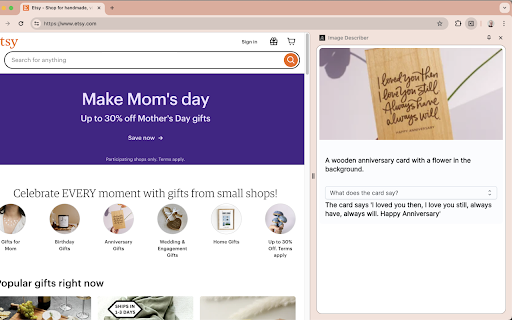
To describe content, use the context menu on a specific image, or the Extension keyboard shortcut Alt+Shift+I to describe the full tab contents. The description can be copied to your clipboard through an menu item in the context menu, or through the extension popup or Chrome side panel drawer. You can also change the voice or toggle muting using the Extension Options page at chrome-extension://ogoddjgogmlndofcpkljmmdobjpfdolf/options.html To access the side panel without the mouse, on Mac press Command + Option + Down arrow. On Windows, press F6.
Image Describer screenshot 1

Reviews (3 cached)

★☆☆☆☆2024-07-30
awais Khan

Dear Cameron Cundiff I love using your Image Describer extension, but the sound it produces is quite irritating for me. Could you please add an option to mute the sound? This would make the extension much more user-friendly in different environments. Thank you for your understanding! Best regards,

★☆☆☆☆2024-07-20
Inam Ullah

Overall performance for the extension was good but it's been 5 days it stopped working .. I can't generate title for the extension...now I think it useless .. The extension team should repair the error and one more thing, there is always the background playback which irritate me during work .. they should stop this .. My honest review

★☆☆☆☆2024-03-22
Hassan Ali

Now He is not working Kindly take a look on it. Kindly Fix the issue He is not showing image or image description

Permissions (9)

Permissions

activeTab Can access the current tab when you click the extension clipboardWrite Can write to your clipboard commands contextMenus Can add items to the right-click menu identity Can use your Google account identity scripting Can inject scripts into web pages sidePanel storage Can store data locally in your browser tts Can use text-to-speech

Details

Version 1.8.0
Updated Dec 25, 2024
Size 178KiB
First Seen Mar 21, 2026

