
⚠️Not updated in over a year
Description
CSS/XPath Content Extractor is a simple and efficient Chrome extension designed for developers, testers, and anyone working with web content. Whether you're a QA engineer validating page elements or a web developer looking to scrape data from specific parts of a webpage, this tool helps you extract content easily using both CSS Selectors and XPath.
Key Features:
Extract web content with CSS Selectors or XPath.
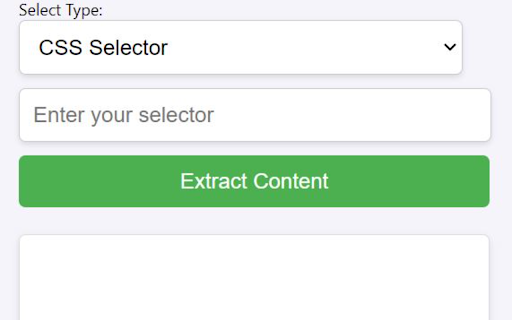
Intuitive interface: Simply input the selector or XPath, and extract the matching content from the webpage.
Get a formatted list of content directly from any webpage, ready to copy to your clipboard.
Supports content extraction from Shadow DOM elements, ensuring compatibility with modern web development techniques.
Quick copy functionality: Once the content is extracted, click a button to copy it instantly to your clipboard.
Responsive and lightweight: No unnecessary bloat, ensuring fast and reliable performance.
How to Use:
Open the web page from which you want to extract content.
Enter the CSS Selector or XPath of the element you wish to extract in the input field.
Choose the type (CSS or XPath) from the dropdown.
Click the Extract button, and the matching content will be displayed.
Use the Copy button to copy the content to your clipboard instantly.
This tool is ideal for:
Web developers and designers working with front-end technologies.
QA engineers and testers verifying web page elements.
Data analysts looking to scrape data from specific web page sections.
Anyone working with DOM structures.
Start simplifying your web content extraction today with CSS/XPath Content Extractor!
Permissions:
Requires access to the active tab for content extraction from the currently loaded webpage.
Reviews
Loading reviews...
Permissions (2)
Permissions
activeTabℹ Can access the current tab when you click the extension scriptingℹ Can inject scripts into web pages
Details
| Version | 1.0 |
| Updated | Sep 24, 2024 |
| Size | 5.5KiB |
| First Seen | Mar 26, 2026 |
More by amol.bhaskar1


Popular in developer

GoFullPage - Full Page Screen Capture
by GoFullPage
10M
★ 4.89
developer
10M
★ 4.89
developer

TouchEn PC보안 확장
by 라온시큐어
8M
★ 1.33
developer
8M
★ 1.33
developer

React Developer Tools
by Meta
5M
★ 3.95
developer
5M
★ 3.95
developer

Meta Pixel Helper
by Meta
4M
★ 3.91
developer
4M
★ 3.91
developer

ColorZilla
by colorzilla.com
4M
★ 4.59
developer
4M
★ 4.59
developer
Popular Extensions

Adobe Acrobat: PDF edit, convert, sign tools
by Adobe Inc.
331M
★ 4.40
workflow
331M
★ 4.40
workflow

AdBlock — block ads across the web
by AdBlock
62M
★ 4.48
workflow
62M
★ 4.48
workflow

Grammarly: AI Writing Assistant and Grammar Checker App
by Grammarly
42M
★ 4.50
communication
42M
★ 4.50
communication

Chrome Remote Desktop
by Chrome Remote Desktop Release Managers
38M
★ 3.14
workflow
38M
★ 3.14
workflow

Microsoft Single Sign On
by Microsoft
36M
★ 2.27
workflow
36M
★ 2.27
workflow