
✅Recently updated
Description
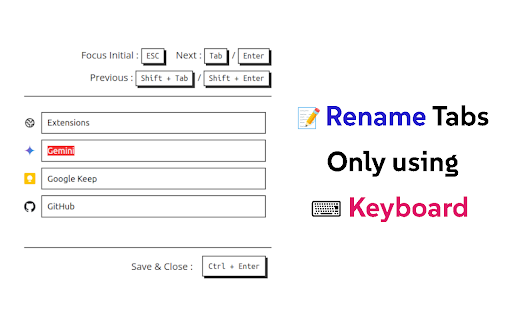
⌨️ Rename tabs without using a mouse!
- Press 'F2' to Open Rename Page at any tab
- 'Tab' or 'Enter' / 'Shift+Tab' or 'Shift+Enter' to Move around tab titles
- 'Ctrl+Enter' to Apply changes and Close
- 'Shift+R' to reload connectable tabs
- 'F5' or 'Ctrl+R' to Reset changes (browser original)
- 'Ctrl+W' or 'Ctrl+F4' to Close without applying (browser original)
📌 'F2' shortcut and Renaming is ⚠️not available⚠️ at some pages (e.g. ⚠️ chrome web store page ⚠️, chrome:// pages, new tab page, etc) due to security reasons of the browser.
📌 When extension is 'first installed ⬇️', you need to 'refresh 🔄' tab to use 'F2' shortcut because extension cannot connect to tabs that are created before its installed.
v1.2
- Added descriptions about unavailable tabs
- Reload all reconnectable tabs with 'Shift+R' shortcut
- All buttons are now clickable
v1.1
- Added settings
- Change shortcut
- Darkmode
- Adjust list width
Source code of this extension is opened : https://github.com/vhv3y8/rename-tabs-with-f2
Feature Request, Language Support, Bug Report : Github Issue or vhv3y8@gmail.com


Reviews
Loading reviews...
Permissions (2)
Permissions
storageℹ Can store data locally in your browser tabsℹ Can see your open tabs and their URLs
Details
| Version | 1.2.1 |
| Updated | Mar 6, 2026 |
| Size | 358KiB |
| First Seen | Mar 26, 2026 |
More by vhv3y8


Popular in tools

Zotero Connector
by Zotero
8M
★ 3.96
tools
8M
★ 3.96
tools

Browsec VPN - Free VPN for Chrome
by Browsec
7M
★ 4.44
tools
7M
★ 4.44
tools

AnyDoc Translator - Translate Web and PDF
by www.wps.com
7M
★ 4.59
tools
7M
★ 4.59
tools

Microsoft Bing Homepage & Search for Chrome
by Microsoft Corporation
4M
★ 3.72
tools
4M
★ 3.72
tools

IE Tab
by Blackfish Software
4M
★ 4.31
tools
4M
★ 4.31
tools
Popular Extensions

Adobe Acrobat: PDF edit, convert, sign tools
by Adobe Inc.
331M
★ 4.40
workflow
331M
★ 4.40
workflow

Grammarly: AI Writing Assistant and Grammar Checker App
by Grammarly
42M
★ 4.50
communication
42M
★ 4.50
communication

Chrome Remote Desktop
by Chrome Remote Desktop Release Managers
38M
★ 3.14
workflow
38M
★ 3.14
workflow

Microsoft Single Sign On
by Microsoft
36M
★ 2.27
workflow
36M
★ 2.27
workflow

Cisco Webex Extension
by cisco.chromestore
23M
★ 2.34
social
23M
★ 2.34
social