
⚠️Not updated in over 2 years
Description
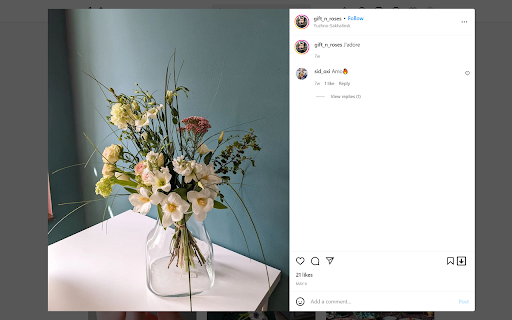
Easy Saver will help you to easily download photos, videos and live streams from your or your friend's account. It adds download button on all media of web version of Instagram.
Using this extension, you can download photos and videos from your feed, from your friend's profile, or from your own profile with one click. You can download reels, stories, and even whole carousel posts.
Easy Saver creates "easy-saver-folder" in your Download folder. All videos and photos will be saved in subfolders like this: "%Downloads_folder%\easy-saver-folder\%friends_username%\", so it will be very easy to sort photos from different accounts.
After the download is finished download button will blink green, if it was successful, or red if it wasn't. (usually because it's a private video or because you cancel the download yourself)
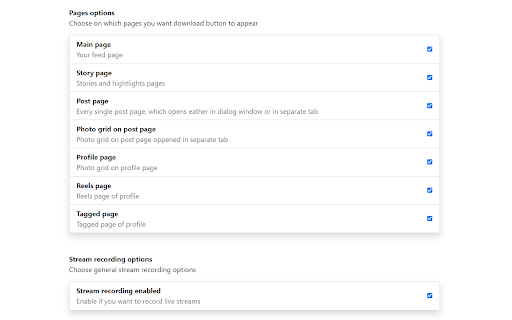
New feature🔥🔥🔥: now you can record Instagrams live stream which is currently online. Open streams page, find record panel, click "Start recording" button. That's it. The stream will be recorded and saved automatically at the end. Or you can click "Stop and save" button and currently recorded part of a live stream will be saved right away. While the stream is being recorded you can minimize the recording panel and continue to browse the Instagram. Yes, you can leave live stream page and browse your feed, stream will be recorded anyway (But don't reload Instagram page with browser reload button, it would stop the recording. Basically, if you see a recording panel then the stream is being recorded) You can record 🔥several streams simultaneously🔥 in one tab. Just open the other stream you want to record and another record panel will be added. At the end of the stream you will receive two files: one with video .m4v, one with audio .m4a. Extension can't merge these files by itself, but you can use video player (VLC for example) to open video and add an audio track. Or you can use "ffmpeg" program to merge these files into one video file (I prefer this way) Or you can find some online service to merge it, it's up to you.
Note, that if you want Chrome to automatically download photos, you need 'Ask where to save each file before downloading' option to be turned off, otherwise it will ask you where to save every single photo. It's not bad, but it's not as convenient as originally intended.
And don't forget, that all videos and photos belong to their creators. Don't download it without the owner's permission.


Reviews (4 cached)
★☆☆☆☆2023-08-14
Marilyn Scya
IT'S NOT WORKING
★★☆☆☆2024-02-10
iS Me
February 2, 2024. It not work. The download icon isn't show
★★☆☆☆2023-03-09
Fu Sheng Kok
when I download some picture remain the same although in the post is different image
★★★☆☆2023-04-10
Soner Şen
Hello developer first of all thank you very much for keeping the plugin up to date. If you leave only the file name to us, for example, it would be much better if we specify the file names.
Permissions (3)
Permissions
downloadsℹ Can manage and monitor downloads storageℹ Can store data locally in your browser webNavigationℹ Can monitor navigation events
Details
| Version | 1.3.18 |
| Updated | Dec 12, 2023 |
| Size | 111KiB |
| First Seen | Mar 22, 2026 |
Popular in fun

Custom Cursor for Chrome™
by BLife Team LLC
5M
★ 4.67
fun
5M
★ 4.67
fun

Google Meet Enhanced Experience
by niritshlif
1M
★ 3.36
fun
1M
★ 3.36
fun

SuperNova SWF Enabler
by Tactics Technology LLC
400K
★ 2.04
fun
400K
★ 2.04
fun

Custom Cursor Trails
by BLife Team LLC
300K
★ 4.30
fun
300K
★ 4.30
fun

Cursor Style – Custom Mouse Cursors & Trails for Chrome™
by Oleksii Semeniuk
200K
★ 4.79
fun
200K
★ 4.79
fun
Popular Extensions

Adobe Acrobat: PDF edit, convert, sign tools
by Adobe Inc.
330M
★ 4.40
workflow
330M
★ 4.40
workflow

Chrome Remote Desktop
by Chrome Remote Desktop Release Managers
38M
★ 3.14
workflow
38M
★ 3.14
workflow

Cisco Webex Extension
by cisco.chromestore
24M
★ 2.34
social
24M
★ 2.34
social

Kami for Google Chrome™
by Kami
17M
★ 4.56
education
17M
★ 4.56
education

Read&Write for Google Chrome™
by Texthelp
17M
★ 3.44
accessibility
17M
★ 3.44
accessibility