
Description



Reviews (200 cached)
very poor, extension stopped working during typing
am from odisha , here odia typing very popular and also odia language is available this apps .so i tried to download but it not be downloaded yet
Doesn't work for me. Always writes in English, doesn't matter which language I choose :(
GOOLE HAS REMOVED INPUT TOOLS FOR WINDOWS
The tool works for all languages except Hindi. It used to work earlier but big tech a**ho**es are jealous of our rise, hence this intentional bug.
bogus and misguiding public . extention does not work . foollish
can't work on Word,Execel, etc.
INPUT TOOLS ARE NOT WOKING IN HINDI LANGUAGE . KINDLY CHECK THE BUG. AND RESTORE IT.
it is not working for me even after setting up all as instructed in the video tutorial
my hindi phonetic keyboard is not working, kindly seek into the matter asap
Hello Team, I noticed that when Google Input Tools extension is enabled, the Enter key does not send messages properly on Discord Web in desktop view. Disabling the extension resolves the issue. Kindly look into this for a smoother user experience.
can't work today hkg ..........how
Saw it thrice and still couldnt download Google input tool for Hindi input. Either I am too dim or Google is too smart.
I hate that i cannot instal virtual keybord on Chrome anymore. In opera is stil activated...
It doesn't work in Microsoft Edge browser.
Does not work with Skype online!
Santali (Ol Chiki) , language code: sat , has not been included in Google Input Tools till now. We, the Santali language community, are waiting to use Google Input Tools to type Santali language in Santali script (also called Ol Chiki). Please faster the process to bring Santali (Ol Chiki) input tool in Google Input Tools. Thanks, Karia
Does not work. UX terrible. No feed back / help button. Does not work, but for developers probably is obvious... ;) not recommend anyway
extension will collapse the text box on meta business when creating post
Now it would not to get automatically space in Hindi language. when in write a Hindi words then i click space the extension not accept my space order.. just wait 2 sec and i clicked space than work properly.. that kind of issue same time when i wrote a word and click a space... [My Issue] All the issued i faced with fast typing.. when i write slow.. it's work perfect.. but my speed is same when i work a 3 or 4 day ago. what is this issue please fix that immediately. Recent 5 August 2024 update is bad i think .... please FIX ASAP.
It's been a month since the cantonese input has errors occurred, nothing has been fixed, large numer of users are still facing this low-level error on a daily basis, is there anyone in google even noticed the issue?
there is a space after typing in google doc by using cantonese pingyin, please fix it and it is very annoying
Latest Arabic update in awful ... Not working correctly at all with Franco Arabic as before!
We are facing issues with Indian languages like Marathi , Hindi and Sanskrit . This fonts are not working on google drive at all.
I've been using this extension for ages, but it happens from time to time that when I'm trying to type chinese while using Google Doc/ Slides etc, the punctuations are not right (I am using cantonese input), even if I've switched it to chinese with the "。," option. Sometimes the defect goes away when I close and reopen the wndow or restart my computer, but this time it persisted for two days. Apart from the punctuations being off, I have found that there is an extra space after the words even if I didn't press the space button for selection. I've already restarted my computer and reinstalled the extension but it's not doing anything, please help. (By the way I've definietely refreshed the page, restart chrome etc.)
All my language inputs do not work on google slides and docs anymore.
can't use cantonese input on google doc after update. please fix.
not working in Google (docs)
Cantonese input stopped working on google doc, google slides for a few days already. please fix
Stopped working with Bangla input in Google docs.
Cantonese input stopped working.
stopped receiving option with English word
Google input tools is not working for me to type in Sanskrit in Google Slides. It seems to work in Sheets and Docs and email. Please fix.
Till now it was working well with Kannadaq language. Now whenever I type 'a' and press space, it deletes the letter which I have just typed and takes to back space on 'Google Keep', but works well with Google Search. Also ಌ appears instead of ಳ್ಳಿ when I type LLi. These two needs to be fixed ASAP. Without this working in Kannada language has become a nightmare.
couldn't proceed, need further help.
No doubt, it was the best language extension tool but nowadays google input tool specially for 'Hindi Language' is not working properly. it automatically disconnected in 1 or 2 minute. Now, its condition is horrible. I am exhausted with this tool. please, solve this issue.
maybe this extension is now discontinued .... and maybe this is ghost extension. (a child process without parent process running ) :-o maybe it divert your information to someone , elsewhere ? :-)
Marathi / Hindi users facing lot of issues after update.
exe file is not there., in video there is a option, WHY.
Sometimes, I type in English 99.9% of the time. sometime I want to type in Chinese, but the extension keep default to chinese so that I have to retype all the time.
i could not get the required result .. waste of time
This extensions messed with my keyboard settings.
I was using Cantonese pinyin on google doc and it suddenly stop working, not showing any word. But it's still ok to type on search engine, google translate... What has triggered the problem???
not work
It is very slow and cannot match the typing speed.
No instructions. Spanish has two keyboards, neither has any of the diacritical markings one needs, Google acts like this is just a walk in the park to install and use and it is absolutely not. I can't type any characters with accents while in Chrome. Ugh.
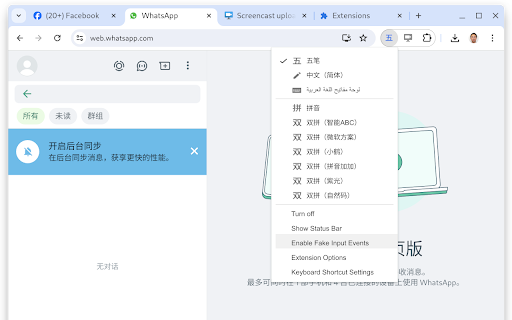
I used it to write in Devnagri script (Marathi and Hindi) Out of the blue it stopped working for whatsapp web.
it is very slow
Since Facebook and Whatsapp using non input element in html, the word appear with highlighted and replace when input new word, that's have been happen in almost 2 years hope this can be fix asap in future
Not working on Facebook and Whatsapp Web! This extension not giving support for typing in Whatsapp Web and Facebook. Please fix it ASAP! Because basically most of users use this input tools for typing on social media.
Permissions (4)
Permissions
Details
| Version | 11.4.0.0 |
| Updated | Sep 5, 2025 |
| Size | 795KiB |
| First Seen | Mar 28, 2026 |
Popular in tools




Popular Extensions


