
⚠️Requests 2 sensitive permissions ✅Recently updated
Description
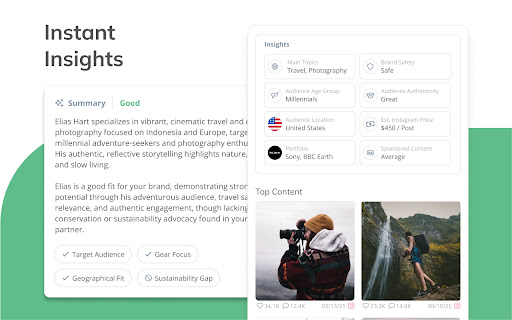
As a Klear customer, you can now access influencer insights directly while browsing Instagram, TikTok, YouTube, Facebook, or X using the Klear Chrome Extension. Open the extension to view creator analytics, engagement performance, brand safety checks, and AI-powered summaries all without switching tabs or interrupting your workflow.
Whether you’re researching new creators, reviewing profiles shared by your team, or evaluating potential partners in real time, the extension brings Klear’s intelligence right into your browser.
How it works
- While viewing a creator on Instagram, TikTok, YouTube, Facebook, or X, click the Klear icon in your Chrome toolbar.
- Log in with your Klear account to view the creator’s Klear profile, including insights, engagement metrics, and top-performing content and more.
- Access AI summaries tailored to your brand and campaign criteria for quick vetting and fit assessment.
- Tag creators, add them to campaigns, or reach out directly all without leaving the social platform.
How to install
- Click Add to Chrome from the Chrome web store.
- Find the Klear icon by selecting the puzzle piece in the top-right corner of your browser’s toolbar.
- Click the “pin” icon to keep the extension visible and easy to access.
- Log in with your Klear account to start exploring influencer insights instantly.
Make influencer research effortless and stay in the flow of discovery, wherever you find your next creator.


Reviews
Loading reviews...
Permissions (5)
Permissions
cookiesℹ Can read and modify browser cookies sidePanel storageℹ Can store data locally in your browser tabsℹ Can see your open tabs and their URLs webRequestℹ Can observe and analyze network traffic
Details
| Version | 2.0 |
| Updated | Mar 23, 2026 |
| Size | 24.56KiB |
| First Seen | Mar 28, 2026 |
Popular in tools

Zotero Connector
by Zotero
8M
★ 3.96
tools
8M
★ 3.96
tools

Browsec VPN - Free VPN for Chrome
by Browsec
7M
★ 4.44
tools
7M
★ 4.44
tools

AnyDoc Translator - Translate Web and PDF
by www.wps.com
7M
★ 4.59
tools
7M
★ 4.59
tools

Microsoft Bing Homepage & Search for Chrome
by Microsoft Corporation
4M
★ 3.72
tools
4M
★ 3.72
tools

IE Tab
by Blackfish Software
4M
★ 4.31
tools
4M
★ 4.31
tools
Popular Extensions

Adobe Acrobat: PDF edit, convert, sign tools
by Adobe Inc.
331M
★ 4.40
workflow
331M
★ 4.40
workflow

Grammarly: AI Writing Assistant and Grammar Checker App
by Grammarly
42M
★ 4.50
communication
42M
★ 4.50
communication

Chrome Remote Desktop
by Chrome Remote Desktop Release Managers
38M
★ 3.14
workflow
38M
★ 3.14
workflow

Microsoft Single Sign On
by Microsoft
36M
★ 2.27
workflow
36M
★ 2.27
workflow

Cisco Webex Extension
by cisco.chromestore
23M
★ 2.34
social
23M
★ 2.34
social