
⚠️Not updated in over 2 years
Description
Initial configuration
1. Open the add-on options and configure the break time.
How to use
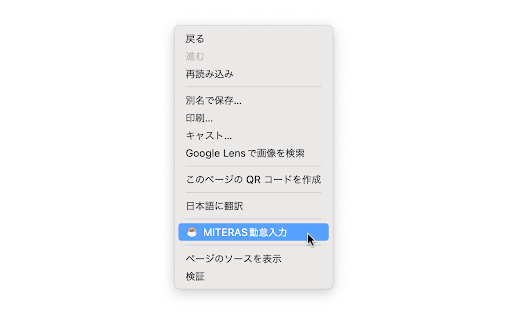
1. Show the context menu (normally right click) on the break time input page of MiTERAS KINTAI.
2. Select "MiTERAS KINTAI Helper" from the context menu.
3. The break times will be entered automatically.
Reviews
Loading reviews...
Permissions (3)
Permissions
contextMenusℹ Can add items to the right-click menu storageℹ Can store data locally in your browser tabsℹ Can see your open tabs and their URLs
Details
| Version | 1.2.0 |
| Updated | Nov 12, 2023 |
| Size | 53.62KiB |
| First Seen | Mar 26, 2026 |
More by tomarin


Popular in workflow

Adobe Acrobat: PDF edit, convert, sign tools
by Adobe Inc.
331M
★ 4.40
workflow
331M
★ 4.40
workflow

Chrome Remote Desktop
by Chrome Remote Desktop Release Managers
38M
★ 3.14
workflow
38M
★ 3.14
workflow

Microsoft Single Sign On
by Microsoft
36M
★ 2.27
workflow
36M
★ 2.27
workflow

MetaMask
by metamask
13M
★ 2.68
workflow
13M
★ 2.68
workflow

Free VPN for Chrome - VPN Proxy VeePN
by www.veepn.com
12M
★ 4.51
workflow
12M
★ 4.51
workflow
Popular Extensions
Adobe Acrobat: PDF edit, convert, sign tools
by Adobe Inc.
331M
★ 4.40
workflow
331M
★ 4.40
workflow

Grammarly: AI Writing Assistant and Grammar Checker App
by Grammarly
42M
★ 4.50
communication
42M
★ 4.50
communication
Chrome Remote Desktop
by Chrome Remote Desktop Release Managers
38M
★ 3.14
workflow
38M
★ 3.14
workflow
Microsoft Single Sign On
by Microsoft
36M
★ 2.27
workflow
36M
★ 2.27
workflow

Cisco Webex Extension
by cisco.chromestore
23M
★ 2.34
social
23M
★ 2.34
social