
⚠️Not updated in over 2 years
Description
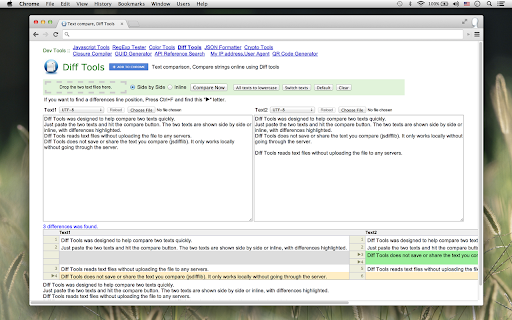
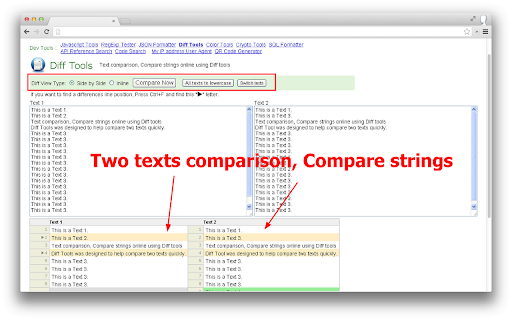
Diff Tools was designed to help compare two texts, files quickly.
Just paste the two texts and hit the compare button. The two texts are shown side by side or inline, with differences highlighted.
Provides connect with Google Drive. You can open the two files to compare from Google Drive.
This tool supports Text, PDF, DOC, DOCX, PPT, ODT, ODP, Pages.. comparison. You can compare PDF, DOC.. files by converting them to plain text.
You can find the difference between the two documents in a short time.
Supported Formats: pdf,doc,dot,docx,docm,dotx,dotm,xls,xlw,xla,xlt,xlsx,xlsm,xltx,xltm,xlsb,htm,html,ppt,ppa,ppsx,ppsm,pps,pot,pptx,pptm,potx,potm
odt,ods,odp,fodt,ott,fodp,otp,fods,ots,rtf,epub,ics,ical,ifb,icalendar,mobi,fb2,chm,mht,mhtml,ps,wk4,123,pages,hwp
Reviews (4 cached)
★☆☆☆☆2018-10-20
Paul Parker
Didn't work. Complained about ad-blocker so I disabled, but still never even loaded either .gdoc file, much less displayed the differences.
★☆☆☆☆2015-07-27
S W
Google API key doesn't work
★☆☆☆☆2015-05-13
Faraz Hasan
Useless
★★★☆☆2016-09-17
Todd Andrews
Comparison is view-only. You're not able to edit differences in the compare pane; you have to remember what you want to change and scroll back to the very top to the edit panes.
Permissions (2)
Permissions
notificationsℹ Can show desktop notifications unlimitedStorage
Details
| Version | 1.0.0.5 |
| Updated | May 24, 2018 |
| Size | 18.52KiB |
| First Seen | Mar 22, 2026 |
More by Cute



Popular Extensions

Adobe Acrobat: PDF edit, convert, sign tools
by Adobe Inc.
330M
★ 4.40
workflow
330M
★ 4.40
workflow

Chrome Remote Desktop
by Chrome Remote Desktop Release Managers
38M
★ 3.14
workflow
38M
★ 3.14
workflow

Cisco Webex Extension
by cisco.chromestore
24M
★ 2.34
social
24M
★ 2.34
social

Kami for Google Chrome™
by Kami
17M
★ 4.56
education
17M
★ 4.56
education

Read&Write for Google Chrome™
by Texthelp
17M
★ 3.44
accessibility
17M
★ 3.44
accessibility