
⚠️Not updated in over 2 years
Description
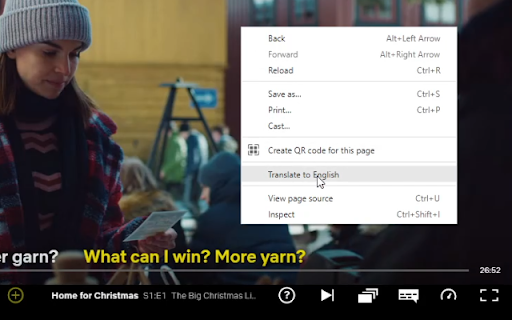
Update: This still works as of October 16, 2023!
Recommended Method:
1. Turn on the subtitles for your Target Language
2. Right Click the page --> "Translate to [Native Language]"
Alternate Method (If target language subtitles aren't available):
1.Turn on the subtitles in your Native Language
2. Right Click --> Translate to your Target Language
(Note: Some shows in the following languages may use hardcoded subtitles which means the extension won't work: Arabic, Hebrew, Hindi, Japanese, Korean, Persian, Thai, Chinese, Vietnamese.
However, Netflix seems to have updated them all so it should be fine, I just can't make any guarantees. If it is the case though, the alternate method will still work)
You can click the extension icon at the top right to customize text color, size, and opacity. There's also an on/off button up there too. Don't forget to turn off Browser Translation as well when turning off the extension (or just refresh the page).
----
Honestly, the Alternate Method is not ideal for me since the audio likely won't match the target language text. Other people have told me they still find it very useful though so you can decide for yourself.
Other things I should mention:
This works on Microsoft Edge but I don't know how their translator compares to Chrome's
*The accuracy is determined by Google Translate, not me! *
If you care, this is open source (the website link is the GitHub repo).
I prefer to keep this a simple and unobtrusive extension but feel free to email me if you really think there's a feature I should add. Or you can just message me on Reddit at /u/DuhMeTreeUs


Reviews (6 cached)
★☆☆☆☆2025-12-13
Serhii Dub
Doesn't work. I'm just see only original subtitles
★☆☆☆☆2024-03-29
Amelia M
Not working as of now (March 29)
★☆☆☆☆2024-01-06
Ming Jie Kong
the subtitles got stuck several times while watching a movie. Had to refresh several times to finish a 30min show
★☆☆☆☆2022-03-18
Ilya Roscha
doesnt work in mac M1
★★☆☆☆2022-05-05
genar h
Seems great, but it's showing both texts in the same language (i.e. only the selected text on Netflix, without any translation.) I saw the instruction to "Click right and select "Translate to", but I don't see this option anywhere - where to click right? On the page? On the extension dialog? Somewhere else... ? Maybe if this bit of instruction were clearer the problem can be avoided. Thanks!
★★★☆☆2024-06-12
Hig Lition
Not work for me. I found this one works perfect: https://chromewebstore.google.com/detail/fkmkfpejabcjnabammjkhodkpjjbfipo
Permissions (1)
Permissions
storageℹ Can store data locally in your browser
Details
| Version | 1.9.1 |
| Updated | Oct 17, 2023 |
| Size | 78.17KiB |
| First Seen | Mar 22, 2026 |
Popular in accessibility

Read&Write for Google Chrome™
by Texthelp
17M
★ 3.44
accessibility
17M
★ 3.44
accessibility

SYTools
by wasaby
4M
★ 3.16
accessibility
4M
★ 3.16
accessibility

Screenshot Tool - Screen Capture & Editor
by screenshot-tool.app
1M
★ 4.70
accessibility
1M
★ 4.70
accessibility

Помощник диагностики
by kontur.extension
1M
★ 3.00
accessibility
1M
★ 3.00
accessibility

WebCRX
by webcrx
1M
★ 4.87
accessibility
1M
★ 4.87
accessibility
Popular Extensions

Adobe Acrobat: PDF edit, convert, sign tools
by Adobe Inc.
330M
★ 4.40
workflow
330M
★ 4.40
workflow

Chrome Remote Desktop
by Chrome Remote Desktop Release Managers
38M
★ 3.14
workflow
38M
★ 3.14
workflow

Cisco Webex Extension
by cisco.chromestore
24M
★ 2.34
social
24M
★ 2.34
social

Kami for Google Chrome™
by Kami
17M
★ 4.56
education
17M
★ 4.56
education
Read&Write for Google Chrome™
by Texthelp
17M
★ 3.44
accessibility
17M
★ 3.44
accessibility