
✅Recently updated
Description
Instantly analyze any webpage's SEO meta tags, Open Graph data, Twitter Cards, and more — all in one clean, powerful panel.
Overview:
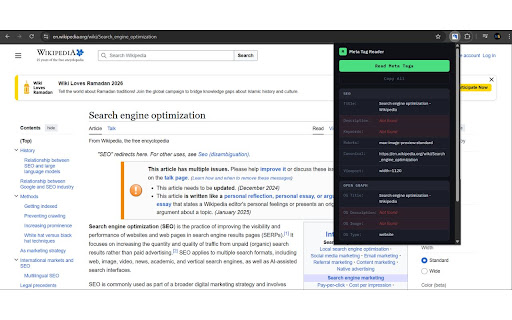
Meta Tag Reader is the essential Chrome extension for SEO professionals, web developers, content strategists, and digital marketers who need fast, accurate insight into how a webpage presents itself to search engines and social media platforms. With a single click, you get a complete, organized breakdown of every meta tag on the page — no source code digging, no developer tools, no guesswork.
Whether you're auditing your own website, researching a competitor's SEO strategy, debugging social sharing previews, or simply verifying that your tags are configured correctly, Meta Tag Reader puts all the information you need right at your fingertips.
What It Reads:
Meta Tag Reader gives you a comprehensive view of the tags that matter most:
🔍 Standard SEO Meta Tags:
The foundation of search engine optimization. Meta Tag Reader instantly surfaces your page's title tag, meta description, meta keywords, author, viewport settings, charset, and language declarations — the core signals that search engines use to understand and rank your content.
📘 Open Graph (OG) Tags:
Open Graph tags control how your content appears when shared on platforms like Facebook, LinkedIn, Pinterest, and messaging apps like WhatsApp and Telegram. Meta Tag Reader reads all OG properties including og:title, og:description, og:image, og:url, og:type, og:site_name, og:locale, and more — giving you a full picture of your social sharing appearance before you hit publish.
🐦 Twitter Card Tags:
Twitter's Card system determines the rich preview that appears when a URL is shared in a tweet. Meta Tag Reader decodes twitter:card, twitter:title, twitter:description, twitter:image, twitter:site, and twitter:creator so you can confirm that your Twitter sharing experience is exactly as intended.
🔗 Canonical Tags:
Canonical tags tell search engines which version of a page is the "official" one — critical for managing duplicate content and consolidating link equity. Meta Tag Reader highlights the canonical URL so you can instantly verify it's pointing to the right place.
🤖 Robots & Indexing Directives:
See exactly what instructions a page is giving to search engine crawlers. Meta Tag Reader reads robots meta tags including directives like index, noindex, follow, nofollow, noarchive, nosnippet, and more — letting you confirm that pages you want indexed are discoverable and pages you want hidden stay that way.
📰 Article & Structured Metadata:
For news sites, blogs, and content-heavy platforms, Meta Tag Reader also captures article-specific tags like article:published_time, article:modified_time, article:author, and article:section — giving content teams and editors the visibility they need to ensure metadata accuracy across every post.
🌐 Alternate & Hreflang Tags:
Running a multilingual or multi-regional website? Meta Tag Reader surfaces hreflang and alternate link tags so you can verify that international SEO configurations are set up correctly across every locale.
Why Meta Tag Reader?
There are plenty of ways to view a page's source code, but none of them are fast, readable, or organized the way Meta Tag Reader is. Here's what sets it apart:
Zero friction. Click the extension icon and your meta tag data appears immediately — no page reloads, no developer console, no copy-pasting raw HTML.
Organized by category. Tags are grouped logically so you can scan exactly what you need without wading through clutter.
Works on any page. Whether it's your own website, a client's site, a competitor's landing page, or a blog post you're researching, Meta Tag Reader reads it all.
Missing tag detection. Quickly spot gaps in your metadata — if an important tag like og:image or meta description is missing, you'll see it at a glance.
Clean, minimal UI. Designed to get out of your way and surface information clearly, without overwhelming you with complexity.
No account required. No sign-ups, no logins, no data collection. Meta Tag Reader works privately and locally.
Who Is It For?
SEO specialists auditing on-page optimization and technical metadata
Web developers verifying tag implementation during builds and deployments
Content marketers checking how articles and landing pages will appear when shared on social media
Digital agencies performing competitive research and client site reviews
Bloggers & creators making sure their content looks great in search results and social feeds
Product managers validating metadata as part of QA and launch checklists
The Details Matter:
In SEO and digital marketing, metadata is invisible to most users — but it shapes everything from your search ranking to how your brand appears in a Facebook post. A missing canonical tag can bleed link equity. A wrong noindex directive can remove a page from Google entirely. A blank og:image means your shared links look plain and get fewer clicks.
Meta Tag Reader makes the invisible visible. It turns the raw, technical layer of any webpage into a clear, actionable snapshot — so you can catch mistakes early, validate your work confidently, and understand any page's SEO setup in seconds.
Install Meta Tag Reader and see every page the way search engines and social platforms do.



Reviews
Loading reviews...
Permissions (2)
Permissions
activeTabℹ Can access the current tab when you click the extension scriptingℹ Can inject scripts into web pages
Details
| Version | 1.0 |
| Updated | Mar 17, 2026 |
| Size | 9.53KiB |
| First Seen | Mar 22, 2026 |
Popular in developer

Lighthouse
by lighthouse-extension-owners
1M
★ 4.42
developer
1M
★ 4.42
developer

Контур.Плагин
by kontur.extension
1M
★ 3.11
developer
1M
★ 3.11
developer

Similarweb - Website Traffic & SEO Checker
by Similarweb
1M
★ 4.66
developer
1M
★ 4.66
developer

SEO META in 1 CLICK
by Bilal Hadri
900K
★ 4.87
developer
900K
★ 4.87
developer

影刀RPA
by sanco1987
900K
★ 3.46
developer
900K
★ 3.46
developer
Popular Extensions

Adobe Acrobat: PDF edit, convert, sign tools
by Adobe Inc.
330M
★ 4.40
workflow
330M
★ 4.40
workflow

Chrome Remote Desktop
by Chrome Remote Desktop Release Managers
38M
★ 3.14
workflow
38M
★ 3.14
workflow

Cisco Webex Extension
by cisco.chromestore
24M
★ 2.34
social
24M
★ 2.34
social

Kami for Google Chrome™
by Kami
17M
★ 4.56
education
17M
★ 4.56
education

Read&Write for Google Chrome™
by Texthelp
17M
★ 3.44
accessibility
17M
★ 3.44
accessibility