
Netflix Subtitle Translator
v1.0 Updated Jul 2, 2024 19.39KiB
⚠️Not updated in over a year
Description
Netflix Subtitle Translator is a Chrome extension designed for language learners and anyone who wants to enjoy Netflix content with translated subtitles. By providing real-time subtitle translations, this extension enhances your viewing experience and helps you understand foreign languages better.
Why install it?
Language Learning: Ideal for language learners who want to watch shows in a foreign language with dual subtitles, allowing you to compare the original and translated text simultaneously.
Overcome Limitations: Bypass Netflix's limitations by getting translations in languages that are not offered by Netflix.
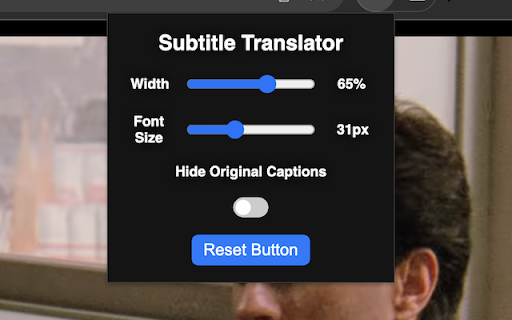
Customization: Adjust the font size, textbox width, and placement of the translated subtitles on your screen for a personalized viewing experience.
User-Friendly: Easily toggle the visibility of original captions and reset all settings with a single click.
Functionalities:
Drag the translated text box to any location on the screen.
Adjust font size and textbox width using sliders in the extension's popup.
Toggle the visibility of the original captions with the "Hide Original Captions" button.
Reset all settings to default with the "Reset" button.
Installation and Usage:
Install the extension from the Chrome Web Store.
Go to Netflix.com and start playing a video.
Right-click on the screen, select "Translate," and choose your target language.
The translated subtitles will appear in your chosen language.
By installing Netflix Subtitle Translator, you gain an effective tool for language learning and an enhanced viewing experience on Netflix.

Reviews (2 cached)
★★☆☆☆2025-02-02
Ian Sobolewski
It technically works, but it's not functional. I have three main issues with it. 1) There is about a two second delay before the subtitles are translated, so by the time they show up, the regular subtitles are disappearing, meaning they barely flash on the screen for a second. There's just not enough time to read them! 2) They're technically "supertitles," not subtitles, and I can't find a way to make them not stuck against the upper right corner. 3) You can't use this while Netflix is full screen. Netflix web client is annoying enough, but to have to watch out of full screen isn't worth it.
★★★☆☆2024-07-07
Cooldude
good extension. not working currently. fix it please
Permissions (3)
Permissions
activeTabℹ Can access the current tab when you click the extension scriptingℹ Can inject scripts into web pages storageℹ Can store data locally in your browser
Details
| Version | 1.0 |
| Updated | Jul 2, 2024 |
| Size | 19.39KiB |
| First Seen | Mar 22, 2026 |
Popular in entertainment

SpotiAds - Ads remover for Spotify™
by Tomer
80K
★ 4.10
entertainment
80K
★ 4.10
entertainment

Better Lyrics (Lyrics for Youtube Music)
by Boidushya
50K
★ 4.87
entertainment
50K
★ 4.87
entertainment

VLC online - multimedia player
by Winfy
40K
★ 3.41
entertainment
40K
★ 3.41
entertainment

Mouse Cursor - Custom Cursor
by Cute Cursors
20K
★ 3.52
entertainment
20K
★ 3.52
entertainment

Mul.Live Plus
by argo
20K
★ 4.89
entertainment
20K
★ 4.89
entertainment
Popular Extensions

Adobe Acrobat: PDF edit, convert, sign tools
by Adobe Inc.
330M
★ 4.40
workflow
330M
★ 4.40
workflow

Chrome Remote Desktop
by Chrome Remote Desktop Release Managers
38M
★ 3.14
workflow
38M
★ 3.14
workflow

Cisco Webex Extension
by cisco.chromestore
24M
★ 2.34
social
24M
★ 2.34
social

Kami for Google Chrome™
by Kami
17M
★ 4.56
education
17M
★ 4.56
education

Read&Write for Google Chrome™
by Texthelp
17M
★ 3.44
accessibility
17M
★ 3.44
accessibility