
✅Recently updated
Description
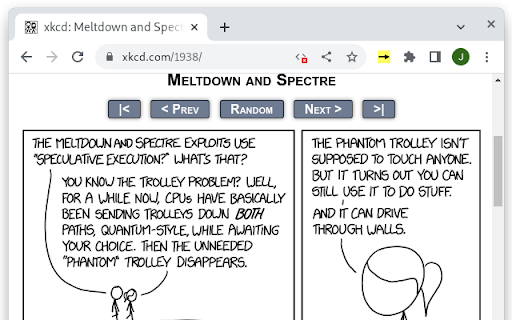
This extension speeds up webcomics by pre-loading the next page in the background. This way, when you decide to go to the next page of the comic, you don't have to wait for it.
To activate the extension (per tab):
- open the webcomic you want to read
- press the arrow symbol in the extension bar;
the arrow should turn yellow
To teach the extension how to find the next page, just click the link to the next page as normal. After a few seconds, the page should change, and the arrow should turn green. If the arrow doesn't turn green, the extension failed to identify the pattern for the "next page" link; if there are multiple links to the next page, try clicking a different one.
To go to the next page of a comic, either click the normal link to the next page or press enter.
This is an entirely personal project.
Reviews
Loading reviews...
Permissions (2)
Permissions
activeTabℹ Can access the current tab when you click the extension scriptingℹ Can inject scripts into web pages
Details
| Version | 4 |
| Updated | Feb 21, 2026 |
| Size | 6.83KiB |
| First Seen | Mar 22, 2026 |
Popular in accessibility

Read&Write for Google Chrome™
by Texthelp
17M
★ 3.44
accessibility
17M
★ 3.44
accessibility

SYTools
by wasaby
4M
★ 3.16
accessibility
4M
★ 3.16
accessibility

Screenshot Tool - Screen Capture & Editor
by screenshot-tool.app
1M
★ 4.70
accessibility
1M
★ 4.70
accessibility

Помощник диагностики
by kontur.extension
1M
★ 3.00
accessibility
1M
★ 3.00
accessibility

WebCRX
by webcrx
1M
★ 4.87
accessibility
1M
★ 4.87
accessibility
Popular Extensions

Adobe Acrobat: PDF edit, convert, sign tools
by Adobe Inc.
330M
★ 4.40
workflow
330M
★ 4.40
workflow

Chrome Remote Desktop
by Chrome Remote Desktop Release Managers
38M
★ 3.14
workflow
38M
★ 3.14
workflow

Cisco Webex Extension
by cisco.chromestore
24M
★ 2.34
social
24M
★ 2.34
social

Kami for Google Chrome™
by Kami
17M
★ 4.56
education
17M
★ 4.56
education
Read&Write for Google Chrome™
by Texthelp
17M
★ 3.44
accessibility
17M
★ 3.44
accessibility