
Description


Reviews (15 cached)
Used to be great but the settings has now broken in the way that you can't scroll through the so only the top portion of the settings are available, pleas fix and I'll change it to 5 stars!
garbage just freezes the whole tab when turning the overlay on dont bother with this trash
I have a giant chat button.
Does not work as of April 2021. Will amend if this is fixed
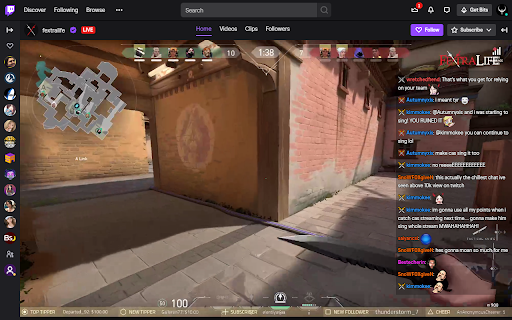
7tv emotes works on sidebar chat but not overlay
Its a good extension, but I have to keep it off because on ModView, it keeps indefinitely loading thousand and thousand of "actions" and make it all very laggy.
Slightly works, only problem is chat's not displaying. Only shows "null".
How do I change font size?? EDIT: I found a way to reach the settings: when you open the Settings menu, start pressing TAB. It will start highlighting clickable options and therefore scroll down the menu to show each highlighted option within a click. It's a goofy workaround but it works. Still, it would be nice if the dev fixed this issue. Other than that, very nice and useful extension, thanks!
i cant change font size as i cant see past "auto claim channel points", others that this everything is perfect.
why did the chat overlay button disappear today? I've tried re-loading and uninstalling, nothing works. doesn't work on vods anymore.
WHEN IS THE FONT OUTLINE GONNA BE FIXED?, IS 7TV MESSING WITH IT?.... FIXED!!!! my issue, i removed 7tv and bttv and enabled 7tv and bttv in frankerz setting (addons)
Works well for VODS but shows 'null' on livestreams. Also breaks the community tab in chat, can't scroll down the user list. Thought that it may have been something else but upon uninstalling the extension I can scroll down the user list but when reinstalled I can't anymore. So hopefully that can be fixed.
The scroll doesn't work on the emote menu please fix it
Many of the customization options simply don't work for me. Font customization (typeface, size, color, outline, and weight) and hiding timestamps don't do anything at all, and the hide usernames option hides messages as well. The only options that DO work without any issues are the background color customization and the auto-claim channel points feature. The emote menu is also broken, it opens and I can click emotes, but I can't scroll through the menu so I'm limited to only picking whatever's at the very top. The funny thing is, despite these problems this remains the best chat overlay extension of the handful I've tried so far. Based on the other reviews it seems like most people aren't having the same issues I'm running into so your mileage may vary I suppose, and at the end of the day it still does what it says on the tin: overlays a (mostly) functional Twitch chat in fullscreen.
Since twitch updated their viewer's list layout a few weeks ago, this extension does not allow us to scroll down on viewer's list anymore.
Permissions (1)
Permissions
Details
| Version | 1.0.8 |
| Updated | Jan 14, 2026 |
| Size | 261KiB |
| First Seen | Mar 22, 2026 |
Popular in entertainment



Popular Extensions




