
Description
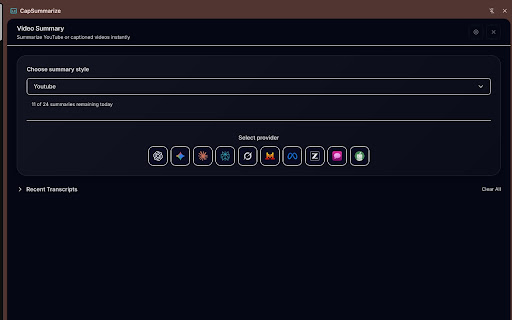
CapSummarize unlocks the full potential of your video content with the world’s most advanced open-source AI assistant. Whether you're studying a 3-hour lecture, planning your next YouTube upload, or breaking down a technical tutorial, CapSummarize helps you learn, create, and work faster—directly inside your browser.
Unlike traditional extensions that charge monthly fees or lock you to a single model, CapSummarize lets you use your existing AI accounts. If you're logged in to ChatGPT, Gemini, Claude, Grok, or others, you can get instant summaries, thumbnails, scripts, and insights with zero setup.
⭐ Core Features
📝 Intelligent Video Summaries
Turn long videos into clear, structured notes instantly.
- 15+ preset formats: bullet points, study notes, executive briefs, detailed articles, show notes, Twitter threads, and more.
- Custom prompts: Save your own formats for repeat use.
- Multi-language support: Summaries in any language your AI provider supports.
- Ask anything: Get deep-dive analysis from the video without switching tabs.
🎨 AI Thumbnails & Image Generation
Generate viral-ready thumbnails and visuals based on video context.
- Style presets inspired by creators like MrBeast, Casey Neistat, and tech reviewers.
- Create mind maps, infographics, flowcharts, and comic strips.
- Upload a reference image to match style and composition.
🎬 AI Video Repurposing
Transform long videos into short, platform-ready content.
- Auto-generate short clips, recap formats, ads, and trailer scripts.
- Perfect for YouTube Shorts, TikTok, Instagram Reels, and LinkedIn.
- Script generation powered by Gemini and other top models.
🎯 Who Is It For?
Students & Researchers: Summarize lectures, extract key ideas, generate study guides and mind maps.
Content Creators: Instant thumbnails, title ideas, descriptions, and short-form cuts.
Professionals: Turn meetings, webinars, and industry videos into actionable summaries.
Developers: Get code explanations, technical breakdowns, and step-by-step insights from tutorials.
🔒 Privacy First & 100% Open Source
- Runs locally in your browser
- No tracking, no analytics, no hidden servers
- Your transcripts go directly to the AI model you choose
- Fully open-source: review the code anytime on GitHub
🚀 Get Started
1. Click Add to Chrome
2. Open any supported video
3. Launch the CapSummarize panel
4. Choose your AI model
5. Click Summarize and save hours instantly
Join thousands of creators, students, developers, and professionals who use CapSummarize to learn faster and create smarter.



Reviews
Loading reviews...
Permissions (3)
Permissions
scriptingℹ Can inject scripts into web pages sidePanel tabsℹ Can see your open tabs and their URLs
Details
| Version | 1.1.0 |
| Updated | Dec 9, 2025 |
| Size | 228KiB |
| First Seen | Mar 28, 2026 |
More by Point Five Pixels

Popular in tools

Zotero Connector
by Zotero
8M
★ 3.96
tools
8M
★ 3.96
tools

Browsec VPN - Free VPN for Chrome
by Browsec
7M
★ 4.44
tools
7M
★ 4.44
tools

AnyDoc Translator - Translate Web and PDF
by www.wps.com
7M
★ 4.59
tools
7M
★ 4.59
tools

Microsoft Bing Homepage & Search for Chrome
by Microsoft Corporation
4M
★ 3.72
tools
4M
★ 3.72
tools

IE Tab
by Blackfish Software
4M
★ 4.31
tools
4M
★ 4.31
tools
Popular Extensions

Adobe Acrobat: PDF edit, convert, sign tools
by Adobe Inc.
331M
★ 4.40
workflow
331M
★ 4.40
workflow

Grammarly: AI Writing Assistant and Grammar Checker App
by Grammarly
42M
★ 4.50
communication
42M
★ 4.50
communication

Chrome Remote Desktop
by Chrome Remote Desktop Release Managers
38M
★ 3.14
workflow
38M
★ 3.14
workflow

Microsoft Single Sign On
by Microsoft
36M
★ 2.27
workflow
36M
★ 2.27
workflow

Cisco Webex Extension
by cisco.chromestore
23M
★ 2.34
social
23M
★ 2.34
social