
Description
Overview
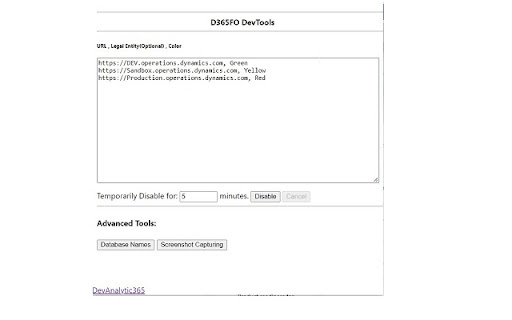
An Extension that is compatible with Google Chrome and Microsoft Edge, allowing users to change the color of the navigation bar to show the database names of forms, fields, and more.
Now you don’t have to be confused ever again!
Personalize navigation bar colors, this extension works with Dynamics 365 Finance and Operations (not affiliated with or endorsed by Microsoft) :
• According to URL
• By legal entity names
• Database form names
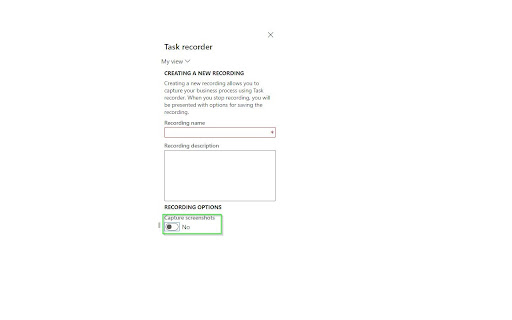
You can also add screenshot capturing to the task recorder. It can be installed in Microsoft Edge and is fully compatible with the browser.
Applications
This Extension allows the user to change the color of the D365FO (not affiliated with or endorsed by Microsoft) navigation bar according to the environment. The latest version of the tool can instantly show database form names.
For more information, please visit this link:
https://devanalytic365.com/blog/f/how-change-d365-fo-navigation-bar-color-in-chrome
Features
• Instantly show database form names
• Allows users to distinguish environments by legal entity names
• Adds screenshot capture feature to task recorder (Screenshot capturing chrome extension)
• Adds task recorder screenshot (task recorder with screenshot)
Update V 7.0
• Added a checkbox to show an environment banner at the bottom right of the screen
• Revamped the Chrome extension with a brand-new design, improving usability and aesthetics.
Update V 6.0.1
• Updated to properly handle order of text entries
Update V 6.0.0
• Updated to Manifest V3
Update V 5.1.2
• Columns Header Database Name added
Update V 5.1.1
• Enhanced Database form name function
The tool now displays more fields in the Database form names function, including some missing headers in previous versions.
Update Version 5.1.0
• Visuals improved
• Stability improved
• Functionality improved
Disclaimer
The product is not provided with any warranty by the developer and comes “as it is.”
Note
We do not collect any usage, analytics, or personal data in any capacity for any purpose.



Reviews
Loading reviews...
Permissions (4)
Permissions
activeTabℹ Can access the current tab when you click the extension scriptingℹ Can inject scripts into web pages storageℹ Can store data locally in your browser tabsℹ Can see your open tabs and their URLs
Details
| Version | 7.1.0 |
| Updated | Oct 11, 2025 |
| Size | 337KiB |
| First Seen | Mar 27, 2026 |
Popular in developer

React Developer Tools
by Meta
5M
★ 3.95
developer
5M
★ 3.95
developer

Lighthouse
by lighthouse-extension-owners
1M
★ 4.42
developer
1M
★ 4.42
developer

Контур.Плагин
by kontur.extension
1M
★ 3.11
developer
1M
★ 3.11
developer

Similarweb - Website Traffic & SEO Checker
by Similarweb
1M
★ 4.66
developer
1M
★ 4.66
developer

Clear Cache
by Little Void LLC (Ben Bojko)
1M
★ 4.45
developer
1M
★ 4.45
developer
Popular Extensions

Adobe Acrobat: PDF edit, convert, sign tools
by Adobe Inc.
331M
★ 4.40
workflow
331M
★ 4.40
workflow

Chrome Remote Desktop
by Chrome Remote Desktop Release Managers
38M
★ 3.14
workflow
38M
★ 3.14
workflow

Microsoft Single Sign On
by Microsoft
36M
★ 2.27
workflow
36M
★ 2.27
workflow

Cisco Webex Extension
by cisco.chromestore
24M
★ 2.34
social
24M
★ 2.34
social

Kami for Google Chrome™
by Kami
19M
★ 4.56
education
19M
★ 4.56
education