
⚠️Not updated in over 2 years
Description
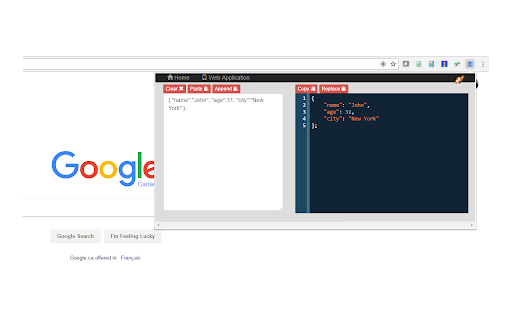
A simple tool to quickly and easily format your JavaScript and JSON. See your code formatted as you type! Or have your code instantly converted when you paste into the text area. Also lets you convert between JSON and XML.
This tool is useful if you :
- want a quick way to format JSON that is, for example, returned as a single line by a Web service call.
- have a JSON structure that's just badly formatted,
- just want to prototype a JSON structure and have it formatted as you type rather than worry about formatting it yourself.
- want to see the formatted JSON while debugging a web service call
- need your JSON as XML or want to convert some XML to JSON
Features:
- available as an icon on your Chrome toolbar
- remembers the current state so when you reopen the tool you can carry on where you left off- you won't lose any of your work when you close the tool
- convenient buttons for copy and pasting to and from the clipboard
- provides a useful button for replacing the JSON in your work area with the formatted version - useful when prototyping a JSON structure
- formats Javascript
- basic json validation errors are shown
- provides links to other tools from LinangData from the More tools menu
- It's free!

Reviews (1 cached)
★★★☆☆2019-10-21
Emily P
Does what it promises, but should have the ability to paste a url and, more importantly, to collapse objects and arrays. That would be especially helpful for working with geojson where there are massive chunks of coordinates.
Permissions (2)
Permissions
clipboardReadℹ Can read from your clipboard contextMenusℹ Can add items to the right-click menu
Details
| Version | 1.0.12 |
| Updated | Oct 19, 2022 |
| Size | 1.75MiB |
| First Seen | Mar 21, 2026 |
More by LinangData


Popular in developer

Lighthouse
by lighthouse-extension-owners
1M
★ 4.42
developer
1M
★ 4.42
developer

Контур.Плагин
by kontur.extension
1M
★ 3.11
developer
1M
★ 3.11
developer

Similarweb - Website Traffic & SEO Checker
by Similarweb
1M
★ 4.66
developer
1M
★ 4.66
developer

SEO META in 1 CLICK
by Bilal Hadri
900K
★ 4.87
developer
900K
★ 4.87
developer

影刀RPA
by sanco1987
900K
★ 3.46
developer
900K
★ 3.46
developer
Popular Extensions

Adobe Acrobat: PDF edit, convert, sign tools
by Adobe Inc.
330M
★ 4.40
workflow
330M
★ 4.40
workflow

Chrome Remote Desktop
by Chrome Remote Desktop Release Managers
38M
★ 3.14
workflow
38M
★ 3.14
workflow

Cisco Webex Extension
by cisco.chromestore
24M
★ 2.34
social
24M
★ 2.34
social

Kami for Google Chrome™
by Kami
17M
★ 4.56
education
17M
★ 4.56
education

Read&Write for Google Chrome™
by Texthelp
17M
★ 3.44
accessibility
17M
★ 3.44
accessibility