Speech Recognition Anywhere icon

Speech Recognition Anywhere

by jeffsbaker

v1.7.41 Updated Nov 2, 2025 380KiB
CWS
30K
Users
★ 3.81
240 reviews
#3323
of 209K
workflow
#1060 of 32K
⚠️Requests 1 sensitive permission

Description

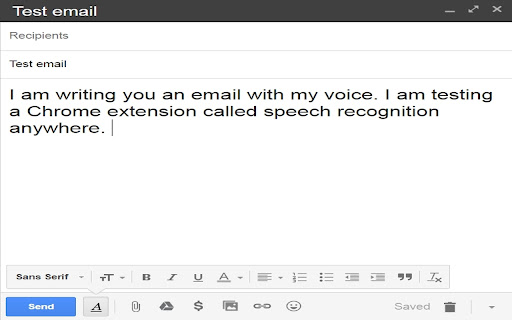
Control the Internet with your voice. Use voice recognition to fill out forms and write documents on the Internet! Dictate emails with speech to text! Speech Recognition Anywhere expands the capabilities of the Web Speech API in both Chrome and Edge, in order to allow users to control the Internet or to fill out documents and forms using their voice. A user can use simple voice commands to go to websites or to click on buttons and links. It also works with Google Docs, Microsoft Word online, Gmail, outlook.com and more. Medical professionals use it to fill out web based online medical records. Business professionals use it dictate letters and emails. Custom commands can be created by the user to allow the user to say shortcut phrases that print out a lot of text into a form. See seabreezecomputers.com/speech for more information on custom commands and scripts. FREE TRIAL FEATURES: * Browser extension for Chrome or Edge * Choose between dozens of languages and dialects for speech recognition * Dictate emails and online documents * Fill in forms with your voice * Go to the next or previous field with your voice * Go to any web page with your voice * Switch tabs and navigate webpages with your voice * Scroll page up or down * Click on links and buttons with your voice * Cut, Copy, Paste, Clear, Highlight * Say "Show labels" to see labels to buttons on a webpage * Say "Show numbers" to add numbers to links and buttons * Say "Youtube (name of artist or song)" to play music instantly * Text to Speech (tts) * Three custom voice commands * Scripting FULL FEATURES: * Use Voice Activation Wake Up Phrase: (Examples: 'Ok Google', 'Computer', 'Alexa', 'Hey Siri', 'Hey Cortana') * Start when Chrome starts (Always Listening) * Optional Windows Add-On * Start in the background * Submit search fields automatically * Pause speech recognition if audio is playing in a tab * Virtual Assistant Mode * Prevent system from sleeping while listening * Prevent screen from sleeping while listening * Unlimited custom voice commands * Auto Punctuation * Export/Import custom commands NOTE: Extensions are not allowed to work on special chrome:// pages or edge:// pages or the Chrome Web Store or Edge Add-Ons website. Therefore, you will not be able to write a review directly at the Chrome Web Store using your voice. This is a restriction imposed by the browser. It is not a limitation of the extension. TIP: If speech recognition is not working on a specific webpage then you can try (1) refresh the web page or (2) restart your computer. This will often fix the problem. Disclaimer of Warranty: Sea Breeze Computers makes no warranties as to the performance of this product or service. This extension uses the Web Speech API built into some browsers (such as Google's Web Speech API or Microsoft Edge's Web Speech API) for speech recognition, therefore we cannot guarantee the quality or continued operation of the voice recognition service. TERMS OF USE By using this software you agree to the Terms of Use available at http://www.seabreezecomputers.com/speech/terms VERSION HISTORY 10/30/2025 - Version 1.7.41 + German: Added "Fragehaken" and "Schlusspunkt" for "question mark" and "period" because sometimes Google's Web Speech API doesn't work with "Fragezeichen" and "Punkt". + Fixed a Windows Add-On license issue. 9/26/2025 - Version 1.7.40 + Spanish: Added Commands: Capitalizar todas, Capitalizar, Mayúscula, Minúscula + Bug Fix: \n\n in custom command action was not converting to new paragraph. + Bug Fix: \u{xxxx} Unicode characters in actions work again. + Changed billing url and title url. 8/16/2025 - Version 1.7.39 + Windows Add-On was not working with new Lemonsqueezy subscription 8/6/2025 - Version 1.7.38 + Spanish: Mueva el cursor hasta el final. + Portuguese: Acesse website.com + Portuguese: Mova o cursor para o (cima|baixo|esquerda|direita|fim|topo|inicio|final) + Bug Fix: SRA365 was not working with Windows Add-On. + Bug Fix: 3:00 a.m. was being converted to 3:00 a periodm. 7/31/2025 - Version 1.7.37 + Fixed editor caret so that text can be deselected more easily. 7/25/2025 - Version 1.7.36 + Added editor toolbar to SRA tab. + Improved 'click' on form select option. + New payment processor. 4/21/2025 - Version 1.7.35 + Bug Fix: In Swedish "komma" was being replaced with "," 4/15/2025 - Version 1.7.34 + Added Spanish auto punctuation. + Added language menus for: Arabic, Czech, Indonesian, Swedish, Turkish, Polish, Vietnamese. + Added punctuation commands for: Turkish, Polish, Vietnamese, Dutch, Greek. 4/8/2025 - Version 1.7.33 + Added Russian punctuation, menus and commands. + Added Arabic punctuation. + Added more Korean commands. 3/26/2025 - Version 1.7.32 + Go to URL, switch tabs, play video, etc... will now work in current window if the setting "Allow Speech Recognition in other Chrome Windows" is checked. 3/19/2025 - Version 1.7.31 + Better support for Google Sheets 3/7/2025 - Version 1.7.30 + New command action: toggle_voice_commands(enable|disable) 2/28/2025 - Version 1.7.29 + Added + and = to the "type" key command. + Now asterisks next to each other in a phrase will be escaped. *** to \*\*\* + Dark Mode CSS: Added border-color: white; to buttons. + Cancel subscription message in Settings. 11/28/2024 - Version 1.7.28 + Fixed Chinese comma 逗号 | 逗號 to ,and Chinese enumerated comma 顿号 | 頓號 to 、 11/20/2024 - Version 1.7.27 + Translated menus to Chinese Simplified (zh-CN) and Chinese Traditional (zh-TW) + Fixed help link 11/13/2024 – Version 1.7.26 + Adding new credit card at amazon.com caused error: Refused to display 'https://apx-security.amazon.com/' in a frame because it set 'X-Frame-Options' to 'sameorigin'. Fixed! 10/18/2024 – Version 1.7.25 + SRA stopped working in Google Docs because of Google Chrome update. Fixed! 9/18/2024 – Version 1.7.24 + Google Docs was sometimes putting a space at the start of a new line. 9/10/2024 - Version 1.7.23 + Google Docs was sometimes not putting a leading space in front of speech input from the user. 6/29/2024 - Version 1.7.22 + Displays custom error message for Opera, Brave, Vivaldi and other custom Chromium browsers stating that the Web Speech API does not work in these browsers. + Translated menus into Portuguese. 4/15/2024 - Version 1.7.21 + Improved Spanish commands + Improved French commands 4/12/2024 - Version 1.7.20 + The setting "Disable Microsoft Edge Chromium Auto Punctuation" no longer lowercases all letters. + Improved German "Press <key>" and "Delete last word|sentence" etc. + Added Spanish "Delete last|next word|sentence|character|paragraph". + Added French "Supprimer (la) ligne|paragraphe|mot|phrase|caractère|lettre(s) (suivante|précédente)" + Added French "Sélectionnez (le) (prochaine|tout|aucun|fin|début) (n) (ligne|paragraphe|mot|phrase|caractère|lettre|boîte|champ|document|papier)(s) (suivant|précédent)" 3/27/2024 - Version 1.7.19 + Added French Windows Commands + Added Spanish Windows Commands + Added more Korean Windows Commands 3/20/2024 - Version 1.7.18 + Added German Windows Commands + Added Korean punctuation and commands 2/27/2024 - Version 1.7.17 + Windows Add-On Beta first release. + Indonesian punctuation added. + Bug fix: replace_word() wasn't working if word stated alone without a sentence. 2/2/2024 - Version 1.7.16 + Bug fix: replace_word() was running twice. + Bug fix: German das komma. 1/22/2024 - Version 1.7.15 + Added "Insert date and time" command. + Added Capitalize, Uppercase, Lowercase and Type <key> commands. + click_element() is now like querySelectorAll() in JavaScript with an optional [n] to specify which element in the array to click. + Improved Google Docs to preserve text formatting commands (bold, underline, italic) + Improved "Move cursor to start/end of paragraph". + Improved "Change language" command in other languages. + Fix for Microsoft Teams + New "Pin Extension" setting. 7/31/2023 - Version 1.7.14 + Bug Fix: Facebook was deleting the end text if the user edited between words. 6/26/2023 - Version 1.7.13 + Bug Fix: Fixed German "paste" not working. + Added to French: Copier|Couper|Coller. + Added to Japanese: コピー|切り取る|切り取り|貼り付け + Added to Chinese: 复制|剪切|粘贴 5/10/2023 - Version 1.7.12 + Bug Fix: Websites like Gmail with "Keyboard shortcuts on" were doing keypresses if "Disable Auto Focus on nearest text box when speech is heard" setting is enabled. 5/3/2023 - Version 1.7.11 + Now works with shadowRoot elements such as Bing Chat uses. + No longer converts French "plus" to "+". 4/24/2023 - Version 1.7.10 + Bug Fix: Previous version stopped working in Google Docs. Fixed. 4/12/2023 - Version 1.7.9 + Bug Fix: Cannot read properties of undefined (reading 'removeChild') at scrollToCursor (content.js:4896:42) 4/3/2023 - Version 1.7.8 + Bug Fix: script() without a return was printing null. + Slowed down keypresses for keypress() command. + Bug Fix: Commands like enter_key() were activating 0 times unless it was enter_key(1) 3/17/2023 - Version 1.7.7 + Added French punctuation that Chrome web speech API stopped doing. + Stopped SRA tab from scrolling to and focusing on text box on speech recognition. + Bug Fix: Some languages like Thai were printing each statement twice. + New Setting: Use key presses to send text (Works with some websites that block paste) 3/8/2023 - Version 1.7.6 + On 1/15/2023 Google's Chrome web speech API stopped converting punctuation such as "period", "question mark" and "comma". So now the extension will do the punctuation conversion. + %2C can be used in place of a comma (,) in custom command "actions". They will be converted to a text comma. Or to use a comma in an action you can put it in double quotes. Example: keypress("hello, how are you?"); + Improvements to textbox on SRA tab. 2/12/2023 - Version 1.7.5 The setting 'Pause "Speech Recognition Anywhere" if audio is playing in a tab', now also pauses speech recognition if text to speech (tts) from the Web Speech API is playing. 1/10/2023 - Version 1.7.4 + German: Google's Web Speech API stopped converting "komma" to "," for some reason. So now SRA will do the conversion itself. + Spanish: Changed Help and Support links to link to Spanish versions. 12/25/2022 - Version 1.7.3 + Can now send extra commands to tabs opened in the background with url() action. Example: Phrase: Google (.*?) Action: url(https://www.google.com/search?q=$1, Google, false); speak_element("[aria-level='3']") + More improvements for sentences that use the word "period". 12/10/2022 - Version 1.7.2 + Added Hindi language commands and menus + replace_word() action now works better with words from other languages with letters that are not in the standard English or Latin alphabet. The word boundary is improved. + "Start in background" stopped working with Chrome update. Fixed. + Previously, in Chrome the word "period" would always be replaced with "." but now there are more instances where it will stay "period" such as in the sentence: "It was a brief period of time." + Added css: font-size: 1em. 9/28/2022 - Version 1.7.1 + Bug Fix that started in version 1.7.0: The extension icon would not start SRA because of error: "Uncaught TypeError: Cannot read properties of undefined (reading 'addListener')" in background.js with line "chrome.declarativeNetRequest.onRuleMatchedDebug.addListener". 9/26/2022 - Version 1.7.0 + Updated to Manifest V3. ATTENTION: Google is requiring developers to update all extensions to Manifest V3. Google's requirements for Manifest V3 may cause some things to not work properly. Please notify us if something does not work properly and we will try to fix it if possible. + Some custom command action results now appear in the text box on the Speech Recognition tab. 9/18/2022 - Version 1.6.13 + CKEditor was putting @ with "New line" and "New paragraph". Fixed. + Improved "New line" and "New paragraph" to work better with Word Online. + Improved "New line" and "New paragraph" to work better with Google Docs. 8/19/2022 - Version 1.6.12 + Fixed license check date issue 8/14/2022 - Version 1.6.11 + A few users were not having the words "period" or "full stop" convert to "." so now the extension converts them instead of relying the Web Speech API to do so. + Changed navigation() action to browse() because navigation is a new W3 Javascript window function. 6/29/2022 - Version 1.6.10 + Improved keypress() action to work better with punctuation in a string and more accurate keyCodes. 6/15/2022 - Version 1.6.9 + Bug Fix where some single words spoken such as "endless", "finally" and "tablet" were matching commands for "end", "fin" and "tab". + Some Italian commands had an extra space between "il tasto". 2/23/2022 - Version 1.6.8 + New speak_element() action that works like querySelectorAll with optional [n]. For example speak_element(img._3c8e[1]) to read outloud WolframAlpha result. 12/31/2021 - Version 1.6.1 + Italian version now displays instructions and menus in Italian. (Italiano) + Now easier in other language versions to change language with voice using English translation of language names. 12/28/2021 - Version 1.6.0 + French version now displays instructions and menus in French (français) 12/22/2021 - Version 1.5.9 + Japanese version now displays instructions and menus in Japanese. (日本語) 12/16/2021 - Version 1.5.8 + German version now displays instructions and menus in German. (Deutsch) 11/23/2021 - Version 1.5.6 + Spanish version now displays instructions and menus in Spanish. + script() action can now include a return variable to print in a textarea. 11/6/2021 - Version 1.5.4 + Improved scroll_it to be able to say, "Scroll menu", "Scroll box" or "Scroll page". 10/13/2021 - Version 1.5.3 + Now you can click on words that use smart apostrophes or curly apostrophes, such as: "Click on See What’s New". 10/5/2021 - Version 1.5.2 + Added commands for French, Portuguese, Japanese, Chinese Traditional and Chinese Simplified. + Now works with Google Docs new canvas element! + Saying "Click on paper" will now click on most contentEditable editors. + Added setting for "Always lowercase all text". + Move Cursor now works in Google Docs and TinyMCE and CKEditor + scrollToCursor now works in TinyMCE and CKEditor + scroll_it now works with Google Docs, and iFrames (TinyMCE). + Keypresses for arrow keys, home and end keys now works in Google Docs. 2/10/2021 - Version 1.4.3 - Added more languages such as Chinese Cantonese (Traditional). 1/30/2021 - Version 1.4.2 - Added "Disable Auto Gain Control" in Settings because Chrome changes the system microphone volume up and down on some computer systems. 5/29/2019 - Version 1.3.0 - The converter can now do advanced scripting with the script() command. 5/6/2019 - Version 1.2.9 - replace_word() can now have multiple phrases separated by a vertical pipe | 3/7/2019 - Version 1.2.6 - New simple word replace feature. For example, to replace "ok" with "okay" then create this custom command: Phrase: ok Action: replace_word(okay) 1/20/2019 - Version 1.2.3 - Improved Screen Reader features such as reading of ARIA roles and html tag names for certain items like IMG and Hyperlink. Also a "Simple Mode" that does not read ARIA roles and html tag names. 1/5/2019 - Version 1.2.0 - + Text-To-Speech: Now you can say "Read selected|highlighted|article|website|site|links|page|webpage|paragraph|alert|notification|status". Press ESC to stop reading or say "Stop reading". 10/28/2016 - Version 0.98.1 - Languages and dialects are here! Added an option in settings to choose between dozens of languages and dialects for voice recognition. 09/12/2016 - Version 0.9 - First release.
Speech Recognition Anywhere screenshot 1Speech Recognition Anywhere screenshot 2Speech Recognition Anywhere screenshot 3

Reviews (37 cached)

★☆☆☆☆2025-10-01
Megan Parks

Update: Jeff Baker has contacted me to update my rating or delete my review. At the time of the review, the problem was not fixed. And could not be blamed on AWS or Cloudflare going down as this occurred prior to it. AWS went down on October 20 and Cloudflare on November 18. The webstore was broken and I was unable to upgrade from the free trial version at the time on the review and the review reflects those facts. If I had not been contacted asking me to remove or edit my negative review (for a second time), I would consider giving this program another shot since it is that good. The reviews should reflect all experiences not just the positive ones. It deserves a higher rating but right now there is absolutely no way to upgrade from the free trial version. It's probably the best speech recognition program save for Dragon out there. Vastly superior to anything Google or Apple has. However, the web store appears to be broken and there's no way to subscribe or go beyond the trial version. No real information on how to contact someone either.

★☆☆☆☆2024-04-18
Marius Codrin

Speech recognition error detected: network. Reinstalling Chrome or doing a Chrome Reset may help fix this error.

★☆☆☆☆2024-03-03
g ninja

pay to use garbage you have to pay after 30 days waste of time

★☆☆☆☆2023-07-27
Frédéric HAUGUEL

PAYING

★☆☆☆☆2022-09-02
Jorge Ramirez Sierra (Nino)

Speech Recognition Anywhere FREE TRIAL - Buy Upgrade days leftSign in to browser or enter Order Number. Note: The user turned off browser signin See HelpSpeech recognition error detected: network. Reinstalling Chrome or doing a Chrome Reset may help fix this error. this is the very first thing i see. wasnt even able to try it and really need it it/ thankss. i searched what they were saying the problem was so to fix it and it didnt exist. currently using AVG secure browser. i will attempt this all again on chrome and firefox and hope for the best

★☆☆☆☆2022-03-04
Fert Lefter

Hi, looked promising but despite no indication at all in description that this is a fremium package.. As soon as I started to test use; I see a big FREE TRIAL! Why is it this way.. Also the app gives an error "Error: OAuth2 not granted or revoked." despite I gave the Permissions: Read your browsing history Read and modify data you copy and paste Know your email address What else do you need?? Also, your support page explains the above OAuth2 prob. as: Sign in with your Google account. Make sure Sync is on. Click on the extension icon and click on "Settings" scroll down to License and click on "Check"... and on and on.. WHAT SİGN İN? WHAT SYNC? ALL I wanted to use this is to dictate using TinyMCE.. What is all this fuss??! I am using many extensions and trying many many.. Never seen all this hassle!!

★☆☆☆☆2022-02-09
jbq life game all jbq life game all

i want one better application

★☆☆☆☆2020-11-13
Jeffrey Baitis

Didn't work with Google Chrome in Linux; repeatedly opened audio device

★☆☆☆☆2020-11-11
Alexandte RFST

paid

★☆☆☆☆2020-08-19
Kishor Gautam Jain

i am not geatin voice serch in youtube app in crome store and yor app is not sporting me in youtube voice serch

★☆☆☆☆2020-06-29
Rick Fleischer

Is it supposed to DO something? I am in chrome; I see no menu, no start; in google docs, I seen no text when I speak. Even Windows speech does something.

★☆☆☆☆2019-04-06
Maria del Pilar Chlopas

not good, and pricey for all the limitations

★☆☆☆☆2019-03-17

how do i get it off ? its not enabling a delete from chrome option its getting me blocked signing i everywhere and the computer is getting mixed messages how dio i delete this app .

★☆☆☆☆2018-07-29
Brain Outy

Won't work in Linux, despite instructions at bottom. I can see the instruction page register the speech, but when talking into a form in another tab, zilch (dol efast Forms 5500 website, govt) Maybe it works in Win7? Sorry about the 1 star, will re-rate if I get it to work at least in Win7.

★☆☆☆☆2017-04-27
Joseph Iapichino

This doesn't work I want my money back

★☆☆☆☆2017-04-08
Bruce

does not work 100% of the time ...the custom commands work fine ....when i click to buy it shuts down all windows . It is not working to write this review . I tried an e mail , fist time it worked 5 minutes later same web site , it did not work ....all the words that was spoken went into the "subject " line I think it worth the 10 bucks just for the custom commands stopped working , will not get passed " initializing " just does not want to work in any window , was not very accurate .

★★☆☆☆2024-07-09
Geoff Speedie

ffs its an extension. the golden rule for years was no charging for this stuff. donate sure. and SUB models dude... F THAT. one time price of 3$ is asking a lot to be honest, but at the worst it should be one time price. unless its 50 cents a month which I know its not, this is not wort anything more

★★☆☆☆2022-09-28
George drysdale

I bought this ext/app several years ago and I have loved it....It failed today...I think it's over. Bummed. No matter what, I can not get this thing to work.

★★☆☆☆2022-02-04
Nikon Guy

Was working great but this week started to disable playing videos on any site. Youtube videos say audio renderer error!!!!

★★☆☆☆2019-06-16
os earth

Sounds phenomenal but I fear it has a non-obvious trial period, that is a hard-limit-exit point but that is not why the low rating' when i tried to install it i got an unexpected permissions request (below) with no explanation or reasoning for need to view my store apps/exts.. ·∙·∙·∙ 8< 8< 8< 8< 8< 8< 8< 8< 8< 8< 8< 8< 8< 8< 8< 8< 8< 8< 8< 8< 8< 8< ·∙·∙·∙ 'Speech Recognition Anywhere' wants to access your Google Account This will allow Speech Recognition Anywhere to: ·∙·∙View your Chrome Web Store apps and extensions·∙·∙ Make sure you trust 'Speech Recognition Anywhere' You may be sharing sensitive info with this site or app.

★★☆☆☆2019-03-06
Jack Hammer

I'm dictating this. And putting the most glaring errors. In parentheses. I was seduced by this add on when it first came out. it seems like a great idea because! I like to write the way I speak. But it's been loaded with glitches. Ever since I got it. And paying for it didn't make it any better. Annoying things like. Adding oh. To the end of phrases. But (that) you have to go back. Elite. (delete) I'm (and) getting entire passages of words wrong. And sometimes it will get an individual word wrong. And you can go back and pronounce that word. (I spoke "again and again and it didn't pick it up) As articulately. As possible. And it won't change the word. That it has put up. Or sometimes it changes. (the word to ) Another word that you didn't intend. No matter how you. Pronounce it. Now I see that I have turned on. Punctuation. And it is adding. A period every time I stop a phrase every time I take a breath. Also, in long messages it works slower and slower the further you get into it, far slower than I type. And (it) makes more mistakes. . In the end it ends up taking more time. To dictate something using this. Then it does to just type it. Because. Up (of) time spent going back and correcting. It's mistakes. Like that is supposed to read. Because of the time spent going back and correcting its mistakes.. So, I'll stop the punctuation so it'll quit adding a. Every time I stop speaking. But I don't really know what to do about all of the errors that it makes? Paying for the full version. Didn't change anything. I'm very disappointed. On the one hand. It's a great idea! On the other hand. It's so flawed that it takes more time than it does typing. By the way. My laptop is an intel. I7 8550u chip. What's (with) 12 mags (megs) of RAM? Running upgraded. Oh, that's supposed to be updated. And you see it added oh, windows 10. and up to date chrome. And I'm using. A handheld. Vocal singing microphone. That is almost as good. Has (as) my shure sm58. I've tried it with that microphone too and it makes no difference. I use this one because it has an off on switch.. The volume is up high enough. That I can speak. 10 inches away from the microphone. What the tendency is. It starts making so many (mistakes the tendency is) To hold the microphone right up to my lips. And it makes no difference either.. See ,that was supposed to be no difference either. (it's refusing to add the word "way") Any ideas? I compose this in gmail.. Using the add-on. To highlight the mistakes. So now I'll copy paste it. As is. So it's not only ends up taking longer (and) it adds to your frustration. I've gone back. And read this three times trying to correct. (the) Mistakes. And I'll bet I still didn't catch them all.

★★☆☆☆2019-02-19
Peter Sommer

Still showing "expired trial" three hours after paying for full version (and having the payment acknowledged by Google accounts.

★★☆☆☆2019-02-10
translipcorsia

Sadly, this is only a free trial. Regardless of whether you want a free version or not, there is no free version. Also, I am dictating this review using Google Chromebook's built in dictation, which means that turn certainly is a way to make it work in every single box. Free, forever. My advice, just invest a little on a Chromebook and you'll have a limitless voice to speech dictation machine.

★★☆☆☆2017-07-29
Tarbut TAU

I tried to implement dictation here, but it didn't work. So here is one of the major deficiencies of this add-on. It works not where a user would like it to, like Dragon NS or Windows SR, but only where Google wants you to use it -- in Google mail. After only few sentences I realized that the trial version at least cannot be customized, so I got capital letters in the middle of sentences wherever I paused. I wholeheartedly support this endeavor, which will not leave the field to one company only (Microsoft has given up on its SR), but the quality of the UI and SR itself should be at least competitive. I will go on testing it to better understand what it can do.

★★☆☆☆2017-07-10
Kotonoha Katsura

App doesnt work well you can´t decide wich flie you want to fill in the dictation.

★★☆☆☆2017-06-29
Phacopx Rel

Speech recognition error detected: network. Google's Web Speech API seems to have a bug that causes this 'Network' error. Speech Recognition does not work for about 30 seconds or more before the error message. Please notify me if you receive this error so I can inform Google about how many people are getting this error.

★★★☆☆2025-09-21
Stephen Jones

I am giving it three stars because this is the same app as speech to text. If you have them both installed, you will see this.

★★★☆☆2025-02-11
Francis

I am getting either: Speech recognition error detected: audio-capture. or Error getting audio stream from getUserMedia: NotReadableError: Could not start audio source or Speech recognition error detected: audio-capture. . Initializing error. Reinstalling Chrome or doing a Chrome Reset may help fix this error.Speech recognition error detected: audio-capture. My microphone on chrome can run perfectly on mictests.com, even the extension volume meter is moving indicate it can somehow detect my microphone. The extension just suddenly unusable couple days earlier. The problem persist even after I restart my PC.

★★★☆☆2023-04-23
Michael Cordon

Didn't work for Bing Chat, which is a deal-breaker for me. Maybe one of the paid settings could fix it?

★★★☆☆2022-09-29
Joshua Busby (Coach JB)

I paid for the advance features a couple of years ago and it has worked GREAT. Now it no longer works. I am disabled and I depend on this extension every day. If you are unable to fix it I request a refund so I can get something that will meet my needs. Thanks.

★★★☆☆2021-12-01
Reza Orang

Good program partly It is not very different from other programs The settings you added have been slightly improved It's not worth the money I have to pay Good luck

★★★☆☆2019-03-20
Daniel

Sadly this extension joins the long list of transcribing apps/extensions that just don't cut the mustard. Too many frequent error. Does not automatically add full stops or other punctuation causing you a great deal of work post transcription which is precisely what you want to avoid.

★★★☆☆2019-01-01
Jonathan Bauer

I was excited to learn about this extension, but it appears my expectations were excessively high, in part due to the name including "Anywhere". The speech recognition only works for me in a Chrome browser window. Furthermore it only works for me when the tab is in the same window as the Speech Recognition tab. (I usually use many Chrome windows.) The extension worked well when using Google search tab in the same window. On the other hand, I ran into issues using it even in the same Chrome window, including this review text. This is not what i expected based on the description, "The speech you speak is automatically typed into any form on any web page handsfree." I'm a fan of the developer's concept of leveraging Google voice to text and would love to switch from Dragon Naturally Speaking. I hope i'm doing something wrong or that there are workarounds, such as disabling other software that interferes.

★★★☆☆2018-01-31
John Slade (Slade)

Works fairly well, I would reccomend this app, it doesn't always recognize the commands, but it works better than all the others I have tried so far, unfortunately though it costs money, and I would not pay the outrageous price of $14.99.

★★★☆☆2017-04-30
Brandon Peterson

on google docs it only did the title of it not the rea paper!!

★★★☆☆2017-04-16
Lila Murphy

I could not dictate one letter at a time. I would like to do this as well.

★★★☆☆2017-01-18
Mariusz Kreft

I like the idea. Speech recognition works very accurate. But this software does not work on my Windows 10 Tablet when I try to use it in google chrome browser for google docs edit.

Permissions (14)

Permissions

activeTab Can access the current tab when you click the extension clipboardRead Can read from your clipboard clipboardWrite Can write to your clipboard declarativeNetRequest Can block or redirect network requests declarativeNetRequestFeedback identity Can use your Google account identity identity.email idle Can detect when you're away from the computer nativeMessaging Can communicate with programs on your computer power scripting Can inject scripts into web pages storage Can store data locally in your browser tabs Can see your open tabs and their URLs unlimitedStorage

Details

Version 1.7.41
Updated Nov 2, 2025
Size 380KiB
First Seen Mar 31, 2026