
Google Analytics Debugger
Description

Reviews (43 cached)
Could be better in many ways.
Trying to filter developer traffic in GA4. Have the data filter setup in GA4 correctly but not sure how to enable debug mode. Supposedly this should do it, but don't think it's working. Didn't have high expectations since this was updated back in 2019.
Sadly I can't use this because we apparently have 5,000 "Debug devices" with similar names. Until they fix this... it is useless and we can't validate any tracking. How did they miss this?
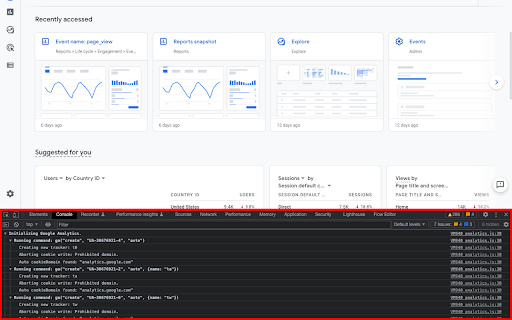
Nothing happens, nothing in console. Icon says ON. No settings? Not sure what its even supposed to do. All the preview screenshots are super blurry.
very terrible it was debugged couldn't code the s word so it was very terrible
doesnt work unfortunately
Not work on chrome 61.0.3163.100
It doesn't work, nothing gets in the console, however GA is working correctly on my site.
Doesn't work
Doesn't work.
Didn't work at all!
Did absolutely nothing
Pretty frustrating to install and not be able to turn it on. Click on icon? Didn't work (though enabled).
Installing this disables AdBlock+, so get ready for commercials
No instructions at all. No idea how this is meant to help debug anything. As a Chrome extension the lack of information is really poor. I would have expected better of Google.
zero!!!
It failing instantly. Installing, but confusing icon and no action, the page flickering and not showing anything.
Malwarebytes Anti-Malware detected 9 files in this extension: PUP.Optionnal.BrowserCoupon.A I suggested that you uninstall that extension!
Doesn't work at all.
i think this extension is bugged .. i get lots of ads with this extension enabled .. not adviced..
Terrible instructions, as always from Google.
Not able to download. It show added to chome button. But i check on my extension, can't found that extension.
Doesn't work for me, no tracking logging at all. Using Chrome 24 on an Ubuntu 12.04 amd64 Box.
Often doesn't work. I see nothing in the JS console on pages that clearly have the call to _trackEvent. Hasn't helped me debug at all.
Very very buggy, usually requires me to refresh the page multiple times in order for it to show any tracking information (it is not because of cookies/cache, as I have tried in a fresh session with the same buggy results). This would be a very useful plugin if it worked as advertised. I hope Google can work out the bugs!
It's a really nice way of browsing GA hits. So much cleaner than the official GA plugin. However, it's not maintained (most recent commit 2 years ago) and it doesn't actually pick up every hit. I've noticed sometimes I'll click something, the plugin won't show it, but I'll see the event in the network inspector and in GA so I know it fired. It's a shame because this plugin is really nicely designed but without knowing it's picking up every hit, it's almost useless.
Its very old now and is not maintained. You won't be able to see any of the new stuff like enhanced eCommerce.
The instruction are not terribly clear and intepreting the output is not easy. Would be helped by a little more documentation.
Doesn't work at all. No readout. No instructions. No options. Nowhere on the internet explaining how to fix it either.
Apparently it doesn't work with Google's new analytics.js flavor?
Seems to work, even though Google hasn't touched it in 3.5 years. And, I was not able to find any documentation on how to properly use this or interpret the results. Google is one of the wealthiest companies on the planet, yet they can't find their way to hire a small team to maintain and document this tool? Typical Google Greed.
It used to work perfectly with the previous version but now, with GA4 doesn't work anymore.
not working, dont know why.
Doesn't work half the time
so so
Works as Intended except I cannot remove my preview analytics window - its just a crappy iframe port of the tags page - seems to fire automatically if I have a tag embedded - WHY CAN'T I TURN IT OFF!!!
It doesn't seem to do anything at all.
I normally love this tool, but it hasn't been able to detect any of our new sites using Universal Analytics. Not sure if anyone else is having this problem.
It's not kept up-to-date with the newer analytics tech, like universal analytics. It also sometimes needs to be toggled on-off a few times before you see anything in the console. If it was more reliable, it would be a *great* tool.
Doesnt help with with analytics.js
Handy plugin but it could be better, sometimes it has a tendency to not do it's thing. Also it would be nice if it was updated to show everything sent to Analytics like the content experiment chosen variations.
Great tool for debugging, but does not work if you use the remarketing code. If you could fix that, it'd be fantastic.
This plugin is great when it works, but most times I have to reload the page first to see anything (the first time, ga.js loads, not the debug script). This makes it a bit frustrating, and also makes it impossible to test certain things if reloading violates what you are trying to track.
Permissions (3)
Permissions
Details
| Version | 3.0 |
| Updated | Dec 30, 2024 |
| Size | 28.41KiB |
| First Seen | Mar 21, 2026 |
Popular in developer





Popular Extensions




