
Description
Reviews (63 cached)
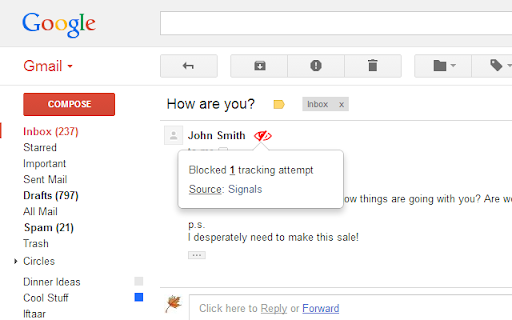
Does this work on past emails? How do I know if it's working? I added it to chrome it and it is greyed out in my extensions bar and is not showing the red eye next to the sender's name
I agree with Sean, it is blocking gmail images that should not be blocked. I have turned this extension off until I see a correction to Version 2023.12.13 to resolve this issue.
Not working. I have this extension installed, and I've just received an email from a colleague in which it is clearly said "Remitente notificado con Mailtrack" ("sender notified with Mailtrack")
01/20/2024: WELL, Omar??? 12/15: NOPE. Pixelblock does NOT successfully BLOCK the Mailtrack for Gmail tracker! Protonmail DOES. I would rather rely on your extension and unsure why you would say it was "fixed". Maybe you assumed so but didn't test it. Get it working and I will gladly go to 4/5 stars. Thanks for your efforts. 12/7: The blocked red eye icon finally reappeared for the last month or so, ONLY to disappear today with the Chrome update. Please fix and thanks! 12/13: THANKS OMAR! *BUT* Pixelblock does NOT block MAILTRACK for GMAIL (mailtrack.io)? What's up with that? Should I know of this limitation already? The "red eye" leads me (and others) to believe that not only was a pixel or pic blocked, but that the *TRACKING* pixel was blocked. Can you recommend another extension that can block Mailtrack tracking?
Blocks all images in Gmail now. Abandoned by developer. Was great while it lasted.
Used it for years, Now images are being blocked even when they are allowed, have to disable it to see images at all now.
Echoing others. Used to be great (5 stars). Worked effectively for years. It now blocks ALL IMAGES in Gmail. I had to disable it. I hope they fix it.
currently blocking ALL images. will remove this review once it's fixed.
Starting late October, 2023 this has been blocking all images in emails. Will have to turn the extension off. Please fix. Thanks.
Needs to be suspended from the Chrome Web Store as it blocks ALL images from appearing in ALL incoming Gmail messages.
They break all of my ad images when using Google Ads. I have to disable it from Chrome to manage my paid search campaigns.
Just downloaded the latest version and tried this extension for the first time. I sent a message with tracking to myself from another of my email addresses. When I checked the email, Pixelblock said that that the tracking had been blocked. BUT when I went back to the email address I sent from, I still received notification that the message was opened.
Does not work :( It also removes a valid images which are not used for tracking.
the extension block every image in the new gmail interface.
No longer works on New Gmail. Darn...
This extension worked fine until the new version of Gmail was released -- then it blocked ALL images. Oddly, you can see the images loading first, then they're killed, so not sure if this method was EVER truly effective.
Doesn't work - just stops notification from popping up. It still shows when you click for sidekick at least.
Worked great...while it worked. Just stopped working a couple days ago, and re-installing it did nothing. So, apparently this extension is currently "dead" :(
blocked images on other websites
Just downloaded it today and tested it with an account I know has Sidekick but no red eye and confirmed by the recipient that they received a read notification....will be uninstalling
Was awesome, recently started breaking all images, no red eye. Would love to put this back to 5 stars.
Blocks ALL images from ALL messages. Not a single one showed a red eye icon.
hate it messes up images uploading in emails I want to see such a mess
Doesn't work. No red eye, just broken images, most of which are NOT pixel tracking.
This broke Drive (corrupted Google Sheets). Not worth the hassle until they fix it.
Busted again with latest update to Chrome (v 123.0.6312.106). Images no longer loading.
Suddenly started blocking mostly everything in every email (Nov 2023), had to disable.
Suddenly started blocking mostly everything in every email (Nov 2023), had to disable.
Was good, but unfortunately no longer updated or supported. I've just found Email Privacy Protector which seems to better anyway.
Can't see the red eye anymore after switching between my accounts on the same device.
From a display standpoint, PixelBlock is easy to understand and takes not effort on the user other than a simple install. The reason for the low review is due to PixelBlock clearly not working after basic user testing. I installed PixelBlock on my primary email account; Under a secondary, external account, I installed a free email tracker -- in this case Mailtrack -- and sent my primary account a tracked email; Immediately after opening the tracked email from the primary account, the secondary account received a response that the email had been opened. This was tested 3x for basic consistency. I've emailed the developer (omar.w.qureshi [at] gmail.com) a screenshot showing one occurrence to help their team (as well as clearly describing above with app used); however, I will be uninstalling PixelBlock as it clearly does not work as designed.
on every email it says that it blocked tracking but that the source was unknown. all its done so far is block pictures in emails from restraints and my work emails.
Does not work. Tested with Acymailing and it was able to track my email back without any notice from the extension.
Just doesn't work unfortunately
No longer works for the last couple of weeks. It shows the red eye, that trackers exist but still load them and notify the sender. I know because I sometimes add trackers myself and since the last few weeks it started showing me open notifications for my own emails when I open them, something that didn't use to happen before.
Hi PixelBlock Team, This has reference to the receiving of mail from one of my known person and it seems to be a tracking one. The mail included a button texted as "click here to open few message" and clicking on the same resulted into opening of various links. It totally seems to some kinda malware/ hidden app to track my account and phone. Found no help from PixelBlock on this. Please do suggest in order to be clear on this. Thanks Shubham Sharma
No longer working with the new gmail
Why does extension needs to read the browsing history?
Started blocking inline images in new Gmail interface
This used to work great but doesn't seem to be compatible with new Gmail
Causes images to be blocked in the new gmail
Need to disable. Was stopping embedded pics in Gmail, which I need to see.
I just installed it after reading about it online. And I also installed mailtrack to track my sent emails. I tested PixelBlock by sending a test email to another email ID and PixelBlock just gave me notification that they blocked a tracking attempt. But Mailtrack still showed that my email was received and read. So seems it doesn't work.
Works great EXCEPT if you want to print or create a PDF file from a Gmail message. PixelBlock blocks the graphics and you get just graphic placeholders. No bueno. Tracking beacon pixels should be blocked, but not every pixel in every graphic on every page of every message. Fix this and I'll give you five stars.
There is no way to tell if it works unless you ask someone who has a tracker to let you know. Also, it breaks images in your emails!
Seems to just break ALL images in my emails.
Says that there's tracking elements in emails that I know don't have any. They're from other personal email accounts I use that I know have no tracking elements in it. They may have an image in their signature, such as for social media, but this doesn't mean they are tracking my email. Also, most emails that it does find tracking elements, it says the source is "unknown" so it's not very helpful.
Hesitant to enable after the permissions update, probably will not use; I don't see why "Read your browsing history" "Block content on *any* page" is needed.
Thanks for your work on this. I liked this extension but the new permissions seem a bit excessive. Can you please clarify why the extension now needs "Read your browsing history" permission? I'm going to uninstall the extension until that's resolved. Thanks
As of 3rd March, the extension doesn't seem to be compatible with Chrome anymore and has been switched off in my browser.
Permissions (1)
Permissions
Details
| Version | 2025.12.01 |
| Updated | Dec 2, 2025 |
| Size | 70.53KiB |
| First Seen | Mar 21, 2026 |
Popular in accessibility



Popular Extensions



