Copy To Notion: Clip anything to Notion icon

Copy To Notion: Clip anything to Notion

by idrissaithafid

v0.20.0 Updated Jan 21, 2025 169KiB
CWS
10K
Users
★ 4.72
349 reviews
#3260
of 122.5K
workflow
#985 of 18.8K
⚠️Not updated in over a year ⚠️Requests 1 sensitive permission Highly rated

Description

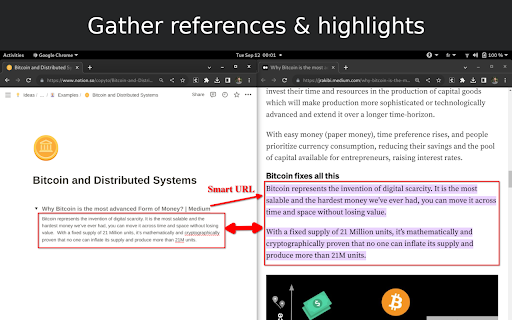
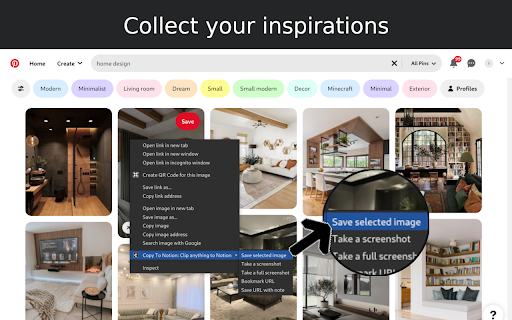
Copy to Notion: The Ultimate Web Clipper and Organizer for Notion Save and organize web content seamlessly into Notion with Copy to Notion—the ultimate Chrome extension designed for Notion users. Transform how you collect, organize, and retrieve online content directly into your Notion workspace. 💡 Key Features: ✅ Web Clipper for Notion: Easily save articles, text snippets, screenshots, images, bookmarks, notes, and any webpage elements directly to Notion, preserving original formatting. ✅ Multi-Select Functionality: Select multiple items—text, images, or any webpage elements—and save them to Notion in one go. ✅ Intuitive Notion Integration: Save web clips directly to specific Notion pages or databases, fitting seamlessly into your Notion workflow. ✅ Advanced Highlighting & Screenshots: Capture essential website highlights and full-page screenshots for thorough research documentation. ✅ CSS Selector Feature: Auto-fill your database fields dynamically with data such as images, text, and URLs from web pages using your preset CSS selectors. ✅ Personalized Notes: Add custom notes to your saved clips, capturing your insights and thoughts instantly. ✅ Automatic Link Saving: Each clip includes the source URL for quick reference and citation. ✅ Bookmarking & Embedding Made Simple: Bookmark URLs or embed them within Notion pages for organized access. ✅ Web Clips Manager Template: Utilize our exclusive ready-to-use Notion template to centralize and manage your clippings effectively. ✅ Flexible Saving Options: Choose exactly where in Notion you save your clips, allowing for customized organization. ✅ Right-Click Image Saving: Save images directly to Notion via right-click, streamlining your content gathering process. ✅ Full-Screen Capture: Easily capture and save entire webpage screenshots to Notion for comprehensive reference. ✅ Customizable Saving Options: Tailor how and where your clips are saved within Notion for personalized organization. ✅ Site-Specific Database Forms: Set up unique database forms for different websites, enhancing organization. ✅ Keyboard Shortcuts: Leverage shortcuts for rapid note-taking, bookmarking, and more, enhancing your productivity. ✅ Multi-Workspace Support: Easily switch between multiple Notion workspaces for diverse projects. 👥 Ideal For: ✅ Notion Users Seeking a Web Clipper: Save web content like articles, images, and text snippets directly into Notion. ✅ Researchers and Students: Build a personal knowledge base by capturing design assets, statistics, and research findings. ✅ Content Creators and Designers: Collect inspiration, visuals, and design elements for your projects. ✅ Professionals Tracking Competitive Intelligence: Gather competitor information, pricing, and marketing materials. ✅ Newsletter Curators: Compile content and resources effortlessly for upcoming issues. ✅ Project Managers: Develop project plans and roadmaps by gathering relevant information and resources. ✅ Social Media Managers: Clip quotes, articles, and images for future social media posts. ✅ Language Learners: Save vocabulary words, grammar rules, and learning resources into Notion. ✅ Recipe Collectors: Clip recipes and cooking tips from different websites. ✅ Travel Enthusiasts: Gather information on destinations, attractions, and accommodations. ✅ Anyone Streamlining Online Research: Efficiently collect and organize information from various sources. ✉️ We Value Your Input Curious about our upcoming features? Check out our roadmap: https://copytonotion.featurebase.app/ For assistance or feedback, reach out to us at support@copytonotion.com. We're committed to continually improving Copy to Notion based on your insights.
Copy To Notion: Clip anything to Notion screenshot 1Copy To Notion: Clip anything to Notion screenshot 2Copy To Notion: Clip anything to Notion screenshot 3Copy To Notion: Clip anything to Notion screenshot 4Copy To Notion: Clip anything to Notion screenshot 5

Reviews (10 cached)

★☆☆☆☆2025-10-01
jay Double

it is not working now.

★☆☆☆☆2025-08-26
Liutauras Elkimavicius

"To proceed, please share the selected page with Copy To Notion". Do I need to share each page I want to take article on? Very unconveniant

★☆☆☆☆2025-04-12
Nayeem Rahman

75 clips for free tier is not practical.

★☆☆☆☆2023-03-08
speerfissure

So I tried then "free" version and I did not recall reading in the description about the crippling limit to how much text it would capture at once: 2000 characters. Really? Uninstalling this trash.

★★☆☆☆2025-08-27
Ryan Gutierrez

I started using this extension tonight so I could do some product research on AliExpress. I have been using Send to Notion off and on for years but admit I fell off recently so I was unaware that they hold images hostage now. Yes it's true that AliExpress tries their hardest to make images hard to copy from the site, but I thought it was pretty weak for Send to Notion to paywall uploading images straight into the Files column. It really thought I had figured it out but then I got stuck trying to isolate the tags I needed with CSS Selectors. That's when I found Copy to Notion and thought it was doing pretty well dealing with clipping from AliExpress. It didn't always get the image previews into the Files column, but it was at least manageable. I have learned many tech skills in my way and for some reason CSS Selectors make zero sense to me. So I was really impressed and excited that Copy to Notion essentially solved it by just making the area you want to clip clickable!!! That was about 4 hours ago and now all of a sudden it's holding me hostage because I've clipped too many pages IN ONE NIGHT and it is wanting a review to re-up for another 30!!! I thought Send to Notion was borderline outrageous to charge $5.99 a month but 90 BUCKS A YEAR FOR something that Send to Notion and the official extension basically do for free is insane. I've been away from the Notion ecosystem for so long that apparently everyone now thinks everyone else is not only made of money but that clipping is so important that we can't figure out a better, cheaper, more effective way to do it??? Well congratulations because with your powers combined, Copy to Notion and Send to Notion may have created YET ANOTHER NOTION CLIPPING EXTENSION BECAUSE NOW I MIGHT F* AROUND AND VIBE CODE MY WAY INTO YOUR MARKET SHARE!!!!

★★☆☆☆2024-05-09
Markus Falkenhagen

top

★★★☆☆2025-04-17
AuGie M Bloom

its alrryyyyyt

★★★☆☆2025-04-17
Aleksandr Novikov

Cool idea, but does not copy code snippets - simply selecting what you need, ctrl+c, ctrl+v does a lot more than this.

★★★☆☆2024-09-04
Barış Koçak

Clips page content text only and can't take a full page screenshot.

★★★☆☆2023-12-03
Greg M

Has an issue in subreddits at least when Reddit is using a black theme. Impossible to screen shot anything. Wind up with a completely blank page

Permissions (5)

Permissions

activeTab Can access the current tab when you click the extension contextMenus Can add items to the right-click menu cookies Can read and modify browser cookies scripting Can inject scripts into web pages storage Can store data locally in your browser

Details

Version 0.20.0
Updated Jan 21, 2025
Size 169KiB
First Seen Mar 28, 2026