
Description



Reviews (31 cached)
bruh you need a email
There is no need to ask this many permissions to log in with my github account: """ Jam by Jam wants to access your gustavostz account Organizations and teams Read-only access This application will be able to read your organization, team membership, and private project boards. Learn more Project Read access to projects. This application will be able to read projects. Learn more Personal user data Email addresses (read-only), profile information (read-only) This application will be able to read your private email addresses and read your private profile information. Learn more Repositories Public and private This application will be able to read and write all public and private repository data. This includes the following: Code Issues Pull requests Wikis Settings Webhooks and services Deploy keys Collaboration invites Note: In addition to repository related resources, the repo scope also grants access to manage organization attributes and organization-owned resources including projects, invitations, team memberships and webhooks. This scope also grants the ability to manage projects owned by users. Learn more Discussions Write, update, and react to Team discussions. This application will be able to write, update, and react to Team discussions. """ You're even requesting access to my private repositories...
Getting lot of bugs recently. CTAs don't get enabled to record and take screenshot. Been this bugs since 4 months but no fix yet.
Jam keeps telling my I have an active jam in another tab then refuses to take me to that tab. This occurs even when I freshly open chrome and there are no other tabs. It's not obvious at all how to delete these "draft" jams in order to make a new one.
Jam is not working properly now. Every day, I have to uninstall and reinstall it just to record a video. Otherwise, it keeps showing "waiting for Jam to finish loading." This is very frustrating. At first, Jam worked perfectly, but now it doesn't. I’ve reported this issue many times to the email provided, but I haven’t received any response. Earlier, there was a chat option to get help, but now that’s also gone. I’m having a very bad experience, and I don’t understand why the team hasn’t fixed this issue.
They now require an account to use this extension. Removed. No stars as I feel this is bait and switch.
The extension is no longer considered safe by Google and is going to be removed soon. This is not professional, you should have migrated a long time ago. Please Advise!
Good
My jam extension won't work what is the cause?
Added it as an extension. When I click on the extension icon it starts, but now the extension icon is gone. When I click on my extensions icon then click on Jam it gives me a message "Zoom to any website and start jamming." It may be great software but it's impossible to start for me. UI fail.
I love the idea. Started using JAM a lot since am a translator and use a Translation Management System with lots of issues that needed recording, so that devs could work on them. However, I was severely disappointed with JAM because it's so damn buggy! unbelievable how many times it crashed, stopped working, refused to record last minute. Please solve this issue.
Something is taking longer than usual... Try refreshing the page 😩
Horribly bad, after several uses I'm unable to load jam anymore
Greate extension with severe bug causing it to crash constantly, been unable to use it smoothly for months. This has effected everyone on my team accross multiple devices and browsers. after install, it runs once, followed by crashing with the "😩" emoji. The only way i can get it to work again after a single use (or sometimes not use) is to uninstall, go back to the web store, and install again. Painful!
Can you guys please add some Search By filters in My Jams like search by date etc and give a list view so user can easily scroll and find old jam recordings? Other than that, it is amazing
The extension is causing TinyMCE to crash along with other inconsistencies when I open WSForm email submission action on the WordPress dashboard
Makes Umbraco CMS crash, because its messing with variables like _.
It unfortunately doesn't follow Chrome's latest privacy and security best practices and will soon stop being supported :(
Just finished installing...it's amazing
need HD quality video, i always get low quality video when i share it..
This extension is pretty good, but recently we've started noticing that it interferes with the CSS of some websites, stripping them of all styling. Disabling the extension restores the website proper functioning. In particular, this seems to happen repeatedly with a Chakra UI / NextJS-based web application.
The extension works, but on certain websites, it fails to load the OS version unless you switch back and forth or use the desktop version for proper recognition. Additionally, the functionality seems to depend on the length of the video. I’ve reported this issue multiple times, and every time I get the same generic response: “We’re working on it.” Months later, nothing has changed, and I’m simply frustrated. The main problem is that on specific sites, the extension prevents certain components from loading. For instance, it doesn’t allow tools like the network testing feature on https://www.waveform.com/tools/bufferbloat to function properly. I would consider changing my review rating, but the developers need to be upfront about the extension’s limitations. If the issue can’t be fixed due to how the extension operates, they should clearly communicate this instead of wasting users’ time.
# New Issue: Why doesn't Jam allow me to remove or replace the default keyboard shortcut to activate the extension? I do *not* want CMD+Shift+Y to launch Jam. # Glad this was resolved: What's going on here? From Google Chrome: "This extension may soon no longer be supported because it doesn't follow best practices for Chrome extensions. [https://support.google.com/chrome_webstore/answer/2664769]" Can we get an update from the team? Thank you!
I've been using Jam for quite a while now, but I've noticed that for some time on the Chrome browser (Version 125.0.6422.114 (Official Build) (64-bit)), the window containing the screen recording buttons opens about half a centimetre and is all white. There is no possibility to click on any button."
When I try and create an account with my email, it says "failed to Fetch" I have done all the cache clearing / different browser, etc. I have no doubt this will be resolved.
Extension is good in terms of functionality but consumes more memory compared to other browser extensions. Please check task manager. Even tried Windows efficiency mode. Still consumes more memory than others.
Undoubtedly great tool but fact that it captures personal and web app content makes it illegal within my org to use this extension
I am not able to use the instant capture. It's not showing the network and console data. It shows problem fetching
It was ok the idea of the software is great, but constantly received generating issues when creating the recordings for the bugs. I did however see it work once, which was awesome, but other than that it has never worked.
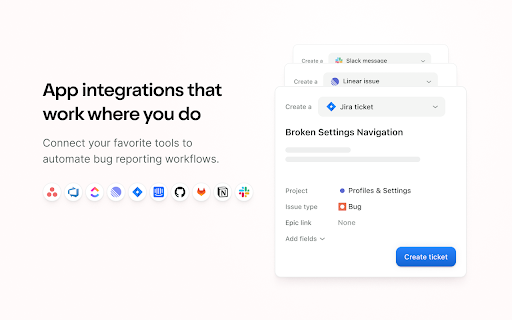
It just doesn't work with Jira. I tried to integrate this with few services but Jam never worked as expected - I have only "Share a link" option.
Great tool, however some people use safari, when sending them links to recordings / screenshots they encounter white screen.
Permissions (12)
Permissions
Details
| Version | 5.58.0 |
| Updated | Mar 9, 2026 |
| Size | 5.0MiB |
| First Seen | Mar 22, 2026 |
Popular in developer





Popular Extensions




