
⚠️Not updated in over 2 years
Description
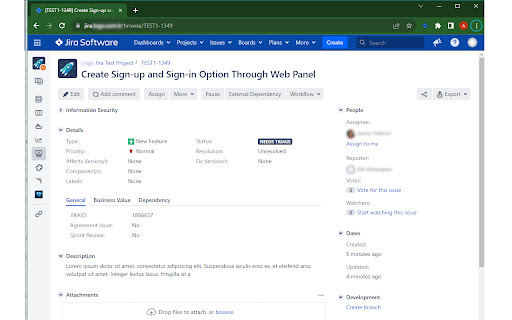
The Jira Issue Copy Helper is a Chrome extension tailored for Jira users. It simplifies your workflow by allowing you to effortlessly copy the title and URL of a Jira issue. Whether you're managing tasks, sharing information with your team, or organizing your work, this extension is a valuable addition to your toolkit.
Key Features:
- One-click copy: Easily copy the title and URL of the current Jira issue to your clipboard.
- Productivity booster: Streamline your work in Jira by eliminating manual copying and pasting.
- Jira-friendly: Designed for Jira users, this extension enhances your experience on the platform.
How to Use:
1. Install the extension from the Chrome Web Store.
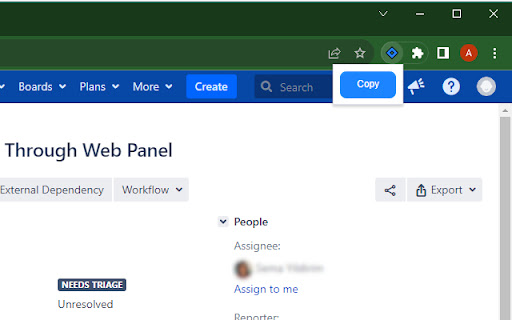
2. Pin the extension to your Chrome extension bar.
3. Navigate to a Jira issue that you want to copy.
3. Click the extension icon in your browser to copy the issue's title and URL to your clipboard.
Privacy and Security:
The Jira Issue Copy Helper extension prioritizes your privacy. It accesses data from the current tab only and does not store any information. Your data remains secure.

Reviews
Loading reviews...
Permissions (4)
Permissions
activeTabℹ Can access the current tab when you click the extension clipboardWriteℹ Can write to your clipboard scriptingℹ Can inject scripts into web pages tabsℹ Can see your open tabs and their URLs
Details
| Version | 1.1.1 |
| Updated | Nov 16, 2023 |
| Size | 5.51KiB |
| First Seen | Mar 27, 2026 |
Popular in tools

Zotero Connector
by Zotero
8M
★ 3.96
tools
8M
★ 3.96
tools

Browsec VPN - Free VPN for Chrome
by Browsec
7M
★ 4.44
tools
7M
★ 4.44
tools

AnyDoc Translator - Translate Web and PDF
by www.wps.com
7M
★ 4.59
tools
7M
★ 4.59
tools

Microsoft Bing Homepage & Search for Chrome
by Microsoft Corporation
4M
★ 3.72
tools
4M
★ 3.72
tools

IE Tab
by Blackfish Software
4M
★ 4.31
tools
4M
★ 4.31
tools
Popular Extensions

Adobe Acrobat: PDF edit, convert, sign tools
by Adobe Inc.
331M
★ 4.40
workflow
331M
★ 4.40
workflow

Grammarly: AI Writing Assistant and Grammar Checker App
by Grammarly
42M
★ 4.50
communication
42M
★ 4.50
communication

Chrome Remote Desktop
by Chrome Remote Desktop Release Managers
38M
★ 3.14
workflow
38M
★ 3.14
workflow

Microsoft Single Sign On
by Microsoft
36M
★ 2.27
workflow
36M
★ 2.27
workflow

Cisco Webex Extension
by cisco.chromestore
23M
★ 2.34
social
23M
★ 2.34
social