
Find and replace for YouTube Subtitles
v2.0.4 Updated Dec 6, 2023 19.88KiB
⚠️Not updated in over 2 years
Description
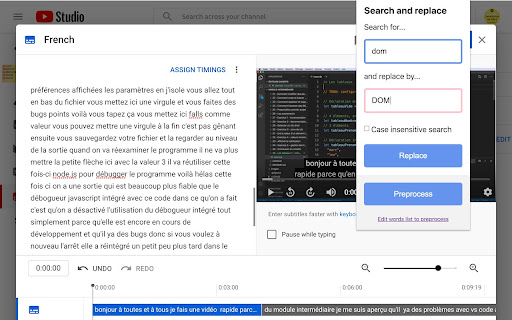
Fix all misspelled words and expressions of YouTube transcripts (subtitles) right from the online YouTube editor with one single click.
Create your own personal list of misspelled words that must be replaced in your video and process them all with one click: huge time saver!
This extension works only when you are on the official online YouTube subtitle editor website.
FEATURES:
- Fix misspelled words in your entire transcript with one click
- Store a list of common misspelled words and fix all of them with one click (preprocess feature)
- Create the start of a sentence easily: click on a word, tap twice on CTRL! It will make the first letter of the word in uppercase and add a dot at the end of the previous word if needed.
KEYBOARD SHORTCUTS
- Open the extension panel with CTRL+SHIFT+F
- Click on the first word of a sentence, tap twice on CTRL to create the start of a sentence
HOW DOES IT WORKS?
1. Log yourself into YouTube
2. Open YouTube Studio
3. Select the "Subtitles" category on the left panel
4. Select the video you want to edit the subtitles from
(at this step the URL should start by https://studio.youtube.com/channel/<your_channel_ID>/translations or https://studio.youtube.com/video/<your_channel_ID>/translations)
5. Click on the "edit" or "duplicate and edit" button next to the subtitle your want to edit
6. WARNING: You MUST use the mode "edit as text" for the extension to work properly. So tap on this button in order to put the entire text of subtitles in one big block of text. That way the extension can search and replace in the whole text otherwise it will modify only a part of the text that is currently displayed in the interface.
7. You can now use this extension, enjoy!
Thanks!

Reviews (2 cached)
★★☆☆☆2021-07-31
charlie latham
Such a shame this doesn't work for me. Just can't get it to edit the subtitles at all, great idea though
★★★☆☆2021-04-20
子浩
I don't know why it doesn't work
Permissions (3)
Permissions
activeTabℹ Can access the current tab when you click the extension declarativeContentℹ Can show the extension icon based on page content storageℹ Can store data locally in your browser
Details
| Version | 2.0.4 |
| Updated | Dec 6, 2023 |
| Size | 19.88KiB |
| First Seen | Mar 29, 2026 |
Popular in tools

Zotero Connector
by Zotero
8M
★ 3.96
tools
8M
★ 3.96
tools

Browsec VPN - Free VPN for Chrome
by Browsec
7M
★ 4.44
tools
7M
★ 4.44
tools

AnyDoc Translator - Translate Web and PDF
by www.wps.com
7M
★ 4.59
tools
7M
★ 4.59
tools

Microsoft Bing Homepage & Search for Chrome
by Microsoft Corporation
4M
★ 3.72
tools
4M
★ 3.72
tools

IE Tab
by Blackfish Software
4M
★ 4.31
tools
4M
★ 4.31
tools
Popular Extensions

Adobe Acrobat: PDF edit, convert, sign tools
by Adobe Inc.
331M
★ 4.40
workflow
331M
★ 4.40
workflow

Grammarly: AI Writing Assistant and Grammar Checker App
by Grammarly
42M
★ 4.50
communication
42M
★ 4.50
communication

Chrome Remote Desktop
by Chrome Remote Desktop Release Managers
38M
★ 3.14
workflow
38M
★ 3.14
workflow

Microsoft Single Sign On
by Microsoft
36M
★ 2.27
workflow
36M
★ 2.27
workflow

Cisco Webex Extension
by cisco.chromestore
23M
★ 2.34
social
23M
★ 2.34
social