
⚠️Not updated in over 2 years ⚠️Below average rating
Description
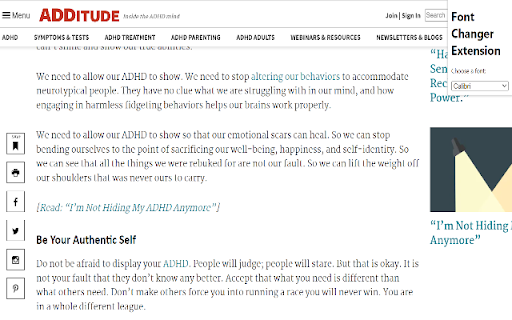
The Font Changer Extension is a tool that helps neurodivergent individuals improve accessibility on the web by allowing them to change the font formatting on any webpage. With a simple drop-down menu, you can choose from three specially designed fonts that are known to be more readable and easier on the eyes for those with dyslexia or other learning differences.
To use the extension, simply install it from the Chrome Web Store and click the extension icon in your browser's toolbar. A menu will appear with a list of available fonts to choose from. Simply select the font you want to use and the extension will automatically apply it to the webpage you are currently viewing. It's that easy!
To download the fonts to your computer, follow these steps:
Download the Font Changer Extension from the Chrome Web Store.
Ensure that each of the three fonts: OpenDyslexic, Calibri, and Arial Unicode MS are downloaded on your computer. I have included the URL for OpenDyslexic (https://opendyslexic.org/), feel free to download the others from any font download site you prefer, I have added sites for each.
https://freefontsdownload.net/free-arial-unicode-ms-font-36926.htm
https://freefontsvault.com/calibri-font-download-free/
For Windows type, "Font" into your search bar, and go into Font Settings. Then drag and drop the unzipped fonts to add them.
Once the fonts are installed, you can use them in any application on your computer, not just in the Font Changer Extension.
We hope you find the Font Changer Extension to be a useful tool for improving accessibility on the web. If you have any feedback or suggestions, please don't hesitate to let me know.


Reviews
Loading reviews...
Details
| Version | 0.1.0 |
| Updated | Dec 25, 2022 |
| Size | 5.73KiB |
| First Seen | Mar 29, 2026 |
Popular in accessibility

Read&Write for Google Chrome™
by Texthelp
17M
★ 3.44
accessibility
17M
★ 3.44
accessibility

360 Internet Protection
by qihoosafe
17M
★ 4.54
accessibility
17M
★ 4.54
accessibility

Screenshot reader™
by Texthelp
7M
★ 2.57
accessibility
7M
★ 2.57
accessibility

OrbitNote
by Texthelp
7M
★ 2.95
accessibility
7M
★ 2.95
accessibility

Volume Master
by Peta Sittek
6M
★ 4.81
accessibility
6M
★ 4.81
accessibility
Popular Extensions

Adobe Acrobat: PDF edit, convert, sign tools
by Adobe Inc.
331M
★ 4.40
workflow
331M
★ 4.40
workflow

Grammarly: AI Writing Assistant and Grammar Checker App
by Grammarly
42M
★ 4.50
communication
42M
★ 4.50
communication

Chrome Remote Desktop
by Chrome Remote Desktop Release Managers
38M
★ 3.14
workflow
38M
★ 3.14
workflow

Microsoft Single Sign On
by Microsoft
36M
★ 2.27
workflow
36M
★ 2.27
workflow

Cisco Webex Extension
by cisco.chromestore
23M
★ 2.34
social
23M
★ 2.34
social