
✅Recently updated
Description
Speco AI - AI Assistant For Architects & Designers
What is Speco AI?
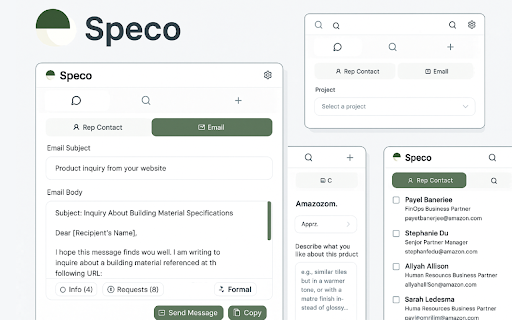
Speco AI is an intelligent Chrome extension designed for architects, designers. Our AI assistant helps you connect with manufacturers and gather essential product details without leaving your browser or find similar materials or products. It is an extended service from our web application.
Key Features:
🤖 AI-Powered Email Composition
- Automatically generates professional inquiry emails tailored to specific building materials
- Customizable templates for different information requests (pricing, samples, certifications, lead times)
- Smart tone adjustment (formal, friendly, urgent) based on your needs
📧 Representative Contact Discovery
- Instantly finds contact information for building material representatives
- Automatically detects company information from the current webpage
- One-click email copying and composition
🎯 Intelligent Request Categorization
- Installation Information
- Product Recommendations
- Certifications & Compliance
- Pricing & Quotes
- Lead Times & Availability
- Durability & Performance Data
- Use Case Applications
- Sample Requests
🔒 Professional & Secure
- Enterprise-grade security
- Privacy-focused design
- No data tracking or selling
- Secure API connections
Perfect For:
- Architects & Designers: Quickly research building materials and specifications
- Interior Designers: Connect with manufacturers for custom solutions
- Construction Professionals: Accelerate project planning and material selection
How It Works:
1. Browse: Visit any building materials or construction company website
2. Compose: Click the Speco AI extension icon to open the smart composer
3. Customize: Select the information you need and adjust the message tone
4. Connect: Our AI generates professional emails and finds the right contacts
5. Send: Copy or directly send your inquiry to multiple representatives
Getting Started:
1. Install the extension
2. Create your free Speco AI account
3. Visit any building materials website
4. Click the extension icon to start composing intelligent inquiries
Reviews
Loading reviews...
Permissions (4)
Permissions
scriptingℹ Can inject scripts into web pages sidePanel storageℹ Can store data locally in your browser tabsℹ Can see your open tabs and their URLs
Details
| Version | 1.5.0 |
| Updated | Mar 16, 2026 |
| Size | 237KiB |
| First Seen | Mar 26, 2026 |
Popular in art

Muzli - Design inspiration hub
by Muzli
400K
★ 4.52
art
400K
★ 4.52
art

Save Image As PNG
by Rob W
400K
★ 3.95
art
400K
★ 3.95
art

Image Downloader - Save pictures
by ImageLoader
300K
★ 4.62
art
300K
★ 4.62
art

Gimp online - image editor and paint tool
by officeonlinesystems
300K
★ 2.61
art
300K
★ 2.61
art

Camera
by david.flinner
200K
★ 3.79
art
200K
★ 3.79
art
Popular Extensions

Adobe Acrobat: PDF edit, convert, sign tools
by Adobe Inc.
330M
★ 4.40
workflow
330M
★ 4.40
workflow

Chrome Remote Desktop
by Chrome Remote Desktop Release Managers
38M
★ 3.14
workflow
38M
★ 3.14
workflow

Cisco Webex Extension
by cisco.chromestore
24M
★ 2.34
social
24M
★ 2.34
social

Kami for Google Chrome™
by Kami
17M
★ 4.56
education
17M
★ 4.56
education

Read&Write for Google Chrome™
by Texthelp
17M
★ 3.44
accessibility
17M
★ 3.44
accessibility