
close_tab(s) icon

close_tab(s)

by bulent

v4.0.5 Updated May 19, 2025 240KiB
CWS
2K
Users
★ 4.62
73 reviews
#14904
of 208.5K
functionality
#412 of 7.8K
Highly rated

Description

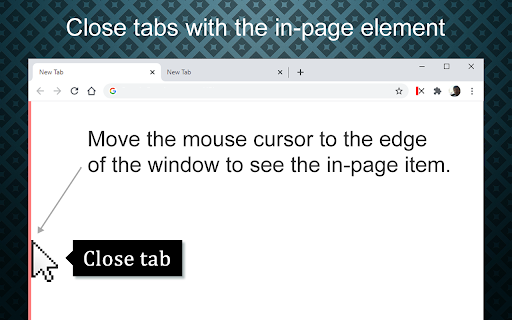
More easy and fast way to close tabs. Allows you to easily close tabs with in-page elements. Features: ---------------- • You can close the active tab by clicking to the selected in-page edge element. • In-page element only appears when you move the mouse cursor to the selected edge. • You can change the features of the in-page element, like hover color, thickness, click event type and position. • Use toolbar icon or context menu to close tabs. Limitations: -------------------- Since Chrome is not allowing, we can't add in-page element into the following pages: chrome:// - chrome-extension:// - chrome-devtools:// - view-source: - data: - chrome.google.com/webstore/ - New tab page. But, toolbar icon and context menu options will continue to work on all pages without any limitation. Note on permissions: ----------------------------------- • with v4.0, new "scripting" permission request added. In previous versions, i was using "chrome.tabs.executeScript()" to reflect settings changes into pages, but with Manifest V3, it is moved to "chrome.scripting.executeScript()", which requires "scripting" permission. • "Read and change all your data on the websites you visit" - That is necessary to insert In-Page element into pages. I do not read your data from any website, nor do i modify it. Changelog: ------------------- v4.0.x Coming Soon ... : • Binding actions. • Custom translations. New features: • Pinned tabs will not be closed (by default). • Store data in memory for faster access. Updates: • Upgraded to Chrome Manifest V3. • Closing multiple tabs is now faster. • The name of the extension has been changed to 'close_tab(s)'. • Some UI changes. Fixes: • Fixed an issue with slow-loading sites. v3.0.x New features: • New add-on features for bottom and right positions. • Tooltips now customizable. • In-page element opacity feature. • Right-click on the selected edge, shows selected options. • Context menu options added. • Auto maxizing new windows feature added. • Toolbar icon popup page added. • Spanish and Portuguese language support added. Updates: • Settings page redesigned. • In-page element positions restructured. • New toolbar icon images available. v2.0.x New features: • New in-page closer positions added. • You can change thickness of the in-page element. • Toolbar icon is added. Clicking to the toolbar icon will close the active tab. • You can change the toolbar icon image. • Multi language support is added, so please help to translate. • Preferences synced with Chrome (if signed in). Updates: • Renamed to 'Close This Tab'. • New Options/Settings page. • Injecting the element into dynamically loaded pages. v1.0 • Initial version
close_tab(s) screenshot 1close_tab(s) screenshot 2

Reviews (6 cached)

★☆☆☆☆2025-06-30
flwrgrl flwrgrl

Instructions for close all tabs please

★☆☆☆☆2021-08-13
Chris Vydas

Didn't work, kiwi mobile Chrome

★☆☆☆☆2021-04-23
N J

Many bugs since the last update

★★☆☆☆2024-06-08
Albert Hui

no longer works on some sites after I re-installed Chrome/ remove / re added this extension doesn't help

★★★☆☆2024-05-26
Caleb Murdock

I installed this extension in Vivaldi, which is based on Chrome (Chrome extensions work in Vivaldi). In Settings, Vivaldi is set to shift the tab focus to the tab to the left when a tab is deleted. With this extension installed, that's not happening. Also, after using the red bar at the left margin, the bare doesn't always appear on the next page that I want to delete. I've decided to delete the extension. What I REALLY want is an X to the right of all the tabs, so I can always go to that X to close whatever tab I want to delete.

★★★☆☆2023-07-14
Jeffrey Nichtberger

Brilliant idea. Highly customizable extension with an inventive & efficient approach for closing tabs. Works pretty well (but can take a bit of time before it renders in) and I like being able to configure it exactly how I want it to behave and look. However, it messes up the vertical scrolling of web pages when you have the bottom bar type selected (the only one that is suitable for a multi-monitor setup). It needs a toggle to hide its vertical scroll bar, just as there is already a toggle for hiding the impact on the horizontal scroll bar. Until that is in place, I can't really use this extension effectively due to my multiple monitors. Future improvements that should get made: No limit for the max bar width, let you select multiple zones to place the bar, allow for clicking on content behind the bar when 'double click to trigger' is selected, and let us pick the icon used in the context menu entry just as can be done for the extension icon.

Permissions (4)

Permissions

contextMenus Can add items to the right-click menu scripting Can inject scripts into web pages storage Can store data locally in your browser tabs Can see your open tabs and their URLs

Details

Version 4.0.5
Updated May 19, 2025
Size 240KiB
First Seen Mar 25, 2026

