
⚠️Not updated in over a year
Description
AlwaysOnTop Sticky Note, Memo.(by pip)
1. Functions
You can always use a memo pop-up window with the features above.
2. Functions
It is recommended for those who move a lot, such as Word, Excel, and web pages.
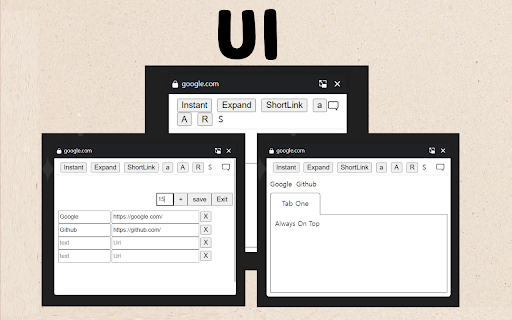
1) You can always bring up a notepad from above. It's always up there no matter what program you turn on.
2) You can adjust the size of the notepad and the size of the handwriting.
3) You can add a link to visit your favorite page immediately.
4) You can click the 'Instant' menu to create additional pop-up notepads.
5) You can open and turn off the notepad with just the keyboard by setting the shortcut key.
6) Shortcuts have been added to the menu that appears when you right-click.
7) If you use the whale browser, you can also use the 'Always Above' function on the notepad that you have floated as Instant. (If you press the top left pin shape in the Instant window, the function always applies to the top.)
3. How to use the full screen
1) Press Instant to open Notepad in a new window.
2) Press F11 to open the notepad on full screen.
When used as a full screen, it can be used as a whiteboard.
4. How to open not-browser programs (ex.Excel) right on top of it all the time
1) chrome://extensions/shortcuts
2) Set to 'Global' and 'All' in the shortcut setting.
3) You can also use shortcuts in other programs to open Notepad.
5. Precautions
1) It is available on most web pages, but sometimes it is not. In this case, you can open a notepad by opening another web page.
2) Because it uses the PIP, the webpage that opened the notepad must be fixed.
* Please refer to the following for future updates, information, and inquiries.
https://utilzip.com



Reviews
Loading reviews...
Permissions (4)
Permissions
activeTabℹ Can access the current tab when you click the extension contextMenusℹ Can add items to the right-click menu scriptingℹ Can inject scripts into web pages storageℹ Can store data locally in your browser
Details
| Version | 1.0 |
| Updated | Jun 5, 2024 |
| Size | 69.98KiB |
| First Seen | Mar 28, 2026 |
More by dexcofogi


Popular in tools

Zotero Connector
by Zotero
8M
★ 3.96
tools
8M
★ 3.96
tools

Browsec VPN - Free VPN for Chrome
by Browsec
7M
★ 4.44
tools
7M
★ 4.44
tools

AnyDoc Translator - Translate Web and PDF
by www.wps.com
7M
★ 4.59
tools
7M
★ 4.59
tools

Microsoft Bing Homepage & Search for Chrome
by Microsoft Corporation
4M
★ 3.72
tools
4M
★ 3.72
tools

IE Tab
by Blackfish Software
4M
★ 4.31
tools
4M
★ 4.31
tools
Popular Extensions

Adobe Acrobat: PDF edit, convert, sign tools
by Adobe Inc.
331M
★ 4.40
workflow
331M
★ 4.40
workflow

Grammarly: AI Writing Assistant and Grammar Checker App
by Grammarly
42M
★ 4.50
communication
42M
★ 4.50
communication

Chrome Remote Desktop
by Chrome Remote Desktop Release Managers
38M
★ 3.14
workflow
38M
★ 3.14
workflow

Microsoft Single Sign On
by Microsoft
36M
★ 2.27
workflow
36M
★ 2.27
workflow

Cisco Webex Extension
by cisco.chromestore
23M
★ 2.34
social
23M
★ 2.34
social