
Description
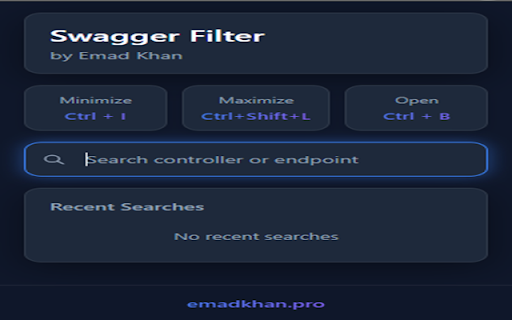
🔥 Swagger Filter by Emad is a premium Chrome extension designed to enhance the usability of Swagger API documentation. It helps developers quickly find, filter, and organize API endpoints without scrolling through large documentation.
✨ Key Features:
✅ Modern Dark Mode UI: Sleek, eye-friendly interface designed for developers who spend hours with API documentation.
✅ Smart Search & Filter: Instantly find API endpoints using keywords, including controller names, URLs, and Sprint numbers.
✅ Search History: Automatically saves your 5 most recent searches for quick access.
✅ Notes System: Add detailed notes to each search item to remember important details about endpoints.
✅ One-Click Copy: Copy your saved notes with a single click for easy reference.
✅ Individual Item Management: Easily delete specific search items or clear all history as needed.
✅ Keyboard Shortcuts: Navigate efficiently with Ctrl+I (minimize all), Ctrl+Shift+L (maximize all), and Ctrl+B (open extension).
✅ Optimized for Developers: Works seamlessly with any Swagger UI implementation, including dynamic/lazy-loaded documentation.
🔒 Privacy & Security:
- This extension uses Chrome's local storage API solely to remember your searches and notes.
- All data remains on your device - no information is transmitted over the internet.
- No user data collection, tracking, or analytics.
- The extension requires minimal permissions: only those needed to interact with Swagger UI and save your search history.
🔹 How to Use:
1️⃣ Install the extension.
2️⃣ Open any Swagger API documentation page.
3️⃣ Press Ctrl+B or click the extension icon to open the filter.
4️⃣ Use the search box to filter endpoints by name, URL, or sprint number.
5️⃣ Add notes to searches by clicking the pencil icon.
6️⃣ Copy your notes with the copy button for quick reference.
7️⃣ Use keyboard shortcuts for quick navigation.
This extension is perfect for developers, QA engineers, and technical team members who regularly work with Swagger/OpenAPI documentation and need to keep track of important API information.
Reviews
Loading reviews...
Permissions (5)
Permissions
activeTabℹ Can access the current tab when you click the extension scriptingℹ Can inject scripts into web pages storageℹ Can store data locally in your browser tabsℹ Can see your open tabs and their URLs windows
Details
| Version | 1.3 |
| Updated | Apr 23, 2025 |
| Size | 72.86KiB |
| First Seen | Mar 29, 2026 |
Popular in developer

GoFullPage - Full Page Screen Capture
by GoFullPage
10M
★ 4.89
developer
10M
★ 4.89
developer

TouchEn PC보안 확장
by 라온시큐어
8M
★ 1.33
developer
8M
★ 1.33
developer

React Developer Tools
by Meta
5M
★ 3.95
developer
5M
★ 3.95
developer

Meta Pixel Helper
by Meta
4M
★ 3.91
developer
4M
★ 3.91
developer

ColorZilla
by colorzilla.com
4M
★ 4.59
developer
4M
★ 4.59
developer
Popular Extensions

Adobe Acrobat: PDF edit, convert, sign tools
by Adobe Inc.
331M
★ 4.40
workflow
331M
★ 4.40
workflow

AdBlock — block ads across the web
by AdBlock
62M
★ 4.48
workflow
62M
★ 4.48
workflow

Grammarly: AI Writing Assistant and Grammar Checker App
by Grammarly
42M
★ 4.50
communication
42M
★ 4.50
communication

Chrome Remote Desktop
by Chrome Remote Desktop Release Managers
38M
★ 3.14
workflow
38M
★ 3.14
workflow

Microsoft Single Sign On
by Microsoft
36M
★ 2.27
workflow
36M
★ 2.27
workflow