
⚠️Not updated in over a year
Description
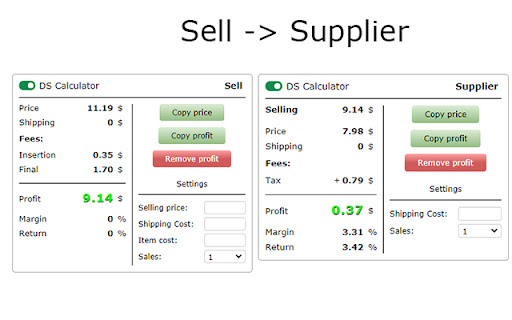
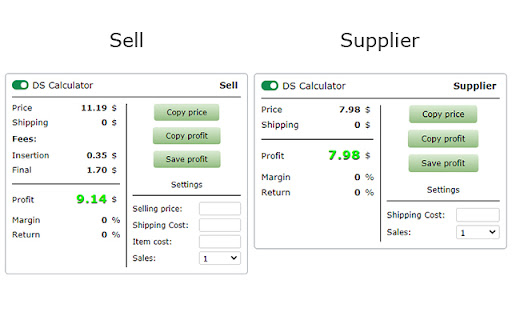
Subtract the price of the product from the selling price.
Slide (2) - The extension saves the selling price (takes away all fees), and on the supplier page subtracts the price of the product, and shows the net profit.
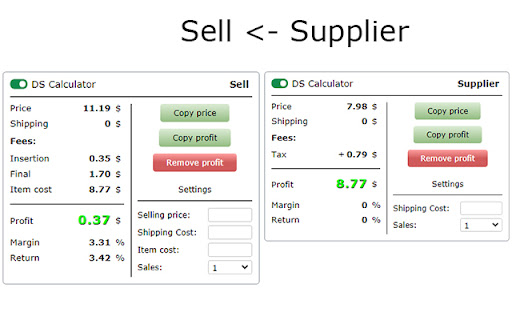
Slide (3) - Or it saves the price of the product from the supplier, and the page for selling the product, takes away all commissions and the price of the product (supplier) from the sales price, and shows the net profit.
The extension is inserted into the page.
All settings are saved for your account (Google).
Settings in the sales block:
- Upgrades - Select optional listing upgrade.
- Listing - Select format listing.
- Store / Account - Select a sales account.
- Fees - Sales fees, the extension receives fees for each account.
- You can enter your individual fees.
- Eprice.it - Extensions receive no sales fees. You need to enter individual fees.
- Payments - You need to enter individual payments.
- VAT - You can enter the VAT of your country and your country's VAT will be added to the fees.
- Sellers performance.
- Margin - Percentage.
- Return - Percentage.
- Fields - For entering individual data:
- Selling price - Your selling price of the item.
- Shipping Cost - Your shipping cost.
- Item cost - The price of the item, from the supplier.
- Sales - Select the number of sales.
Settings in the supplier block:
- Cash back - Percentage of popular services.
- Other fees - You can add or subtract an additional fee to the price of the item, delivery or profit.
- Sales tax (US, product price) - You can enter sales tax, percentage.
- Shipping - You can choose whether you have Amazon Prime, Walmart +, and other suppliers so the extension gets Prime shipping or not.
- Delivery option - If the supplier has several delivery options, you can select the required delivery option and the extension will receive the price of the selected delivery.
- Margin - Percentage.
- Return - Percentage.
- Fields - For entering individual data:
- Shipping Cost - You can manually enter the shipping cost.
- Purchase qty (not all suppliers have) - Select the purchase quantity of the product.
- Sales - Select the number of sales.
*Technical Information (Important):
- If in the extension the delivery price is “-” - it means that the extension cannot get the delivery price for the product, it is only for a few sites.
- If the product price or shipping price is incorrect in the extension, or does not appear on the extension page. This is because the site is redesigning and the extension is receiving incorrect data from the site page. If you notice such an error, please inform the developer by email, so the error will be fixed faster.
- The extensions are constantly checked, and if an error is found, as soon as the developer fixes the error, your extension will be automatically updated and the error will disappear
Sites on which the extension runs:
* Sell:
12 sites
* Supplier:
148 sites
The entire list of sites where the extension works. - https://docs.google.com/document/d/13cqYFnAG-SHysIXV9gNzRM7S8Zt4jCk9jR64lD-rrPU/edit
* For all questions - dscalculator52@gmail.com
Reviews
Loading reviews...
Permissions (5)
Permissions
identityℹ Can use your Google account identity identity.email scriptingℹ Can inject scripts into web pages storageℹ Can store data locally in your browser tabsℹ Can see your open tabs and their URLs
Details
| Version | 2.3.93 |
| Updated | Feb 7, 2025 |
| Size | 142KiB |
| First Seen | Mar 26, 2026 |
More by DS

Listing Sales - Amazon
by DS
207
★ 0.00
workflow
207
★ 0.00
workflow

SaveItems for dropshipping in Google Sheets
by DS
52
★ 0.00
workflow
52
★ 0.00
workflow

Copy listing from Aliexpress to Shopee
by DS
13
★ 3.00
workflow
13
★ 3.00
workflow

Neat JSON Viewer
by DS
5
★ 0.00
developer
5
★ 0.00
developer
Popular in tools

Zotero Connector
by Zotero
8M
★ 3.96
tools
8M
★ 3.96
tools

Browsec VPN - Free VPN for Chrome
by Browsec
7M
★ 4.44
tools
7M
★ 4.44
tools

AnyDoc Translator - Translate Web and PDF
by www.wps.com
7M
★ 4.59
tools
7M
★ 4.59
tools

Microsoft Bing Homepage & Search for Chrome
by Microsoft Corporation
4M
★ 3.72
tools
4M
★ 3.72
tools

IE Tab
by Blackfish Software
4M
★ 4.31
tools
4M
★ 4.31
tools
Popular Extensions

Adobe Acrobat: PDF edit, convert, sign tools
by Adobe Inc.
331M
★ 4.40
workflow
331M
★ 4.40
workflow

Grammarly: AI Writing Assistant and Grammar Checker App
by Grammarly
42M
★ 4.50
communication
42M
★ 4.50
communication

Chrome Remote Desktop
by Chrome Remote Desktop Release Managers
38M
★ 3.14
workflow
38M
★ 3.14
workflow

Microsoft Single Sign On
by Microsoft
36M
★ 2.27
workflow
36M
★ 2.27
workflow

Cisco Webex Extension
by cisco.chromestore
23M
★ 2.34
social
23M
★ 2.34
social