
⚠️Requests 1 sensitive permission ⚠️Below average rating ⚠️Very few reviews for its user base ✅Recently updated
Description
Export Comments Extension – Effortlessly Export Social Media Comments
Boost your productivity with the Export Comments Extension, a powerful Chrome tool that lets you export comments from Instagram, YouTube, LinkedIn, Facebook, and more—directly to Excel.
🚀 Features:
• One-Click Export: Download comments with just a few clicks—no copy-paste needed.
• Automatic Cookie Detection: Simply stay logged in—your session cookies are used securely for seamless exports.
• Multi-Platform Support: Works with Instagram, YouTube, Facebook, LinkedIn, and platforms like Lazada.
• Quick Setup: No complex configuration—install and export instantly.
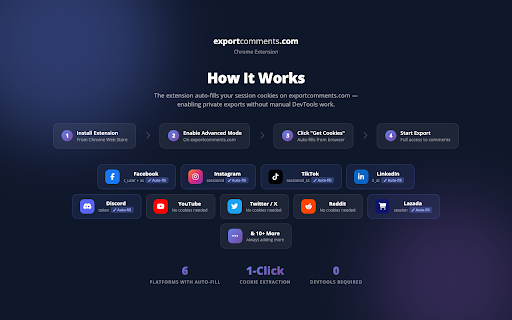
🔧 How It Works:
1. Install the extension from the Chrome Web Store.
2. Log into your social accounts (e.g., Instagram, Facebook).
3. Visit the export page—your session is detected automatically.
4. Choose your post, click export, and download your Excel file.
🎯 Supported Platforms:
• Instagram: Export post comments to Excel for free.
• YouTube: Extract and organize video comments.
• Facebook: Export comments from pages, posts, and groups.
• LinkedIn: Download discussions and replies.
• Lazada & More: Export e-commerce reviews where supported.
💡 Why Choose Export Comments?
• Fast, automated comment extraction.
• Free basic usage for Instagram.
• Clean interface with no extra software required.
💬 Need Help?
Contact us at support@exportcomments.com for assistance.
Start exporting your social media data effortlessly with Export Comments Extension for Chrome.



Reviews (2 cached)
★☆☆☆☆2026-02-08
Shahriar Shahramian
Bait & switch. Riddled with ads.
★☆☆☆☆2024-07-13
Benjamin Philipp
Use case Discord: This extension seems to do nothing but open the website. I thought "let me try clicking on the icon while I'm on a Discord tab". Still just opened the website, discarding my Discord session and call that was going on in that tab in the process. Auth token was not auto-filled as promised. After filling in everything myself, the max number of messages it offered to retrieve was 100, saying if I bought premium, it would let me export 9999. Wondering if it would actually stop at 9999, but I'm sure as hell not going to find out.
Permissions (2)
Permissions
cookiesℹ Can read and modify browser cookies notificationsℹ Can show desktop notifications
Details
| Version | 1.1.0 |
| Updated | Mar 8, 2026 |
| Size | 275KiB |
| First Seen | Mar 29, 2026 |
Popular in workflow

Adobe Acrobat: PDF edit, convert, sign tools
by Adobe Inc.
331M
★ 4.40
workflow
331M
★ 4.40
workflow

Chrome Remote Desktop
by Chrome Remote Desktop Release Managers
38M
★ 3.14
workflow
38M
★ 3.14
workflow

Microsoft Single Sign On
by Microsoft
36M
★ 2.27
workflow
36M
★ 2.27
workflow

MetaMask
by metamask
13M
★ 2.68
workflow
13M
★ 2.68
workflow

Free VPN for Chrome - VPN Proxy VeePN
by www.veepn.com
12M
★ 4.51
workflow
12M
★ 4.51
workflow
Popular Extensions
Adobe Acrobat: PDF edit, convert, sign tools
by Adobe Inc.
331M
★ 4.40
workflow
331M
★ 4.40
workflow

Grammarly: AI Writing Assistant and Grammar Checker App
by Grammarly
42M
★ 4.50
communication
42M
★ 4.50
communication
Chrome Remote Desktop
by Chrome Remote Desktop Release Managers
38M
★ 3.14
workflow
38M
★ 3.14
workflow
Microsoft Single Sign On
by Microsoft
36M
★ 2.27
workflow
36M
★ 2.27
workflow

Cisco Webex Extension
by cisco.chromestore
23M
★ 2.34
social
23M
★ 2.34
social