
⚠️Not updated in over 2 years
Description
⚡ Focus Search Bar Automatically
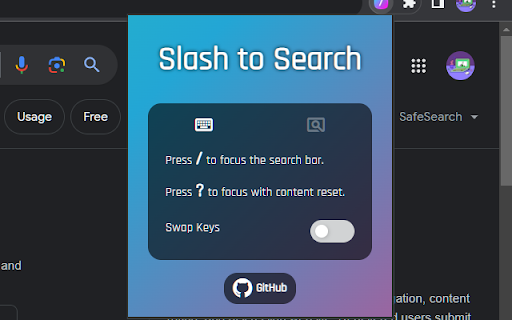
- Press [ / ] to start typing in a search bar without clicking it with a mouse first.
- It automatically finds and focuses a search bar upon key press.
✨ Focus and Clear Content of Search Bar
- Press [ ? ] (shift + /) to focus a search bar and clear its content.
👆 Select Mode for Setting Search Bar Manually
- Use [ Select Mode ] on websites where the extension cannot find a search bar automatically.
- Search bar selected using the select mode will be the default for the site going forward.
🔁 Key Settings
- You can swap the function of [ / ] with [ ? ].

Reviews
Loading reviews...
Permissions (1)
Permissions
storageℹ Can store data locally in your browser
Details
| Version | 1.0.0 |
| Updated | Dec 3, 2023 |
| Size | 23.21KiB |
| First Seen | Mar 29, 2026 |
More by wuutae

Popular in accessibility

Read&Write for Google Chrome™
by Texthelp
17M
★ 3.44
accessibility
17M
★ 3.44
accessibility

360 Internet Protection
by qihoosafe
17M
★ 4.54
accessibility
17M
★ 4.54
accessibility

Screenshot reader™
by Texthelp
7M
★ 2.57
accessibility
7M
★ 2.57
accessibility

OrbitNote
by Texthelp
7M
★ 2.95
accessibility
7M
★ 2.95
accessibility

Volume Master
by Peta Sittek
6M
★ 4.81
accessibility
6M
★ 4.81
accessibility
Popular Extensions

Adobe Acrobat: PDF edit, convert, sign tools
by Adobe Inc.
331M
★ 4.40
workflow
331M
★ 4.40
workflow

Grammarly: AI Writing Assistant and Grammar Checker App
by Grammarly
42M
★ 4.50
communication
42M
★ 4.50
communication

Chrome Remote Desktop
by Chrome Remote Desktop Release Managers
38M
★ 3.14
workflow
38M
★ 3.14
workflow

Microsoft Single Sign On
by Microsoft
36M
★ 2.27
workflow
36M
★ 2.27
workflow

Cisco Webex Extension
by cisco.chromestore
23M
★ 2.34
social
23M
★ 2.34
social