
⚠️Very few reviews for its user base ✅Recently updated
Description
ShadowEcho — AI-Powered YouTube Shadowing Practice
Turn any YouTube subtitle into a focused shadowing loop.
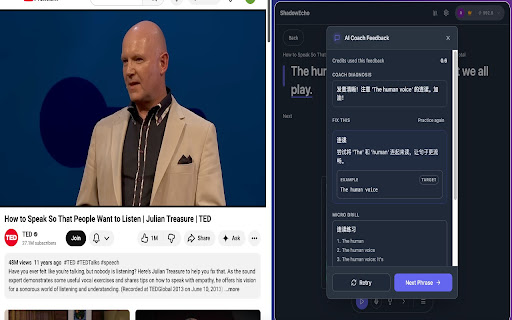
Listen, repeat, record — and get AI-powered feedback on your pronunciation, rhythm, and connected speech.
Built for real shadowing — listen and speak at the same time, just like native speakers do.
Try it instantly — no sign-up required.
──────────────────────────────
WHAT IS SHADOWING?
Shadowing means listening and speaking simultaneously, not just repeating after playback.
It's one of the most effective ways to build natural pronunciation, rhythm, and fluency — but hard to practice efficiently.
ShadowEcho makes shadowing simple, fast, and repeatable on YouTube.
From "found a good line" to "practiced it 10 times" in seconds.
──────────────────────────────
HOW IT WORKS
Listen
Select any subtitle phrase and play it on loop.
Repeat
Shadow the speaker using your microphone.
Get Feedback
AI analyzes your pronunciation with actionable tips.
Track Progress
Review your session summary and share your achievement card.
──────────────────────────────
KEY FEATURES
AI Speech Coach
Record your shadowing and receive instant feedback on pronunciation, rhythm, and intonation.
Know exactly what to fix next.
AI Deep Analysis
Go beyond translation — understand why native speakers phrase it that way and when to use it naturally.
YouTube Subtitle Selection
Click any subtitle line to start practicing.
No copy-paste. No switching tabs.
Multi-Language Subtitles
Switch subtitle languages on the fly — practice English, Spanish, French, Germany, and more.
Loop & Repeat Controls
Repeat short segments to build muscle memory for natural fluency.
Compare with Original Audio
Replay your recording side-by-side with the original speaker to spot subtle differences in timing and intonation.
Practice Queue
Save phrases to your queue for focused practice sessions.
Free users get 100 phrases; Pro users get 300.
Session Summary & Sharing
See your practice stats after each session — phrases completed, accuracy, and streak.
Download your achievement card and share your progress.
Clean Side Panel Workflow
Practice without leaving YouTube.
All playback and recording tools stay organized in one focused panel.
──────────────────────────────
FREE VS PRO
FREE
• Try before signing up — 5 free practice attempts
• Phrase queue: 100
• AI credits: 100 / month
• Speech Coach
• Deep Analysis
PRO ($4.99 / month)
• Phrase queue: 300
• AI credits: 1000 / month
• Speech Coach
• Deep Analysis
• 14-day refund policy
• Cloud sync (coming soon)
──────────────────────────────
IDEAL FOR
• Shadowing learners improving English, Spanish, French, or any subtitle-supported language
• Intermediate to advanced learners polishing pronunciation and fluency
• Anyone preparing for speaking exams (IELTS, TOEFL, etc.)
• Language learners who want to practice with real YouTube content
──────────────────────────────
WHY SHADOWECHO?
• Built specifically for the shadowing method — not just subtitles
• More repetitions in less time, without breaking focus
• Real-world speaking practice from videos you actually want to watch
• Track your progress with session summaries and achievement cards
──────────────────────────────
Try free without signing up. Sign in for full access. Upgrade anytime for more AI credits and storage.
Questions or feedback?
support@shadowecho.app



Reviews
Loading reviews...
Permissions (4)
Permissions
identityℹ Can use your Google account identity sidePanel storageℹ Can store data locally in your browser tabsℹ Can see your open tabs and their URLs
Details
| Version | 0.4.1 |
| Updated | Apr 1, 2026 |
| Size | 6.04MiB |
| First Seen | Apr 1, 2026 |
Popular in education

Google Translate
by google-translate-chrome-extension-owners
36M
★ 4.24
education
36M
★ 4.24
education

EndNote Click
by EndNote Click
4M
★ 4.06
education
4M
★ 4.06
education

Equatio - Math made digital
by Texthelp
4M
★ 3.89
education
4M
★ 3.89
education

Language Reactor
by Dioco
2M
★ 4.20
education
2M
★ 4.20
education

BetterCampus (prev. BetterCanvas)
by BetterCampus
2M
★ 4.83
education
2M
★ 4.83
education
Popular Extensions

Adobe Acrobat: PDF edit, convert, sign tools
by Adobe Inc.
322M
★ 4.40
workflow
322M
★ 4.40
workflow

AdBlock — block ads across the web
by AdBlock
62M
★ 4.48
workflow
62M
★ 4.48
workflow

迅雷下载支持
by Shenzhen Xunlei Network Technology Co., Ltd.
59M
★ 2.77
workflow
59M
★ 2.77
workflow

Grammarly: AI Writing Assistant and Grammar Checker App
by Grammarly
42M
★ 4.50
communication
42M
★ 4.50
communication

Adblock Plus - free ad blocker
by eyeo GmbH
40M
★ 4.39
workflow
40M
★ 4.39
workflow