
⚠️Not updated in over 2 years ⚠️Very few reviews for its user base
Description
Delete browsing history is a powerful chrome extension that allows you to effortlessly clear all or the specific browser data in just two clicks. It's an indispensable tool for every Chrome user, ensuring secure and smooth searching.
🔥Browsing history delete: You can clear search history, clear cache and clear cookies, it stands as an all-encompassing solution for a cleaner, faster browser experience.
🚀 Quick and Easy Usage:
Click on the delete browser history icon to access the control panel.
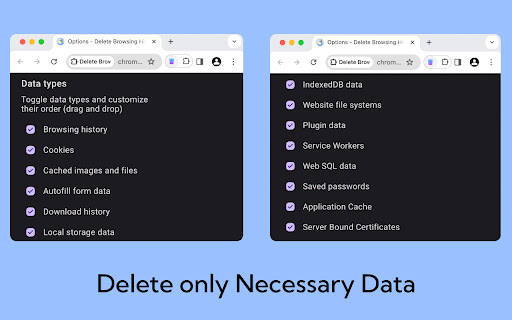
Choose to clear all or clear specific data.
💻 Key Features:
💡 Delete search history chrome: Conveniently erase your entire data or just parts of it.
💡 Cache cleaner: Rapidly clear cache to optimize browser space and enhance performance.
💡 Cookie cleaner: Easily clear cookies to safeguard your privacy.
💡 User-Friendly Interface: A straightforward and intuitive interface simplifies managing your browser data.
💡 Performance Boost: Enhance your browser’s speed by routinely clearing broswer data.
❇️ How it Works:
Delete browsing data employs advanced algorithms to manage your data effectively. A few clicks are all it takes to erase your digital footprints, maintaining the privacy of your online activities and keeping your browser quick and responsive.
📒 Detailed Introduction to clear browser history:
This Chrome extension is crafted to offer a swift and efficient means of managing your digital footprint. Whether it's quickly clear history from browser before a meeting, preserving privacy on a shared computer, or simply ensuring your browser's optimum performance, delete browsing data is the tool you need.
🔥 Main Advantages:
1. Intuitive interface for straightforward navigation.
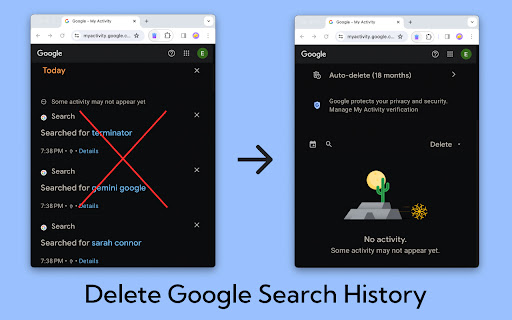
2. Quick process to clear search history in just two clicks.
3. Options to delete cache and cookies, enhancing your privacy.
4. Negligible impact on browser performance.
5. Settings can be customized to align with your browsing habits.
6. Guarantees privacy and security during your internet sessions.
⚙️ Specific Functions of delete browsing history:
➤ Boost Browser Performance: Accumulated browser data can slow down your browser. Use it to delete google search history chrome and clear cache and cookies efficiently, enhancing your browser's speed and responsiveness. Say goodbye to sluggish browsing!
➤ User-Friendly Experience: Designed for simplicity, delete search history offers a user-friendly interface. Effortlessly clear browsing data and delete google search history on Google Chrome with just a couple of clicks.
➤ Master Cookie Control: Take charge of your online privacy by managing cookies effectively. Delete browsing data in chrome allows you to easily delete cookies, ensuring your personal data is not stored longer than necessary.
➤ Enhanced Privacy: Each web session leaves digital traces. Clear browsing history ensures that erasing all your browsing data is a hassle-free process, providing an added layer of security, especially for public or shared computers.
➤ Flexible Cleaning: Whether you need to google history delete all or just the data from the last hour, delete history offers customizable options to suit your needs.
🧑💻 Getting Started:
Install delete browsing history from the Chrome Web Store.
Access the extension with a click.
Select your preferred clearing options and execute with another click.
Revel in a cleaner, faster, and more secure browsing experience.
❓ Frequently Asked Questions about delete browsing history chrome:
📌 Is it free?
Yes, it’s entirely free, providing all features without any charges.
📌 How to delete search history?
By enabling you to history search delete, it ensures your online activities stay private, especially on shared or public computers.
📌 Will delete browsing history google slow my browser?
No, it's specifically designed to improve your browser's performance by eliminating unnecessary data.
This Chrome extension is a vital tool for anyone looking to manage their digital footprint effectively. Whether it's for maintaining privacy on shared computers, clearing data for security reasons, or just to keep your browser running smoothly, clear search history is your go-to solution.
🌐 Experience delete browsing data in chrome today:
Enhance your broswer performance with increased privacy and efficiency. Download delete browsing data now for secure, optimized internet usage.

Reviews
Loading reviews...
Permissions (3)
Permissions
browsingDataℹ Can delete browsing history and data notificationsℹ Can show desktop notifications storageℹ Can store data locally in your browser
Details
| Version | 1.0.0 |
| Updated | Dec 28, 2023 |
| Size | 1.84MiB |
| First Seen | Mar 30, 2026 |
More by xah2222

Popular in functionality

Hola VPN - Your Website Unblocker
by Hola VPN LTD.
4M
★ 4.84
functionality
4M
★ 4.84
functionality

Video Speed Controller
by igrigorik
3M
★ 4.54
functionality
3M
★ 4.54
functionality

SponsorBlock for YouTube - Skip Sponsorships
by Ajay
2M
★ 4.65
functionality
2M
★ 4.65
functionality

OneTab
by OneTab
2M
★ 4.45
functionality
2M
★ 4.45
functionality

Infinity New Tab
by Infinity Teams
400K
★ 4.57
functionality
400K
★ 4.57
functionality
Popular Extensions

Adobe Acrobat: PDF edit, convert, sign tools
by Adobe Inc.
322M
★ 4.40
workflow
322M
★ 4.40
workflow

AdBlock — block ads across the web
by AdBlock
62M
★ 4.48
workflow
62M
★ 4.48
workflow

迅雷下载支持
by Shenzhen Xunlei Network Technology Co., Ltd.
59M
★ 2.77
workflow
59M
★ 2.77
workflow

Grammarly: AI Writing Assistant and Grammar Checker App
by Grammarly
42M
★ 4.50
communication
42M
★ 4.50
communication

Adblock Plus - free ad blocker
by eyeo GmbH
40M
★ 4.39
workflow
40M
★ 4.39
workflow