
Description
Reviews (7 cached)
Shows up in Chrome, but selecting options from the context menu never populates any input fields or text areas.
It's a useful plugin but unfortunately it will be removed soon. I found another very useful Bug Magnet plugin which is super advance, leaving the link below for your reference. https://chromewebstore.google.com/detail/bug-magnet/emejgoaioepelbhkhnfjpkmfbfmnfkbj
Everything is good but it is not starting in my chrome
After installing this tool from google chrome web store, when I right click on page, I am not able to see the option of Bug Magnet.
Extension does not work once installed.
This tool was great but now as this is not supporting anymore, I found Auto Data Filler, the best replacement for this bug magnet.
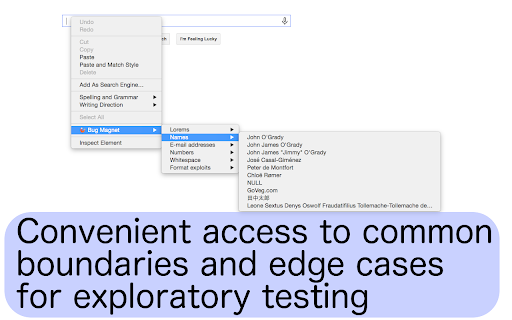
This is super useful for exploratory testing - to quickly input edge cases and common values. Too bad its going to go away soon from the webstore. If you are looking for an alternative - TestChimps' extension now offers the same capability with 2 additional nifty tricks: 1) Supports dynamic values - such as current date, time, year, random numbers, amounts, urls etc. 2) Right-click to add custom vocabulary values - Say you are repetitively using a few values in your sessions. You can easily add them to the vocabulary with a right-click, making them quickly accessible the next time you need it. Here is the link: https://chromewebstore.google.com/detail/testchimp-create-api-auto/ailhophdeloancmhdklbbkobcbbnbglm
Permissions (6)
Permissions
Details
| Version | 4.0 |
| Updated | Nov 7, 2025 |
| Size | 37.22KiB |
| First Seen | Mar 22, 2026 |
Popular in developer





Popular Extensions




