
⚠️Not updated in over a year ⚠️Requests 1 sensitive permission
Description
iManage Work Email Management for Gmail is the perfect solution for Google Workspace
professionals to manage all email communications related to engagements,
enforce security on sensitive content, and easily find and share relevant
information between professionals and clients without wasting valuable time.
iManage Work Email Management for Gmail provides simple yet powerful
capabilities within the Gmail environment already familiar to Google Workspace users.
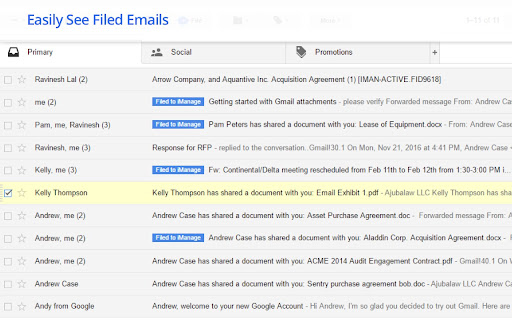
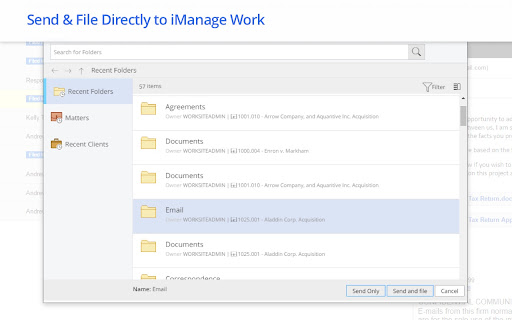
The Send and File feature lets users choose to file emails to an iManage Work
project folder at the same time they are sending it to a recipient. With a single
action, users can bulk file individual emails and conversations with their
document attachments. A visual cue indicates that filing is complete.
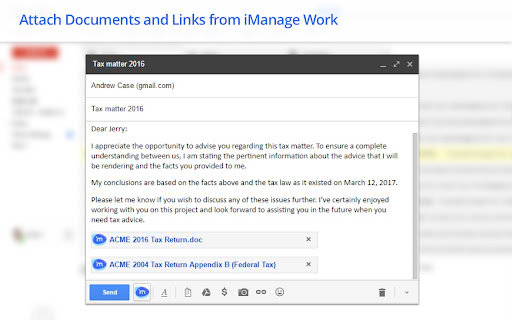
Managing attachments is a breeze with iManage Work Gmail integration.
Documents within the iManage Work project folder-, can be attached directly
to outgoing emails as an HTTP link or an attachment copy. You can preview
document attachments and be alerted if they are sending an outdated copy,
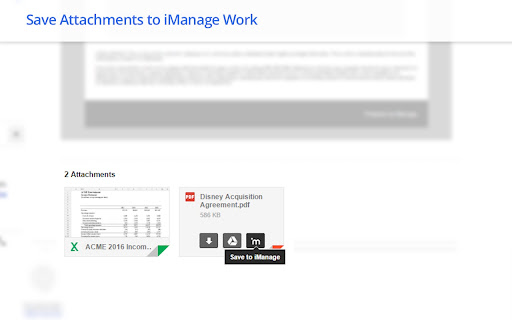
eliminating any risks associated with sharing the wrong version. Inbound
attachments can be detached from the source email and filed as new
documents or new versions of existing documents within the respective project.
You can file multiple emails with multiple attachments as a single operation
using iManage Work Email Management for Gmail.
-----------------------------------------------------------------------------
You need to have an appropriate iManage Work license to use the iManage Work Email Management for Gmail. Please contact your iManage Account Executive if you need further information.
The iManage Email Management for Gmail extension uses the Inbox SDK from Streak to interact with Gmail. The Inbox SDK continuously monitors changes to the Gmail DOM and User Interface elements and updates itself automatically in real-time. This ensures the iManage Email Management for Gmail extension continues to work even when Gmail is updated without any notice.
The Inbox SDK loads required components directly from within the iManage Email Management for Gmail extension from Streak servers, which means that the extension needs to have access to the Internet. When communicating with the Streak servers, no user or company specific data, such as emails, contacts or personal information, is shared with the Inbox SDK or the Streak servers.
The terms and conditions related to the use of the InboxSDK are set forth at https://www.inboxsdk.com/terms.
------------------------------------------------------------------------------
Reviews
Loading reviews...
Permissions (7)
Permissions
contextMenusℹ Can add items to the right-click menu cookiesℹ Can read and modify browser cookies identityℹ Can use your Google account identity identity.email scriptingℹ Can inject scripts into web pages storageℹ Can store data locally in your browser tabsℹ Can see your open tabs and their URLs
Details
| Version | 10.3.0.16 |
| Updated | Feb 4, 2025 |
| Size | 740KiB |
| First Seen | Mar 27, 2026 |
More by iManage LLC

Popular in workflow

Adobe Acrobat: PDF edit, convert, sign tools
by Adobe Inc.
331M
★ 4.40
workflow
331M
★ 4.40
workflow

Chrome Remote Desktop
by Chrome Remote Desktop Release Managers
38M
★ 3.14
workflow
38M
★ 3.14
workflow

Microsoft Single Sign On
by Microsoft
36M
★ 2.27
workflow
36M
★ 2.27
workflow

MetaMask
by metamask
13M
★ 2.68
workflow
13M
★ 2.68
workflow

Free VPN for Chrome - VPN Proxy VeePN
by www.veepn.com
12M
★ 4.51
workflow
12M
★ 4.51
workflow
Popular Extensions
Adobe Acrobat: PDF edit, convert, sign tools
by Adobe Inc.
331M
★ 4.40
workflow
331M
★ 4.40
workflow

Grammarly: AI Writing Assistant and Grammar Checker App
by Grammarly
42M
★ 4.50
communication
42M
★ 4.50
communication
Chrome Remote Desktop
by Chrome Remote Desktop Release Managers
38M
★ 3.14
workflow
38M
★ 3.14
workflow
Microsoft Single Sign On
by Microsoft
36M
★ 2.27
workflow
36M
★ 2.27
workflow

Cisco Webex Extension
by cisco.chromestore
23M
★ 2.34
social
23M
★ 2.34
social